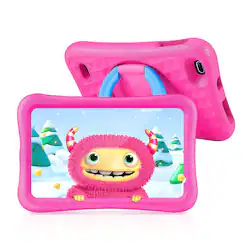
Customers are impressed with the MatrixPad S8 Kids tablet's durability, parental control features, and affordable price. Many customers mentioned that the tablet is perfect for kids and comes with a protective case. Parents appreciate the preloaded apps and long battery life, making it a convenient choice for families. However, some customers have expressed concerns about the tablet's slow performance and screen issues.
The vast majority of our reviews come from verified purchases. Reviews from customers may include My Best Buy members, employees, and Tech Insider Network members (as tagged). Select reviewers may receive discounted products, promotional considerations or entries into drawings for honest, helpful reviews.
I got this for my two nieces ages 8 and 10 and they were beyond excited about it. They found it to be lightweight, comfortable to hold, and the perfect size for them. They said it felt responsive, the screen was nice, enjoyed the default sounds and wallpapers, the speakers9 got plenty loud, and it has a whole bunch of fun things for them to do. They enjoyed the built in stand on the back of the device that also allowed them to hold it. They did notice that loading screens are normal and it can take a bit to get into things, but that only built up the anticipation and made them choose wisely. Okay, maybe I’m being a bit exuberant on that last point. Needless to say I’m currently their favorite Uncle. Which is my favorite spot to be. PARENTAL CONTROLS: This tablet comes with great parental controls. Where you can control a lot about the device. During initial setup it walks you through most of the process. Assuming you already have your own account and willing to create a new account for your child. Privacy is still something that I worry about as they collect an awful lot of information that I don’t think they need. So, I personally made a dummy account. Where your account (parent) will control everything the child account can do. Some examples were saying how much time they can spend on the device (which can be broken down to day by day or app by app). Along with what time of the day it will be available and what time of night it will be available. You can add a payment account to allow them to download things off the app store (or not). When making changes to the settings/tablet you can either put in the parental password and change it on the device, or do it through your own device remotely. Last, in the remote app you can lock that tablet in case you’ve told them to get off and they aren’t listening. KIDOZ APP: I really enjoyed this application. Think of it as a kids version of android. Meaning the home screen is like your phones or tablets home screen, and then the “more apps” app is like the android “play store” app. And so on. As it comes with a bunch of different things that will keep your child entertained without ever leaving it. And it’s not only fun items but also educational ones. You can even set it up (in the parental controls in the app) to disable the home button allowing them to exclusively have access to this app alone. Inside the app you have a bunch of options. Such as the “more apps” which is like a store where you can download different applications. Then you have “videos”, “games”, “websites”, “camera”, “my pictures”, “wallpaper”, and “paintbox” automatically installed. Under each one of these apps takes you to a bunch of different kid friendly options that they can explore when on it. The camera is a bit delayed once you press the button. Also, it saves pictures directly to the app along with the usual gallery on android. I’d recommend turning OFF cloud sharing just for privacy reasons. All in all my nieces loved this app as it adds a lot of things they can do. Both fun (games, painting, camera) along with educational (videos, websites). BUILD QUALITY: It comes with a large pink foam case. Which both me and my nieces were a big fan of. As it is squishy, with some pattern to it, which makes it very easy to hold comfortably. Almost wish my iPad Pro 12.9 had that… seriously, I’m not kidding. The tablet itself is extremely lightweight making it easy to hold. It is just the right size to make it maximally portable. The buttons are crisp but quite a bit recessed best for small fingers over adult size ones. The stand/handle works great with dedicated steps and is quite stiff and sometimes hard to open. Touch screen is responsive but also found with the processor being slow it would get overwhelmed and miss touches from time to time. The screen is bright and looks good with easily readable text and good colors and contrast. PERFORMANCE: Look, this is at the bottom tier of budget with a bottom tier processor so expecting it to be a powerhouse is ridiculous. When inside the Kidoz App everything worked relatively well. You will see a loading screen for almost everything you do when you first open it. Sometimes this is a short wait and other times a long wait. But most of the time once you’re in you’re in and it is relatively smooth. But you can see some major slowdowns once you go into the Google Chrome browser or anything that is moderately demanding. Moving around the tablet and switching apps showed a bit of delay constantly. As that 2GB of RAM is not a lot. But Android does a good job at keeping resources limited. But will also impact overall speed (as it won’t be able to hold it all in memory and need to dump it when doing multiple things). Outside of that I found no issues. I find this to be a good lesson in patience and also allows my nieces to appreciate when they get something more expensive that is faster. As for battery life it is good. Meaning that it will last a few (6 – 8) hours before needing to be recharged depending on usage. I’m probably low-balling a bit. But I’d rather error on saying the battery is worse than it is over the opposite. CONCLUSION: As long as you remember that this is a budget tablet that will be severely limited with a low-end processor and low amounts of RAM you’ll likely be very happy with it. It is powerful enough to do all the bare necessities (relatively pain free). Such as lightweight gaming, reading books, basic web browsing, video watching, etc. The only complaint I really have is the processor but when I think about the price that immediately evaporates. As honestly what you get wholistically (screen, size, sensitivity of screen, etc) is incredible for the price. Making it an easy recommendation. But just don’t expect it to perform miracles as any modern age cell phone that is moderately price ($300 - $500) is going to run circles around it (processing wise).
Posted by SirGalahad
My five-year-old daughter loves this tablet and I think it is a great alternative to toy computer/tablets that are pretty much in the same price range. I was concerned at first that it would be too hard for her to use due to the regular Android unlock screen and small power button that is in a fairly deep recess in the case, but she had the hang of it after only using it for a few hours and was showing me things! The included case is secure and thick to protect the tablet from drops. The case also has a built-in kick stand that rotates so it can be used in portrait or landscape mode. I wish the kick stand was a little easier to pull out of the recess in the case and that it the power/volume buttons were easier to get to, but it works. My daughter really loves the included Kidoz app that had a variety of kid safe apps, videos, and games. Kidoz can function as a launcher (preventing access to any content not controlled inside the app) to keep kids from accessing the normal Android screens and restrict them to only apps you want them to see. Kidoz also has its own camera app and gallery. My daughter loves to draw pictures and edit photos she has taken using the Kid Painter app inside Kidoz. There is also a Kidoz specific app store, where I download a few more educational apps for her, but be warned that some apps cost money and you have to enable 3rd party app downloads in the Android settings menu. My daughter prefers the YouTube Kids app over the Kidoz Video app, but that was easy to swap. Performance is mixed as you would expect with any lower end Android tablet, but there haven't been any real issues outside apps loading a little slower than I am used to. Battery life is around 6hrs of constant games or videos, but with off-and-on use we typically charge it once a day. The charging cable is short (3ft) and is micro-USB, which is harder to plug in (directional) than some newer formats - so I typically don't let her charge it herself. One last thing to note is that if you set up the device with a kid Google account, it is automatically supervised, and it is easiest for the linked parent to manage it from the Google Family Link app. I tried to go without and could not enable certain permissions without it. The security in the Kidoz app and the built-in Google controls can be a bit much, but everything worked fine once I gave Kidoz permission to install 3rd party apps and adjusted the Android Playstore app to only limit purchases (instead of all apps).
Posted by MGoose
The Vankyo Matrix s8 Kids tablet would not be my first choice of tablet for my kids. Mine came with lines in bedded in the screen. I though it may be for the sticker that was on the screen, but after a week, the lines are still there. They are not scratches, they must be screen damage. The best part of this tablet is the case. The pink is a really fun color and the blue piece on the back is awesome. It holds the tablet in great viewing positions. This Vankyo matrix pad was very easy to set up and will sync with any google account. This made downloading apps a breeze. My daughter loves to watch movies on some streaming sites and worked great for that. The kids app pulled up quickly and my kids thought it was neat. My 9 year old said she was “too old” for the games that were on there. I almost feel like this would be perfect for younger kids, 5,6,7. My 6 year old through they were fun and played on it quite a bit. Again, if I were to do it again, I would buy something else in my situation, but it worked for what it was.
Posted by mmwp