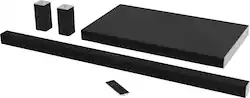
VIZIO - SmartCast™ 5.1-Channel Soundbar System with 26.5" Wireless Subwoofer - Black
- Key Specs
- Wireless Connectivity: Wi-Fi (The manner in which a device sends data to another device over a short distance without the use of wires or cables.)
- Wireless Subwoofer Connectivity: true
- App Compatible: true (The product can be connected to a program or software application on a mobile device, which then receives collected data from the product.)
- Wall Mountable: true (The product is able to be secured to a wall. Some products are designed ready to mount, while others may require additional hardware/accessories for installation.)
- Works With: Google Home (Compatible with or able to be connected to other smart devices or applications.)
- General
- Brand: VIZIO
- Model Number: SB4551-D5
- Product Name: SmartCast™ 5.1-Channel Soundbar System with 26.5" Wireless Subwoofer
- Color: Black
- Audio
- Number of Channels: 5.1 (The number of discrete channels of sound output. This can be a single number or multiple numbers separated by decimal(s). The first number is the primary, horizontally directed audio channels. The number after the first decimal, if applicable, is the number of subwoofer outputs or channels. The number after the second decimal, if applicable, is the number of height or atmospheric channels designed to immerse the listener by producing overhead sound effects.)
- Surround Sound Supported: DTS Studio Sound, DTS TruSurround, DTS TruVolume, Dolby Digital (Surround sound systems use multiple audio channels and speakers to create an immersive sound experience for the listener. There are also various proprietary technologies that imitate this kind of sound via a device's built-in speakers or soundbar.)
- Minimum Frequency Response: 30 hertz (Describes the maximum range of frequencies or musical tones a product can reproduce, from very low tones to very high treble tones. The minimum frequency or musical tone the speaker can reproduce. High treble tones have higher frequencies while low tones and deep bass have lower frequencies.)
- Maximum Frequency Response: 20 kilohertz (Describes the maximum range of frequencies or musical tones a product can reproduce, from very low tones to very high treble tones. The maximum frequency or musical tone the speaker can reproduce. High treble tones have higher frequencies while low tones and deep bass have lower frequencies.)
- Connectivity
- Wireless Connectivity: Wi-Fi (The manner in which a device sends data to another device over a short distance without the use of wires or cables.)
- Wireless Multi-Room Audio: true (Technology that allows multiple speakers and/or soundbars to be connected wirelessly and play audio in separate rooms.)
- Wireless Subwoofer Connectivity: true
- Satellite Speakers: Included (Using satellite speakers in conjunction with a soundbar allows for a surround sound experience; the soundbar can serve as a center channel speaker while satellites provide rear channel audio or additional front channel audio.)
- Audio Only Inputs: 1 x 3.5mm audio
- Number of HDMI Inputs (Total): 1
- Number of USB Inputs: 1
- Number of Optical Audio Inputs: 1
- Number of HDMI Outputs (Total): 1
- Features
- App Compatible: true (The product can be connected to a program or software application on a mobile device, which then receives collected data from the product.)
- Wall Mountable: true (The product is able to be secured to a wall. Some products are designed ready to mount, while others may require additional hardware/accessories for installation.)
- Speaker
- Subwoofer: Included
- Number of Woofers: 1
- Dimensions
- Product Height: 2.05 inches (The out of box height of the item. Height is measured as the vertical distance from the bottom of the item to the top as it would be primarily used or placed.)
- Product Width: 45 inches (The out of box width of the item. Width is measured as the horizontal distance from one side of the item to the other as it would be primarily used or placed.)
- Product Depth: 2.01 inches (The out of box depth of the item. Depth is measured as the distance from the front of the item to the back as it would be primarily used or placed.)
- Product Weight: 3.64 pounds (The out of box weight of the item.)
- Subwoofer Height: 3.22 inches
- Subwoofer Width: 26.5 inches
- Subwoofer Depth: 15.35 inches
- Subwoofer Weight: 15.54 pounds
- Included
- Remote Control Included: true
- Cable(s) Included: HDMI, Optical digital audio
- Mounting Hardware Included: true
- Certifications Listings & Approvals
- ENERGY STAR Certified: false (Devices carrying the ENERGY STAR service mark, such as computer products and peripherals, kitchen appliances, and other products, generally use 20% to 30% less energy than required by federal standards.)
- Warranty
- Warranty - Parts: 1 year
- Warranty - Labor: 1 year
- Compatibility
- Works With: Google Home (Compatible with or able to be connected to other smart devices or applications.)
- Other
- UPC: 845226043635
Enjoy exceptional audio with this 45-inch Vizio 5.1 sound bar, which offers plug-and-play operation. It comes with Vizio SmartCast preinstalled, which lets you cast from most popular applications and use your smartphone to control your television. Pair your Vizio 5.1 sound bar with other SmartCast products for a true multi-room experience.
- SmartCast™ 5.1-Channel surround sound soundbar system: Includes a 45" soundbar with left, right and center channels, a wireless slim subwoofer and rear satellite speakers for rich, dynamic audio that places you at the center of the action.
- New slim™ wireless subwoofer: Fits conveniently beneath or beside your sofa.
- 104dB sound output: From the roar of a crowd to the screech of a car chase, experience every detail in amazing clarity as loud as 104 dB with less than 1% Total Harmonic Distortion.
- VIZIO SmartCast™ App: Download app to turn your smartphone or tablet into a powerful touchscreen remote.Search and browse content across multiple apps at once.
- Google Cast™ built-in: Cast your favorite tunes from your phone to your VIZIO SmartCast™ Sound Bar. Simply tap the Cast button from 100 audio apps you already know and love to start playing on your sound bar.
- Works with Google Home powered by the Google Assistant: Stream your favorite entertainment using just your voice. Turn up the volume, play your favorite show, or stop the music - all without having to raise a finger.
- Connect multiple VIZIO SmartCast™ sound bars or speakers together: To cast the same music to any or every room.
- Outputs: Includes HDMI.
- Intuitive LCD remote: Enables simple operation and adjustments from across the room.
Whats Included
- 4 pcs. Velcro Cable Wrap; Wall Mounts; Aluminum Feet for subwoofer; Quick Start Guide
- 5' Digital Coaxial Cable (RCA)
- 5' Digital Optical Cable (Toslink)
- 5' HDMI Cable
- 5' Power Cord for Subwoofer
- 5' RCA to 3.5mm Stereo Mini Jack; 5' 3.5mm to 3.5mm Stereo Mini Jack
- 8' Power Cord for Sound Bar
- LCD Display Remote
- Rear Satellite Speakers
- Wireless Subwoofer
A: The satellite speakers connect to the subwoofer via wires, and the subwoofer connects wirelessly to the sound bar. Each satellite speaker has a single wire that plugs into the back of the speaker, this wire is at least 20 feet long.
A: The soundbar is not capable of 4K Passthrough. So, no 4K@60, no HDR. It is capable of HDCP 2.2, though, with a maximum resolution Passthrough of 1080P at 120hz.
Q: Can the soundbar be used without the rear speakers...only the soundbar and the woofer?
A: Thank you for a great question! Definitely! The satellite speakers each connect with a cord to the subwoofer for use. If you do not wish to connect them, use the included display remote control or via the SmartCast app, disable the rear surrounds. The SB4551-D5 will automatically mix the rear content into the sound bar. The sound bar will also provide a simulated surround sound experience utilizing the built-in DTS StudioSound technologies! You can connect them later and enable the surround setting when desired to receive the full experience. Thanks again and have a great day! -Collin
A: The wires from the subwoofer to the satellite speakers are 26 feet in length. Thanks -Randal
A: I originally purchased and installed the 38" 5.1. It had a very clean sound but lacked the low end. When I returned it and set up the VIZIO - SmartCast™ 5.1-Channel Soundbar System with 26.5" Wireless Subwoofer - Black the difference was immediate and pronounced. The price difference is totally worth it to me and my audio preferences. I am very satisfied by it[s overall performance.
A: You cannot buy the sub separately. I tried to do that when my sub refused to pair with the soundbar, but the Vizio rep I spoke to said I was out of luck.
A: On your remote, press the menu button and then the up or down buttons on the keypad to navigate to the item that says "Link" on your screen. Then click the left or right arrow to make it say "yes", then press the play button. The subwoofer should then be linked and will turn on and off as you turn the soundbar on and off.
Q: Are the rear speakers wireless?
A: The sound bar to subwoofer connection is wireless but, the satellite speakers will need to connect to the subwoofer via speaker cables which are provided.
People also viewed
 Top Deal$299.99The price was $399.99
 Top Deal$199.99The price was $399.99
 $1,239.99The price was $1,999.99
 Top Deal$649.99The price was $799.99
 $119.99The price was $159.99




Today's top picks
 $629.99The price was $1,099.99
 $129.99The price was $219.99
 $49.99The price was $79.99
 $1,399.00The price was $1,499.00
 $149.99The price was $299.99
 $549.99The price was $849.99
 $399.99The price was $499.99