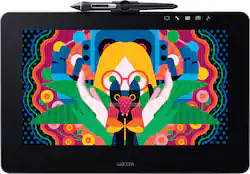
Wacom - Cintiq Pro 13 Creative Pen Display
- Key Specs
- Screen Size: 13 inches (Size of the screen, measured diagonally from corner to corner.)
- Active Area: 11.6 x 6.5 in (The size of the screen area that a user interacts with, either by stylus and/or touch (if supported).)
- Total Storage Capacity: 128 gigabytes
- General
- Brand: Wacom
- Model Number: DTH1320AK0
- Product Name: Cintiq Pro 13 Creative Pen Display
- Year of Release: 2018
- Display
- Screen Size: 13 inches (Size of the screen, measured diagonally from corner to corner.)
- Stylus Input: Active (Electromagnetic Resonance) (An active stylus/pen is able to communicate directly with a compatible device; active electromagnetic resonance (EMR) pens are powered via a device's screen and active electrostatic (AES) pens require an additional power source. A passive stylus does not have electronic features and is compatible with most capacitative touch screens.)
- High Dynamic Range (HDR): true (An HDR-compatible 4K TV or other HDR-compatible product displays HDR video content when it's available from sources like 4K Ultra HD Blu-ray Discs and 4K streaming services.)
- Response Time: 30 milliseconds (The speed at which pixels can change colors is called response time. It is measured in milliseconds (ms).)
- Active Area: 11.6 x 6.5 in (The size of the screen area that a user interacts with, either by stylus and/or touch (if supported).)
- Aspect Ratio: 16:9 (The measurement of the width of a screen compared to the height of a screen, expressed as a ratio.)
- Processor
- Processor Brand: Intel
- Storage
- Total Storage Capacity: 128 gigabytes
- Compatibility
- System Requirements: Apple MacOS X 10.10 or later, Microsoft Windows 7 or later (The software that a product must have for it to be able to integrate with another product.)
- Connectivity
- Headphone Jack: true (The device features an interface that allows for the connection of headphones.)
- GPS Enabled: false
- Interface(s): USB Type C (Refers to the types of connections that devices use to interact and communicate with each other.)
- Power
- Charging Interface(s): USB Type C (The connection for transmitting power to charge the device.)
- Camera
- Front-Facing Camera: false
- Rear-Facing Camera: false
- Dimensions
- Product Height: 0.55 inches (The out of box height of the item. Height is measured as the vertical distance from the bottom of the item to the top as it would be primarily used or placed.)
- Product Width: 14.2 inches (The out of box width of the item. Width is measured as the horizontal distance from one side of the item to the other as it would be primarily used or placed.)
- Product Weight: 2.43 ounces (The out of box weight of the item.)
- Certifications Listings & Approvals
- ENERGY STAR Certified: true (Devices carrying the ENERGY STAR service mark, such as computer products and peripherals, kitchen appliances, and other products, generally use 20% to 30% less energy than required by federal standards.)
- Included
- Stylus Included: true
- Other
- UPC: 753218986801
Create professional-looking graphics with this Wacom Cintiq Pro pen display. It comes with a pressure-sensitive Pro Pen 2 that lets you draw precise lines on the 13-inch screen, and the built-in stand and pop-out legs provide customized tilt positions. This Wacom Cintiq Pro pen display connects to a Mac or PC and delivers high-resolution display to enhance your drawings.
- Create directly on screen with natural pen experience: Add a world-class pen on-screen creative experience to your Mac or PC. Wacom Cintiq Pro 13 offers Wacom's most powerful array of capabilities in a new high-performance creative pen display.
- 13.3-inch Full HD display: With a resolution of 1920 x 1080 and color accuracy up to 87% of Adobe RGB.
- Multi-touch support: Pan, zoom and rotate gestures available in most applications including Adobe Photoshop and Illustrator.
- Wacom Pro Pen 2: Battery-free pen with two customizable side switches and 8,192 pressure levels in both pen tip and eraser (patented electromagnetic resonance method).
- Built-in stand: Integrated pop-out legs for 20° angle.
- Connectivity: Three USB-C ports, one SDXC memory card slot, and one headset jack.
Whats Included
- Wacom Cintiq Pro 13 Creative Pen Display
- Wacom Pro Pen 2 with color rings
- Pen stand with 10 replacement nibs (6 standard, 4 felt), nib removal tool
- Pen holder
- Wacom Link Plus adapter
- AC adapter, power cable
- Cleaning cloth
- Quick start guide
Product Manuals
Q: Is it portable? And does it work with a dell 2in1?
A: Somewhat. It's about the size of a 15in laptop. You just have to worry about all your wires for the dongle, and be ready to plug it in a power outlet. If it was able to do the connection wirelessly, have a building battery, or just simply connect via one plug, I would say it's very portable.
Q: Does this tablet need to be connected to a computer or is it able to work on its own?
A: Yes, the Wacom Cintiq Pro 13 needs to be connected to a Windows or macOS based computer in order to operate.
A: undefined
A: Yes, this tablet is made to work with photoshop and lightroom. This will act as a second monitor that you can draw and change stuff on. You can drag any program onto the screen.
Q: Does the battery come with an accessory to use unplugged?
A: No, the unit is battery-free.
Q: can it be used on the go? I am a manga artist and I hate wasting paper.
A: You have to be connected to a computer in order to use the Pro13, although the functions of the pad are independent - you need the power and brains of the computer to work behind the scenes. You may want to upgrade to the Wacom version that is a stand-alone and does not have to be connected. For working on the 'go', that would be my choice and I would definitely spend the extra money to get that one. I kind of wish I had, although I don't usually draw 'on the go' so this version (Pro13) being attached to my computer is not a big problem with me . aI did have to dedicate one of my computers to it as it's a big deal to hook up so I just leave the 'brain-computer attached at all times). The Pro13 is capable of using by looking directly at the pad and not the computer, giving the feel of actually drawing on paper (which was my reason for upgrading from the little Wacom pad I originally purchased). Mine works fine for my needs and I love it! If you are going to spend that much money anyway - move up to the next level that's self-contained as a computer itself and you'd be better off using that on the 'go.' ps - One more hint - my pad just didn't sit in my lap right. My husband fashioned a piece of plywood, larger than the Pro-13, and the size that works well in my lap, and we used velcro to attach the Wacom 13. Now it works perfectly just to sit and draw at the angle I love and not worry about having to hold the pad at a certain angle all the time.
A: I'd use 'Krita' - it's a clone of Photoshop and free to download; works fine.
People also viewed
 $429.95The price was $499.95




Today's top picks
 $499.99The price was $749.99
 $199.99The price was $249.99
 $789.99The price was $1,049.99










