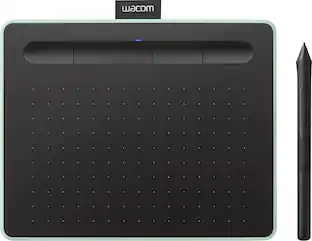
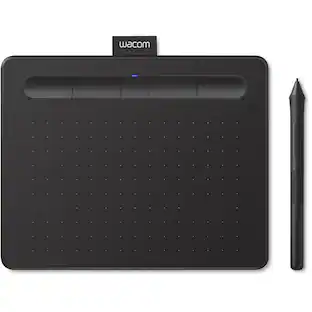
Wacom - Intuos Medium Bluetooth Graphics Drawing Tablet, Includes Training & Software; Works w/ Chromebook Mac Android & Windows - Black
Customers are saying
Customers are enthusiastic about the product's ease of use, overall performance, and convenient size, which make it a popular choice for photography editing and drawing. Users also appreciate the reliable wireless connectivity, precise pressure sensitivity, and accurate pen performance. While some individuals noted a lack of included software and minor compatibility issues with certain devices, these concerns are outweighed by the device's high quality and value. Overall, the product is well-regarded for its functionality, despite a slight learning curve for some new users.
Features
COMPLETE CREATIVE STARTER KIT:
Register your Intuos tablet and gain access to some of the best creative software and online training.
NATURAL, PRECISE DRAWING EXPERIENCE:
Battery-free pressure-sensitive Wacom EMR technology delivers accurate control with no charging or batteries needed - just pick up the pen and draw with instant response and true-to-life precision.
PERFECT FOR BEGINNERS & EDUCATION:
Easy setup gets you drawing in minutes on Windows, Mac, or Chromebook; ideal for drawing, sketching, photo editing, note-taking, document annotation, and classroom use.
COMPACT & COMFORTABLE:
Lightweight design with a paper-like drawing surface and four customizable ExpressKeys for instant access to your favorite shortcuts; small active area perfect for limited desk space while maintaining full creative control.
RELIABLE PERFORMANCE:
Wacom's proven reliability works seamlessly with your computer – no driver headaches, mysterious disconnects, or frustrating "why isn't this working?" moments common with cheaper alternatives.
READY FOR YOUR FAVORITE SOFTWARE:
Works seamlessly with all major creative applications such as Photoshop, Krita, Affinity, Sketchbook, as well as OneNote or Canvas for notes, presentations, annotation and markup.
Specifications
- Screen Size0 inchesActive Area8.5 x 5.3Total Storage Capacity0 gigabytesWireless ConnectivityBluetoothBattery ChemistryLithium-ionPressure Levels4096
Reviews
Rating 0 out of 5 stars with 0 reviews
Customer Images
The vast majority of our reviews come from verified purchases. Reviews from customers may include My Best Buy members, employees, and Tech Insider Network members (as tagged). Select reviewers may receive discounted products, promotional considerations or entries into drawings for honest, helpful reviews.
Compare similar products
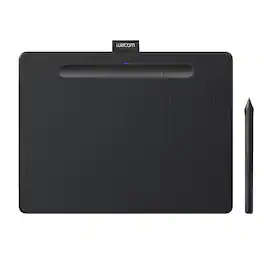
Transform your creative ideas into digital reality with Wacom Intuos drawing tablets. Perfect for casual or aspiring artists this compact graphics tablet delivers reliable Wacom-quality precision at an accessible price. The battery-free, pressure-sensitive pen provides natural, responsive drawing with no charging needed - just pick up and draw, with smooth, jitter-free lines and consistent pressure response. Get started immediately with over $240 in included downloadable creative software and trials, including 2 years of Clip Studio Paint Pro, 12 months of Boris FX Optics, and much more. The paper-like surface texture and four customizable ExpressKeys make digital art, photo editing, illustration, and design feel natural and efficient. Select models (CTL4100WL, CTL6100WL) offer Bluetooth wireless connectivity, letting you create freely at your desk, sofa, or anywhere in the room - with the option to switch to wired mode for ultimate flexibility. The wireless freedom is especially popular with educators and presenters who use the drawing tablet to control their computer while moving around a classroom or conference room. Certified to work with Chromebook and compatible with Windows and Mac, Wacom Intuos seamlessly integrates with Adobe, Corel, and all major creative applications. Backed by Wacom's 40+ years of industry leadership, you're choosing the same pen technology trusted by professional studios worldwide - at a creator-friendly price.
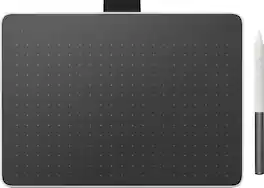
Wacom One is a versatile pen tablet that brings the precision and feel of writing with a real pen to your computer. Whether you're annotating documents, marking up presentations, or sketching out creative ideas, it makes working with a digital pen feel just as natural as pen on paper. Compatible with PC, Mac, Chromebook, and Android devices, Wacom One fits easily into your existing workflow. Write directly on PDFs and contracts, highlight ideas during presentations, guide discussions in video calls, or control your computer from anywhere in the classroom. The battery-free pen is always ready when you are – no charging, no interruptions. Built-in Bluetooth lets you work wirelessly at your desk or move freely during presentations, while the included USB-C cable provides a reliable wired connection whenever you need it. When inspiration strikes, the same natural pen feel is equally suited for sketching, visual thinking, and creative work. Backed by more than 40 years of Wacom pen technology expertise – trusted by studios, classrooms, and workplaces around the world - Wacom One delivers precision, reliability, and a natural writing experience. All models include software and training trials to help you get started.
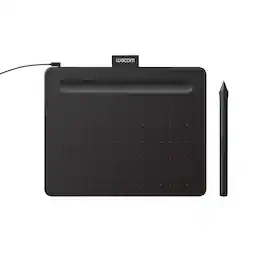
Transform your creative ideas into digital reality with Wacom Intuos drawing tablets. Perfect for casual or aspiring artists this compact graphics tablet delivers reliable Wacom-quality precision at an accessible price. The battery-free, pressure-sensitive pen provides natural, responsive drawing with no charging needed - just pick up and draw, with smooth, jitter-free lines and consistent pressure response. Get started immediately with over $240 in included downloadable creative software and trials, including 2 years of Clip Studio Paint Pro, 12 months of Boris FX Optics, and much more. The paper-like surface texture and four customizable ExpressKeys make digital art, photo editing, illustration, and design feel natural and efficient. Select models (CTL4100WL, CTL6100WL) offer Bluetooth wireless connectivity, letting you create freely at your desk, sofa, or anywhere in the room - with the option to switch to wired mode for ultimate flexibility. The wireless freedom is especially popular with educators and presenters who use the drawing tablet to control their computer while moving around a classroom or conference room. Certified to work with Chromebook and compatible with Windows and Mac, Wacom Intuos seamlessly integrates with Adobe, Corel, and all major creative applications. Backed by Wacom's 40+ years of industry leadership, you're choosing the same pen technology trusted by professional studios worldwide - at a creator-friendly price.
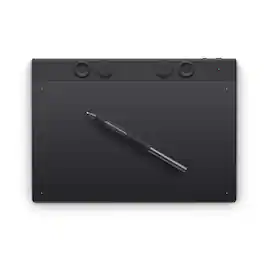
The Intuos Pro drawing tablet, Wacom’s flagship tablet, combines cutting-edge pen technology with unmatched precision, comfort, and versatility to help creators achieve the perfect harmony between work and flow. Designed with professional needs in mind, it’s the only Wacom graphic tablet featuring the customizable Pro Pen 3, which allows you to adjust the grip, weight, and button configuration for a personalized experience with Wacom’s most sensitive and accurate pen technology. This art tablet’s ergonomic layout includes intuitive Dials and ExpressKeys, located at the top of the tablet and easily accessible for both left- and right-handed users. At its thinnest, Intuos Pro is only 4mm, and is built with durable magnesium, it’s portable yet rugged, ideal for studio or on-the-go use. With three sizes to suit any style—whether for detailed editing or expressive art forms - Intuos Pro integrates seamlessly with creative software and supports Bluetooth connectivity. It’s also compatible with previous generation Wacom Pro Pens and EMR styluses from brands like LAMY and STAEDTLER
| Pros for Wacom - Intuos Medium Bluetooth Graphics Drawing Tablet, Includes Training & Software; Works w/ Chromebook Mac Android & Windows - Black | |||
|---|---|---|---|
| Ease of use, Overall Performance, Size, Wireless, Pressure Sensitivity | There were no pros for this product— | Ease of use, Overall Performance, Size, Price, Software | Overall Performance |
| Cons for Wacom - Intuos Medium Bluetooth Graphics Drawing Tablet, Includes Training & Software; Works w/ Chromebook Mac Android & Windows - Black | |||
| Setup, Software, Compatibility, Lag, Learning Curve | There were no cons for this product— | Setup, Connectivity, Pen, Features | There were no cons for this product— |
Specs
Questions & Answers
How do you tell what your drawing if the whole thing is black? Buying for my 14 yr old son who is into anime and wants to make his own little anime clips. Is this what I shld get?
Answered by WacomHello there, than you for asking. I'd like to clarify that the Intuos tablet doesn't have a screen, this is a pen tablet input device that sits next to your keyboard and needs to be connected to a computer to work. When you use the pen inside the active area of the tablet this one maps to the screen you have for your computer. That said, if he's getting started and you would like for him to work directly on a screen, then I would recommend to consider/explore the Wacom One as that is a Pen Display tablet. You can see it from here > https://www.bestbuy.com/site/wacom-one-13-3-graphics-tablet-flint-white/6393542.p?skuId=6393542 - Note that a computer is also nedeed. Hope that helps. Best!

What is the active area of this medium sized tablet?
The active area of the medium tablet is 8.5 x 5.3.
This question and answer was generated by AI based on customer and product data.Are there shortcut keys available on this tablet?
Yes, there are four customizable shortcut keys available.
This question and answer was generated by AI based on customer and product data.Is this drawing tablet compatible with Mac operating systems?
Yes, this drawing tablet is compatible with Mac OS X 10.11 and above.
This question and answer was generated by AI based on customer and product data.What kind of pressure sensitivity does the pen have?
The pen has 4096 levels of pressure sensitivity.
This question and answer was generated by AI based on customer and product data.
More to consider

Explore tech essentials Sponsored
 $319.99The price was $465.99

Discover related products
 $399.99The price was $479.99
 $94.56The price was $98.28
 $319.99The price was $399.00
 $434.99The price was $499.00