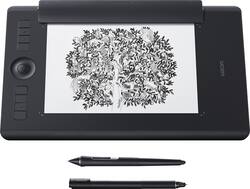
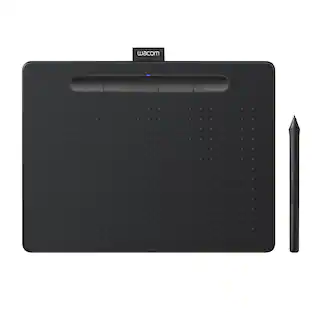
Wacom - Intuos Pro Paper Edition Pen Tablet (Medium) - Black
- Key Specs
- Screen Size: 0 inches (Size of the screen, measured diagonally from corner to corner.)
- Active Area: 8.7 x 5.8 in. (The size of the screen area that a user interacts with, either by stylus and/or touch (if supported).)
- Total Storage Capacity: 0 gigabytes
- Pressure Levels: 8192 (Allows the device to recognize different pressures from a compatible pen or stylus, which may control line thickness, opacity, or color. The more pressure levels, the more responsive the pen will feel.)
- General
- Brand: Wacom
- Model Number: PTH660P
- Product Name: Intuos Pro Paper Edition Pen Tablet (Medium)
- Color: Black
- Year of Release: 2016
- Display
- Screen Size: 0 inches (Size of the screen, measured diagonally from corner to corner.)
- Stylus Input: Active (Electromagnetic Resonance) (An active stylus/pen is able to communicate directly with a compatible device; active electromagnetic resonance (EMR) pens are powered via a device's screen and active electrostatic (AES) pens require an additional power source. A passive stylus does not have electronic features and is compatible with most capacitative touch screens.)
- Graphic Resolution: 5080 lines per inch (The resolution generated by the device. The higher the resolution, the finer the detail that can be seen and reproduced.)
- Active Area: 8.7 x 5.8 in. (The size of the screen area that a user interacts with, either by stylus and/or touch (if supported).)
- Storage
- Total Storage Capacity: 0 gigabytes
- Compatibility
- Operating System Compatibility: Mac OS, Windows
- System Requirements: Windows 7 or later, Mac OS X 10.12 or later; USB port/Bluetooth; internet access (The software that a product must have for it to be able to integrate with another product.)
- Connectivity
- Interface(s): USB Type C (Refers to the types of connections that devices use to interact and communicate with each other.)
- Power
- Charging Interface(s): USB Type C (The connection for transmitting power to charge the device.)
- Battery Life (up to): 10 hours (Battery life will vary depending on the product configuration, product model, applications loaded on the product, power management setting of the product and the product features used by the customer. As with all batteries, the maximum capacity of this battery will decrease with time and usage.)
- Battery Capacity: 1200 milliampere hours (The amount of energy stored in the battery.)
- Features
- Pressure Levels: 8192 (Allows the device to recognize different pressures from a compatible pen or stylus, which may control line thickness, opacity, or color. The more pressure levels, the more responsive the pen will feel.)
- Number of Shortcut Keys: 8 (Allows for convenient access to frequently used software shortcuts.)
- Tilt Angle (Maximum): 60 degrees (Greatest angle of tilt between the pen and active screen area that the device can recognize. Allows for intuitive functions when using the pen, such as more natural brush strokes or shading.)
- Dimensions
- Product Height: 13.18 inches (The out of box height of the item. Height is measured as the vertical distance from the bottom of the item to the top as it would be primarily used or placed.)
- Product Width: 8.54 inches (The out of box width of the item. Width is measured as the horizontal distance from one side of the item to the other as it would be primarily used or placed.)
- Product Depth: 0.31 inches (The out of box depth of the item. Depth is measured as the distance from the front of the item to the back as it would be primarily used or placed.)
- Product Weight: 24.6 ounces (The out of box weight of the item.)
- Included
- Stylus Included: true
- Stylus Model Included: Wacom Pro Pen 2, Wacom Finetip Pen
- Stylus Stand Included: true
- Other
- UPC: 753218988263
Draw and create on this Wacom Intuos Pro Paper Edition tablet. The 8192 levels of pen pressure let you fine-tune your design work on the 13.2 x 8.5-inch tablet, and express keys and a touch ring allow you to quickly select the right tools for the job. Connect this Wacom Intuos Pro Paper Edition tablet to your computer either wirelessly or via USB. 
- Medium size pen tablet: Provides an ample workspace for large brushstrokes and use with multiple displays, and yet it still fits conveniently into most laptop bags.
- Battery-free, pressure-sensitive pen: Features 8192 levels of pressure sensitivity, +/- 60 degrees tilt-response and virtually lag-free tracking. Includes interchangeable pen tips and a beautiful new Pen Stand.
- Finetip pen with extra ink refills included: To sketch on the paper and refine digitally.
- Detachable paper clip: To clip your drawing paper onto the tablet. Editable version is captured and stored on the tablet while you sketch on the paper.
- Multi-touch gesture support: Delivers a more fluid, more enjoyable experience as you create.
- Customizable ExpressKeys™ and Touch Ring: Gives you quick access to your favorite software shortcuts.
- Bluetooth connectivity: Allows cord-free use for flexible placement options. USB interface enables easy wired connection to your PC or Mac via the included 6.6' USB cable.
- Super-slim tablet design: Smaller, more compact footprint and premium materials.
- Bonus software pack: Creative Software: Register your Intuos Pro and receive a 3-month trial to Boris FX Suite; 2-months of Adobe Premiere Pro / Adobe After Effects; and 3-months/250GB of MASV file transfer; offer available for customers located in the Americas
Whats Included
- Wacom Intuos Pro Paper Edition Pen Tablet (Medium)
- Pro Pen 2
- Pen stand (includes 6 standard nibs, 4 felt nibs)
- Finetip Pen
- Paper Clip
- 10 single paper sheets - A5
- Accessory case, Quick start guide
- 3 finetip ink refills, 6.6ft USB cable
- Overlay sheet sample card, Regulation sheet
Product Manuals
Q: What is the purpose of the paper on a graphics tablet? Is it for a smoother surface?
A: It is for a real feel of pen to paper, that slightly rough texture, rather than a super smooth tablet surface. That smooth surface does take some getting used to. The pen that comes with it for the paper is really nice. I'm a traditionalist and love the feel of pen to paper but the electronic tech of today makes things quicker and easier. Here you can have both, and a hard copy of your creation. There is also different surface texture covers for the tablet you can purchase separately that have the feel of pen to paper. Might be cheaper than buying this item with paper option. It is definitely not necessary to get this item with paper option but if you love what you love then yes, it is a must have. Hope this helps =)
Q: What kind of paper is used with the wacom cintique pro paper and how much does it cost
A: Hi Bulldog, Mine is not a Wacom Cintique, it is WACOM Intuos pro. Cintique is very expensive; as opposed to the Intuos Pro, Paper edition. Cintique runs over $1000. I have the medium Intuos Pro, Paper edition. It comes with a supply of paper, but in my opinion, you can use any good 20 LB Bond paper. It runs about $400.00. Best Buy sells them. F.Y.I. The person that I have been studying with is online. He is an awesome Artist and knows everything about Digital Art. If you would like, I'll send you his info. Good luck! Mary24
A: Nope! It comes with a program, and I also recomend downloading AlpacaFire which is a free drawing program.
Q: can you use this just like the Intuos Pro Pen Tablet when not using paper?
A: Yes. The paper edition comes with the Wacom Pro Pen 2 for standard use AND the finetip gel ink pen for use with paper on the tablet.
Q: Do you need a computer or lap top to operate the drawing pad
A: The Wacom Intuos Pro Paper Edition does require a computer to operate for general use. The Paper Edition has the additional option of letting you sketch on traditional paper with the pen, which it then records so that it can be further edited on a PC or Mac at a later time.
Q: Does this only work with a PC or Mac? Or can you link it to another tablet and draw/save art?
A: From the research I've done and everything I've looked at, it is compatible with PC's and Mac's, and since it is bluetooth you can connect it to other devices like tablets or phones, at least from what I know. I hope this helped!
Q: Can I use the Wacom Intuis Pro with an apple ipad ?
A: You can use Inkscape App on iPad and connect with the tablet
Q: How do I buy refills for the ink pen or buy a totally new pen?
A: Three refills come with it and replacement refills can be purchased on Wacom store site or places like Amazon.
People also viewed
 Black Friday in July Deal$69.95The price was $79.95
 $3,499.95The price was $3,599.00


Today's top picks
 Black Friday in July Deal$749.99The price was $1,199.99
 Black Friday in July Deal$199.99The price was $399.99
 Black Friday in July Deal$69.99The price was $129.99
 $249.99The price was $399.99
 Black Friday in July Deal$199.99The price was $249.99
 Black Friday in July Deal$199.00The price was $419.00
 Black Friday in July Deal$169.99The price was $299.99
 Black Friday in July Deal$499.99The price was $999.99