Monster deals on the tech you wantDoorBOOsters coming Oct. 31.Shop now

Skip to content
Main Content
product image

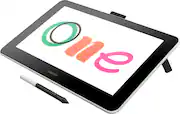
Wacom - One - Drawing Tablet with Screen, 13.3" Pen Display for Mac, PC, Chromebook & Android - Flint White

Model: DTC133W0A
SKU: 6393542
This item is no longer available in new condition. See similar items below
  • Key Specs
    • Screen Size: 13.3 inches (Size of the screen, measured diagonally from corner to corner.)
    • Screen Resolution: 1920 x 1080 (Screens come in a range of resolutions (measured in pixels, horizontal x vertical). The higher the resolution, the greater the picture quality.)
    • Multi-Touch Screen: false (A screen that recognizes multiple points of contact, allowing for intuitive navigation functions such as pinch to zoom.)
    • Active Area: 11.6" x 6.5" (The size of the screen area that a user interacts with, either by stylus and/or touch (if supported).)
    • Color Gamut (Adobe RGB): 72 percent (This number represents the percentage of colors on the RGB spectrum that are visible, as specified by the International Commission on Illumination (CIE).)
    • Total Storage Capacity: 0 gigabytes
    • Operating System: None (The operating system manages all software and hardware, including files, memory and connected devices. Most importantly, it lets you interact with your device and your programs in a visual way; otherwise, you'd be typing computer code to get anything done.)
    • Pressure Levels: 4096 (Allows the device to recognize different pressures from a compatible pen or stylus, which may control line thickness, opacity, or color. The more pressure levels, the more responsive the pen will feel.)
  • General
    • Brand: Wacom
    • Model Number: DTC133W0A
    • Product Name: One - Drawing Tablet with Screen, 13.3" Pen Display for Mac, PC, Chromebook & Android
    • Color: Flint White
    • Model Family: Wacom One
    • Year of Release: 2019
  • Display
    • Display Type: LCD
    • Screen Type: AHVA
    • Screen Size: 13.3 inches (Size of the screen, measured diagonally from corner to corner.)
    • Screen Resolution: 1920 x 1080 (Screens come in a range of resolutions (measured in pixels, horizontal x vertical). The higher the resolution, the greater the picture quality.)
    • Stylus Input: Active (Electromagnetic Resonance) (An active stylus/pen is able to communicate directly with a compatible device; active electromagnetic resonance (EMR) pens are powered via a device's screen and active electrostatic (AES) pens require an additional power source. A passive stylus does not have electronic features and is compatible with most capacitative touch screens.)
    • Multi-Touch Screen: false (A screen that recognizes multiple points of contact, allowing for intuitive navigation functions such as pinch to zoom.)
    • Response Time: 26 milliseconds (The speed at which pixels can change colors is called response time. It is measured in milliseconds (ms).)
    • Graphic Resolution: 2540 lines per inch (The resolution generated by the device. The higher the resolution, the finer the detail that can be seen and reproduced.)
    • Active Area: 11.6" x 6.5" (The size of the screen area that a user interacts with, either by stylus and/or touch (if supported).)
    • Aspect Ratio: 16:9 (The measurement of the width of a screen compared to the height of a screen, expressed as a ratio.)
    • Brightness: 200 candela per square meter (A measure of the total light output.)
    • Color Gamut (Adobe RGB): 72 percent (This number represents the percentage of colors on the RGB spectrum that are visible, as specified by the International Commission on Illumination (CIE).)
    • Displayable Colors (Maximum): 16.7 million
    • Contrast Ratio: 1000:1 (Measured difference between a displayed image's brightest whites and darkest blacks. The larger the first number, the more detail and color that can be displayed.)
  • Storage
    • Total Storage Capacity: 0 gigabytes
  • Memory
    • Expandable Memory Compatibility: None
  • Compatibility
    • Operating System: None (The operating system manages all software and hardware, including files, memory and connected devices. Most importantly, it lets you interact with your device and your programs in a visual way; otherwise, you'd be typing computer code to get anything done.)
    • Operating System Compatibility: Android, Mac OS, Windows, Chrome
    • System Requirements: Windows 7 or later, Mac OS X (10.13 or later), Chromebook (devices running the latest Chrome OS), Android device. Easy plug-in via USB-A/Bluetooth: some devices require USB-C or OTG adapters; internet access (The software that a product must have for it to be able to integrate with another product.)
  • Power
    • Charging Interface(s): USB Type C (The connection for transmitting power to charge the device.)
  • Features
    • Stylus Dock: None
    • Pressure Levels: 4096 (Allows the device to recognize different pressures from a compatible pen or stylus, which may control line thickness, opacity, or color. The more pressure levels, the more responsive the pen will feel.)
    • Number Of Switches: 1
    • Tilt Angle (Maximum): 60 degrees (Greatest angle of tilt between the pen and active screen area that the device can recognize. Allows for intuitive functions when using the pen, such as more natural brush strokes or shading.)
  • Dimensions
    • Product Height: 0.6 inches (The out of box height of the item. Height is measured as the vertical distance from the bottom of the item to the top as it would be primarily used or placed.)
    • Product Width: 14.1 inches (The out of box width of the item. Width is measured as the horizontal distance from one side of the item to the other as it would be primarily used or placed.)
    • Product Depth: 8.8 inches (The out of box depth of the item. Depth is measured as the distance from the front of the item to the back as it would be primarily used or placed.)
    • Product Weight: 35 ounces (The out of box weight of the item.)
  • Certifications Listings & Approvals
    • ENERGY STAR Certified: false (Devices carrying the ENERGY STAR service mark, such as computer products and peripherals, kitchen appliances, and other products, generally use 20% to 30% less energy than required by federal standards.)
  • Included
    • Included Software: Bamboo Paper Pro, Clip Studio Paint Pro (6-Month license Mac/PC, 3-month license for Chromebook), and Magma Studio (3-month Pro license).
    • Stylus Included: true
    • Stylus Model Included: Wacom One Pen
    • Stylus Stand Included: false
    • Tablet Stand Included: true
  • Other
    • UPC: 753218985705

Experience the power of the pen. Wacom One is a digital pen display for all creative uses –a seamless experience whether at home, work or play. Sign documents digitally, view a phone app on a bigger screen, quickly take notes, sketch, paint or edit photos – the 13.3” HD screen is ready to go and comes with creative software to get you started. Use the Wacom One pen or get a digital pen from a range of leading brands to customize your experience. Everyone from creative beginners to digital natives will appreciate the simple way in which Wacom One can be used as an extension of Mac, Windows PC, Chromebook and Android smartphones for drawing, gaming, or office productivity applications. This product works with devices capable of running the latest version of Chrome OS and has been certified to meet Google's compatibility standards. Google is not responsible for the operation of this product or its compliance with safety requirements. Chromebook, Android, and the Works With Chromebook badge are trademarks of Google LLC.

  • 13.3" LCD display: See your imagination come to life in full color on a 13.3”display with a natural surface friction that makes for intuitive drawing on screen. It feels like you’re drawing or writing on paper.
  • Wacom One pen: Feels like a real pen – no need for batteries, the pen feels and looks right. Plus, this one pen uses software to act as multiple pens and brushes in a full range of colors, with superb accuracy.
  • Diverse compatibility: Link up your Wacom One to your Mac, PC or Chromebook, as well as certain Android tablets and smartphones, and even use digital pens from top brands if you want a different option; some devices require USB-C or OTG adapters
  • Bonus Creative software pack: Includes Creative Software: purchase & register your Wacom One and receive Bamboo Paper Pro, Clip Studio Paint Pro (6-Month license Mac/PC, 3-month license for Chromebook), and Magma Studio (3-month Pro license).
  • Bonus EdTech software pack: Register your tablet to receive Education Software: Kami App (12-Months), Foxit PDF Editor for Education (12-Months), and 3-months of Explain Everything, Pear Deck, & Limnu.
  • Full HD 1920 x 1080 resolution: Gives you the ability to hone in on every detail making it perfect for painting, retouching, and page layout.
  • 26 ms response time: Allows pixels to change colors quickly to avoid streaking, blurring, and ghosting.
  • 200 cd/m² brightness: Offers a highly visible display and crisp on-screen images.
  • Integrated pop-out legs: Enable working at an inclined 19° angle.
  • Wacom One X-shape cable: Lets you connect the display to a power source and your computer through HDMI and USB ports. Requires an additional third-party adapter (not included).
  • 13.3" LCD display: See your imagination come to life in full color on a 13.3”display with a natural surface friction that makes for intuitive drawing on screen. It feels like you’re drawing or writing on paper.
  • Wacom One pen: Feels like a real pen – no need for batteries, the pen feels and looks right. Plus, this one pen uses software to act as multiple pens and brushes in a full range of colors, with superb accuracy.
  • Diverse compatibility: Link up your Wacom One to your Mac, PC or Chromebook, as well as certain Android tablets and smartphones, and even use digital pens from top brands if you want a different option; some devices require USB-C or OTG adapters
  • Bonus Creative software pack: Includes Creative Software: purchase & register your Wacom One and receive Bamboo Paper Pro, Clip Studio Paint Pro (6-Month license Mac/PC, 3-month license for Chromebook), and Magma Studio (3-month Pro license).
  • Bonus EdTech software pack: Register your tablet to receive Education Software: Kami App (12-Months), Foxit PDF Editor for Education (12-Months), and 3-months of Explain Everything, Pear Deck, & Limnu.
  • Full HD 1920 x 1080 resolution: Gives you the ability to hone in on every detail making it perfect for painting, retouching, and page layout.
  • 26 ms response time: Allows pixels to change colors quickly to avoid streaking, blurring, and ghosting.
  • 200 cd/m² brightness: Offers a highly visible display and crisp on-screen images.
  • Integrated pop-out legs: Enable working at an inclined 19° angle.
  • Wacom One X-shape cable: Lets you connect the display to a power source and your computer through HDMI and USB ports. Requires an additional third-party adapter (not included).
Whats Included
  • Wacom One - 13.3" - Graphics Tablet
  • Wacom One Pen
  • Wacom One X-Shape cable
  • AC power adapter
  • AC plug head
  • Owner's manual
  • Wacom One - 13.3" - Graphics Tablet
  • Wacom One Pen
  • Wacom One X-Shape cable
  • AC power adapter
  • AC plug head
  • Owner's manual

Q: Does this need to be hooked up to a computer or can you use it by itself

A: Yes. This needs to be connected to a computer to work. It is also compatible with some Android devices, although I think it needs an additional adapter that is not included.

Q: I saw that you said that you can do animation with the right software. Does that mean that this doesn’t come with the software? I want to start an instagram drawing account and an animation youtube channel. Would it work well with both of those?

A: The tablet does not come with any applications or programs for you draw on. This is just an extra screen you can draw on. You can’t use it unless you plug it into a computer with programs to draw and animate already on it.

Q: Can you use this product with out a computer? Dose this item come with a charger?

A: No, this tablet needs to be used with a computer. The tablet and stylus works like a second display and a mouse.

Q: Hi I just wanted to ask can you animate or edit pictures and drawings

A: Yes! You just need the appropriate software like adobe or Smith Micro software!

Q: i only have 1 hdmi port to my desktop and my monitor is connected to it. Can i connect the wacom hdmi to my monitor instead? would that work?

A: Yes you can with an adapter. Usually via the HDMI to mini display port. Best Buy sells such units, but not all of them are compatible with Macs so beware. I’m not sure which ones work with PCs, but to even connect my iMac to the Wacom One I had to go to Amazon for a StarTech USB-C to HDMI adapter. Hope this helps ;0)

Q: What would be the best laptop to go with this?

A: I always suggest getting the fasted CPU, the most RAM and the fastest Video card you can. in that order.

Q: Does it work with Zoom. Need for remote teaching

A: Yes, the Wacom One works great with Zoom. You can take full advantage of the mark-up tools within Zoom using the pen, for a very natural experience.

Q: i own a samsung galaxy s10 plus, can i connect the tablet to my phone?

A: Thank you for your question. The Wacom One is compatible with the Samsung Galaxy S10+ Hope that helps.