Rating 4.1 out of 5 stars with 41 reviews
4.1- Wi-Fi Range (11)
- Setup (8)
- Signal Strength (7)
- Ease of use (6)
- Performance (3)
- Mounting (4)
- Size (4)
- Speed (4)
Customer Images
The vast majority of our reviews come from verified purchases. Reviews from customers may include My Best Buy members, employees, and Tech Insider Network members (as tagged). Select reviewers may receive discounted products, promotional considerations or entries into drawings for honest, helpful reviews.
- Rated 5 out of 5 stars
Helped me get WiFi into a metal shop.
I built a metal shop and could not get WiFi into it. This device worked for me. My shop has a window so that probably helped but regular WiFi extenders would not work - this did!
Posted by SsssuperDave
- Rated 5 out of 5 stars
Awesome product
Insane wifi distance. Mounted outside of my house to supply shop with wifi and even the 5ghz band gets full signal from inside shop. Easy setup. Buy the proper mounting pole size. It doesnt come with one.
- Rated 4 out of 5 stars
GOOD WIFI EXTENDER AP FOR WIRED USE
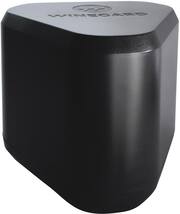
WINEGARD - EXTREME 2.0 HIGH PERFORMANCE OUTDOOR WI-FI EXTENDER MODEL:RW-3035 GOOD WIFI EXTENDER AP FOR WIRED USE The WINEGARD - EXTREME 2.0 HIGH PERFORMANCE OUTDOOR WI-FI EXTENDER is very easy to use and to setup. There is not much to it really. The antenna is well protected, and it is nice that there is mounting gear included. It does a good job, when configured as a wired to Wi-Fi access point, but it is not so good as a WiFi-WiFi extender. I was able to get a “usable signal” at about 400 ft line of site. As long as you can physically connect the included POE (Power Over Ethernet) adapter to your wired network or a spare port on your router, then you should be satisfied with the performance. However, if you are hoping to boost a weak Wi-Fi signal and suddenly make it stronger this is not how things like this work. In Wi-Fi to Wi-Fi mode you are only as good as your weakest Wi-Fi link. If you get for example 100 Mbps just outside the wall of your house, with the overhead of WiFi to WiFi you might get up to 40-60 Mbps a 100 feet into your yard / outdoor space though likely closer to something like 20Mbps. However, if you are connected to a wired network, then you can probably get close to 90-100Mbps (assuming 100Mbps is your normal max speed). A lot of it depends upon what you need the Wi-Fi for. Email, fine. Video Calls, probably not. It is not magic. If you can barely get a signal outside your home, then unless you wire this to your home network you will not get any usable additional bandwidth. I do highly recommend that you enable the 5Ghz band, as I had far better performance (faster) than 2Ghz even at 400 ft from the WINEGARD - EXTREME 2.0 HIGH PERFORMANCE OUTDOOR WI-FI EXTENDER. SETUP: The setup is really easy and straight forward. Just plug it in. Wait for the Wi-Fi Name to come up, connect to it then configure it using the information printed on the instruction sheet. Every time you change anything on a setup page, you need to press “Continue” to save the settings, and then wait a few minutes for the router to incorporate the changes. It would have been nice if WINEGARD include a cable or two for initial setup and maybe even deployment. At least with their antennas they, usually include 25-100 feet of coax. SOME GEEKY STUFF – OK TO SKIP My baseline speed from my (2021) laptop to my in house Wi-Fi network (2019) is about 500Mbps to the internet. If you are attempting Wi-Fi to Wi-Fi extender mode (the default mode), you should know that the source Wi-Fi can only be on the 2Ghz Network. (I have confirmed this with WINEGARD support). Next you can’t have the source network be one 2Ghz channel (like 3) and the rebroadcasted channel to be something less crowded (like 2Ghz / Ch 9). So, this means 2 things. First, there seems to be only one 2Ghz radio that must be utilized to both transmit and receive on the same channel. Next this also means that the WINEGARD - EXTREME 2.0 HIGH PERFORMANCE OUTDOOR WI-FI EXTENDER is stomping on the source Wi-Fi and adding to the congestion by rebroadcasting on the same channel. In my testing, performance dropped by about 80% (to about 20 Mbps) when using only the 2Ghz network. Once I enable the 5Ghz network, I was able to slightly increase performance (around 55 Mbps). Once I changed to “wired to Wi-Fi” (ethernet) mode. I was getting about 80Mpbs on the 2Ghz band and 160Mbps on the 5Ghz band. Not great by any means, but usable for sure. (see pics) The documentation says the antenna is omni directional, which then made it no surprise then that the signal dropped off very quickly. Sure, I could still connect even at 400ft (clear line of site) from the WINEGARD - EXTREME 2.0 HIGH PERFORMANCE OUTDOOR WI-FI EXTENDER, but 2Ghz was about 20 Mbps and 5Ghz was about 80 Mbps. On one hand this is a good signal for the 5Ghz, but I was surprised by how much the 2Ghz dropped off. By way of comparison, I have another very inexpensive outdoor Wi-Fi antenna that is extremely narrow band uni-directional, but I was able to get a similar usable signal almost 3/4 mile away though I had to have the antenna lined up perfectly. For best performance on Wi-Fi only extenders (WiFi to WiFi), you really need 2 (or more) radios each dedicated to either connecting to the source to re-transmitting independently set to different channels. For this price point I was a little disappointed that the WINEGARD - EXTREME 2.0 HIGH PERFORMANCE OUTDOOR WI-FI EXTENDER does not seem have multiple TX/RX radio/antennas for each frequency. I’ve long forgotten the math, but if I recall there is something like a 4X negative impact on throughput using the same radio/antenna combination for rebroadcasting a signal. A CAUTIONARY NOTE ABOUT GENERAL SECURITY FOR ACCESS POINTS Make sure you configure all the passwords to strong passwords, change the default password on the WINEGARD - EXTREME 2.0 HIGH PERFORMANCE OUTDOOR WI-FI EXTENDER (or any AP/router). If for example, you set up the “guest network” with a password of “guest”, you can easily (accidentally) give everyone in your neighborhood or apartment access to everything on your home network. BE CAREFUL. This is an access point device, it is not a firewall nor does it contain any advanced security features. Because this is such a strong antenna, I was easily able to see about 10 other neighbor’s networks as well as dozens of devices like speakers and TVs. Many of these had no password protection. Remember if you can see your neighbor’s networks, then they can see your network as well. If you are an advanced user, then you should try to isolate all traffic to/from your AP to “internet only” to protect your internal devices. Most routers have some capability in this regard. SUMMARY / RECOMMENDATIONS So, boiling it all down. If you just want something super easy to deploy and are not obsessed over lightning fast performance, then the WINEGARD - EXTREME 2.0 HIGH PERFORMANCE OUTDOOR WI-FI EXTENDER will work just fine. My main advice is to wire it to your router if at all humanly possible for better performance. But if you are just chillin’ on your patio and want some signal this will work well enough. If you can’t wire it to your router at least enable the 5Ghz network and use that when possible for better performance. So I will give this a recommend, but only for wired use.
Posted by TheOffice1234
- Rated 4 out of 5 stars
Excellent Wireless range for outdoor needs
Winegard Extreme 2.0 Wi-Fi extender is a wireless-AC access point and extender designed for outdoor needs with simple setup and mounting options. My home is a single-story 4000+ SQ ft and have mesh wireless for indoor but when it comes to outdoor the wireless signal drops to one bar when browsing in backyard. Also, smart devices like Rachio, Flo by Moen, Ring outdoor cameras was suffering from signal issues until this outdoor Wi-Fi extender was professionally installed at my place. Setup was easily. Installation guide was a single piece of paper to assemble the extender with arms that was included in the box. Packing was not great. My unit came in brown box with no packing materials. Not sure if its retail unit but the unit was plastic wrapped and new. I had my AV guys install outdoor cameras and they installed CAT6 cable from my indoor where my router sits. Keep in mind, the cable cannot exceed more than 85 feet in length for it to work. So, I had to choose a place outdoor where its around 80 feet. It does come with power adapter where the cable for ethernet (if wired) and the CAT5E/CAT5/CAT6 cable is plugged in for POE. Cable is not included in the package. Suggest watching few YouTube videos from manufacturer for quick installation and setup. It explains well and speeds up the whole process like breeze. Set your password stronger as this will be mounted outdoor, and anyone can easily hack to your network, if need be, with poor password. Also, turn on the 5GHZ frequency band for greater speeds and make sure to setup guest account with different password to share with guests. To setup you need to enter 10.11.12.1 on your web browser and don’t forget to change the default admin password and check for software updates. Now I have stronger high performance Wi-Fi extender for outdoor and secure (supports WPA, WPA2 and WPA3). Overall, it’s an excellent outdoor Wi-Fi Extender, access point, bridge mode with great range and now all my smart devices that are installed outside gets consistent strong Wi-Fi signal and will recommend to anyone who needs outdoor strong signal strength.
Posted by TechGuru
- Rated 4 out of 5 stars
Really handy if you need range
Set up is really easy and straightforward. Plug it in, connect to it with your phone then add it to your home network. Took minutes to do. The only tricky part would be installation outside, depending on your outdoor layout. I need to decide if I want to bury an ethernet cable across my yard and mount on the post further away from the house or house mount and run off poe. If I do that though, I'll need to update my outdoor outlet enclosure to make sure I can keep the flap open in all weather. If you're dual band (which most people should be at this point) you'll want to set up the 5Ghz Using Google maps, it looks like I have a church just about 1000 feet from where it'd sit in my yard and a playground in the opposite direction. I play mobile games with my kids that require walking outdoors. It's handy to be able to go visit stops and whatnot without me needing to use a Hotspot on my phone since their tablets don't have their own data plan. Long term testing will be needed to see how it fares in all weather since we get snow and rain, but given how the seals look at connections, I don't have reason to think it'll leak and be damaged
Posted by rjv86