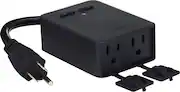
Rating 4.6 out of 5 stars with 27 reviews
4.6- Ease of use (9)
- Dual Outlets (6)
- Energy Monitoring (4)
Customer Images
The vast majority of our reviews come from verified purchases. Reviews from customers may include My Best Buy members, employees, and Tech Insider Network members (as tagged). Select reviewers may receive discounted products, promotional considerations or entries into drawings for honest, helpful reviews.
- Rated 5 out of 5 stars
Great product! Works as it should
Works great, you can control them separately and even with a weak Wi-Fi signal because of distance I've never had an issue. I use these for the lights in my backyard and I have them on a schedule in case I forget to turn them off.
Posted by EdithP
- Rated 5 out of 5 stars
Hasn't disappointed me yet!
I love this plug! I have had my patio Christmas decor plugged in to it & it's so nice to not have to go out in the cold weather to plug in my stuff! I'll have my Best Buy Edison lights plugged in to it this summer!
Posted by Cella
- Rated 5 out of 5 stars
Very convenient item.
I bought this item to use on my outdoor Christmas lights. It replaces a mechanical timer that I had used for years. This plug works great. There are 2 outlets that work independently of each other. Iactivated the device set a schedule of when I wanted the lights to turn on and off and I haven't had to touch it since. Works with Alexa. Only minor issue is that the cord could be a little longer. Didn't affect my setup but I could see where it could be an issue for some.
Posted by Walter
- Rated 5 out of 5 stars
Awsome device for outside lights
Amazing device to have when u have regular lights but want that smart wifi device control without spending so much. I dont have to invest in smart lights now that i can simply control my existing lights with this wifi plug. I run everything through my google home so its just perfect for me and my family
Posted by IsabelP
- Rated 5 out of 5 stars
Excellent works perfectly!
You can control each outlet separately. Works perfectly and is heavily constructed. Respond rapidly and can be controlled with the same Wyse app along with other Wyze smart products. Great product.
Posted by JTO1