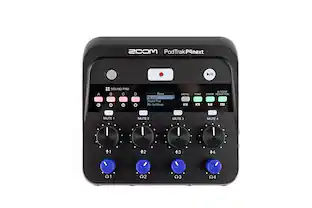
Zoom - PodTrak P4 Podcast Recorder - Gray
- General
- Brand: Zoom
- Model Number: P4
- Product Name: PodTrak P4 Podcast Recorder
- Color: Gray
- Warranty
- Warranty - Parts: 1 year
- Warranty - Labor: 1 year
- Other
- Product Width: 1.3 inches (The out of box width of the item. Width is measured as the horizontal distance from one side of the item to the other as it would be primarily used or placed.)
- Product Height: 4.4 inches (The out of box height of the item. Height is measured as the vertical distance from the bottom of the item to the top as it would be primarily used or placed.)
- Product Length: 6.1 inches (The out of box length of the item. Length is measured as the longest dimension of the item.)
- Product Weight: 0.8 ounces (The out of box weight of the item.)
- Memory Card Compatibility: Secure Digital Extended Capacity (SDXC), Secure Digital High Capacity (SDHC) (The type of memory card(s) recommended for use with the product.)
- Display Type: None
- Microphone Input: true (The device features an input for connecting an external microphone.)
- Batteries Included: false (Indicates whether the product comes with the required batteries for its operation.)
- Headphone Jack: true (The device features an interface that allows for the connection of headphones.)
- Battery Chemistry: Alkaline
- Battery Size: AA (The battery size required for operation.)
- Number of Batteries Required: 2
- Integrated Microphone: false
- Computer Compatibility: Apple iOS
- Internal Memory: 512 gigabytes (Data storage capacity for built-in memory circuits.)
- Integrated Speaker(s): false
- Memory Card Slot: true
- Supported File Formats: WAV
- Recording Type: Voice recorders
- Operation: Digital
- UPC: 884354023522
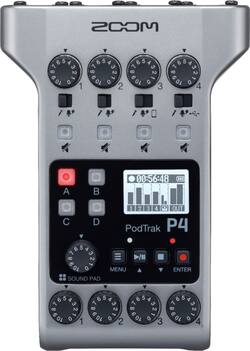
Zoom PodTrak P4 Podcast Recorder has 4 mic inputs, assignable sound pads, TRRS for incoming phone calls preventing feedback using the Mix-Minus function. Gain control knobs and mute buttons for each input. Phantom power for all main inputs. 4 headphone outputs with individual control. Up to 4 hours w/2 AA batteries or use a USB power supply.
Whats Included
- 2 x AA Batteries
A: You can connect the Zoom PodTrak P4 to a laptop/computer via the Channel 4 USB input using a USB-C cable. Then set the gain dial on Channel 4 to a suitable level such as 5, 6, 7. Then plug in headphones to any of the four headphone-in ports at bottom of the device. At this point, the PodTrak P4 is acting as a USB interface connected to a laptop/computer. Whatever sound or music is playing from the laptop/computer can be heard through the headphones plugged into the PodTrak P4. You can hear any sound coming out of the laptop/computer regardless whether the PodTrak P4 is recording or not. If you don't press the record button, then of course the P4 will not record the sound coming from the laptop/computer. If you do press the record button, the P4 will record the sound coming from the computer. For any XLR microphones plugged into the PodTrak P4, the audio can also be heard as well, regardless whether the P4 is recording or not. However, make sure not to insert a microphone into Channel 4 if the P4 is being used as a USB interface (therefore can only use Channel 1, 2, 3 - but not channel 4 if the P4 is being used as a USB interface.
A: Yes you can. you will set number 4 to PC. Connect a USBa to USBC, or USBC to USBC cable to the front connector on the left hand side. It will route all audio to and from the PC this way. You will want your headphones to use the front connectors so you can hear, and you will use XLR1 and 2 for your microphones. You can then use number 3 for a phone using the TRRS connector on the right hand side, or as another microphone. In adition, number 3 can be used as a bluetooth interface with devices if you want by using the add on bluetooth adaptor that would plug into the right hand side. I hope this helps. As for video it would be handled on the PC, and you will have to make sure that in your sound settings that you tell the computer to use the P4 as the microphone. It will then bring in the audio from the USB connection. Do not ajust the levels on the PC if you can help it, you are better ajusting them on the P4.
Q: Does this use an SD card? Or how do you transfer the tracks to your computer?
A: The Zoom PodTrak P4 uses a full size SD memory card, not a micro-SD card. You can also transfer audio files to your computer via a USB-C cable connected from the PodTrak P4 to your laptop/computer so you don't need to remove memory card from the device. Just go into menu of the P4 and select "File Transfer" (with USB-C cable connected from P4 to a computer). Your computer will recognize the P4 as an external hard drive so you can simply transfer audio files back and forth between the P4 and a computer, it's very easy. Otherwise can also remove the full size SD card from the PodTrak P4 and insert into a memory card reader going into your laptop/computer. If you want other useful tips, check out my YouTube channel here for a detailed setup tutorial: https://www.youtube.com/watch?v=VNShNb3o9L4 ALSO join this helpful Facebook PodTrak P4 user group here: https://www.facebook.com/groups/3511099422276369?multi_permalinks=3591994474186863&should_open_composer=false
Q: Can you set up the P4 with lavalier mics?
A: Simple answer is: Yes. But: Most likely a lavalier mic is a condenser/electret microphone, has a 3.5mm plug, and needs Plug-in power (approx. 3 Volts) that most computers, cameras and smartphones provide. P4 has no 3.5mm input with Plug-in power. But it has XLR input that can provide Phantom power 48 Volts. All you need is an 3,5mm-to-XLR adapter, that also transforms high Phantom power to low Plug-in power. Rode adapters VXLR+ and VXLR Pro will do the job properly. It is tried and worked with lavalier mics such as Rode Lav Go, Boya M1, DPA 4060 etc.
A: Because it has already been released to certain stores. You can find it also available in B&H.
Q: Does this Record Each Audio Track from each mic individually or is i just one big audio file?
A: The Podtrak P4 will record and save individual files for each input, but it will also save a single file with all inputs mixed.
People also viewed
Today's top picks
 $98.86The price was $118.88