TP-Link - 5-Port 10/100/1000 Mbps Gigabit Smart Ethernet Metal Switch - Gray
About this product
Upgrade your equipment for your small or medium business network with this TP-LINK TL-SG105E Gigabit smart switch, which offers 5 10/100/1000 Mbps ports with port-based priority setup, making it easy to integrate with your infrastructure.
5-port Gigabit easy smart switch
Allows you to upgrade the equipment on your small or medium business network, to suit your needs.
Port-based priority management setup
Helps ensure clear, smooth, lag-free voice and video.
Power-down idle ports
Auto sense when connected equipment is off or idling to help conserve energy.
Auto MDI/MDI-X crossover on all ports
Eliminates the need for crossover cables or uplink ports, facilitating setup.
Compact size
Ideal for placement on desktops with limited space. Switch can also be mounted on a rack for flexible placement.
Green Ethernet technology
Helps reduce power consumption.
16K jumbo frame
Boosts performance when transferring large amounts of data.
Port Mirroring, Loop Prevention and Cable Diagnostics
Enable effective network monitoring.
- Number of LAN Ports5
Reviews
Rating 4.9 out of 5 stars with 58 reviews
The vast majority of our reviews come from verified purchases. Reviews from customers may include My Best Buy members, employees, and Tech Insider Network members (as tagged). Select reviewers may receive discounted products, promotional considerations or entries into drawings for honest, helpful reviews.
Compare similar products
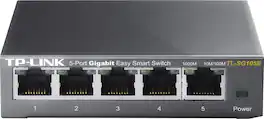
Upgrade your equipment for your small or medium business network with this TP-LINK TL-SG105E Gigabit smart switch, which offers 5 10/100/1000 Mbps ports with port-based priority setup, making it easy to integrate with your infrastructure.

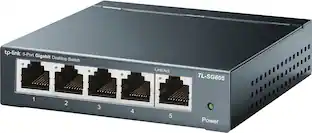
Increase the reliability of your connected devices with the TL-SG605 5-port Gigabit desktop switch. 5x non-blocking gigabit ports enable instant transferring of large, bandwidth-intensive files without interference.

The TP-Link 2.5G Multi-Gigabit Unmanaged Switch TL-SG605S-M2 provides an easy way to expand your wired network. TL-SG605S-M2 delivers 2.5 times faster network performance than traditional Gigabit switches. It works with CAT5e, CAT6, CAT6a and above cables without upgrading your cabling. With eight 2.5G ports, TL-SG605S-M2 unlocks the peak performance of 2.5G Multi-Gig Bandwidth and Devices. TL-SG605S-M2 can be applied for multiple scenarios, including but not limited to LAN party, home entertainment, instant transfer for workstations, small and home offices. Its fanless design ensures silent operation, making it ideal for any use scenario.
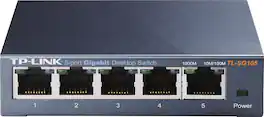
This TP-LINK TL-SG105 5-port switch provides up to 2000 Mbps bandwidth and features QoS for high-speed data transfers. The steel design can be mounted on the wall or on the desktop for plug and play installation.
| Pros for TP-Link - 5-Port 10/100/1000 Mbps Gigabit Smart Ethernet Metal Switch - Gray | |||
|---|---|---|---|
| There were no pros for this product— | Overall Performance, Ease of Use, Connectivity, Setup, Size | There were no pros for this product— | There were no pros for this product— |
Specs
Does it matter what brand you get of port extender
Answered by TPLinkSupportIf you are looking for a simple, unmanaged network switch that supports Gigabit Ethernet connectivity, this model will work just fine and is universally compatible with routers that provide Ethernet connections.

I have a modem and router combo from Century Link. Can I plug this in one of the modem router ports and get extra ports out of that setup?
Answered by TPLinkSupportAbsolutely! Simply connect the switch to one of the LAN ports on your CenturyLink gateway to provide additional Ethernet connectivity to your home. Regards, TP-Link Support
Can this switch provide power over ethernet?
Answered by TPLinkSupportHi! No, the TL-SG105E is not a PoE switch. For a PoE alternative, please consider our TL-SG105PE model instead.
Will my tp link router be able to see the devices behind this switch? I want to limit bandwidth to each pc on the router only for internet. Is that doable on this device? 3-5 mpbs internet :/. I do enjoy the product said earlier the TP link router.
Answered by meoffYes that's what I use it for my TP.
Is this an "Unmanaged" Switch device?
Answered by DonaldI'm just using it in default mode but I know it can be configured to do things like add or strip VLAN tags on the ports, etc, because I know someone else who is using one that way.
Customers ultimately bought

Explore tech essentials Sponsored
 $594.95The price was $629.95
 $449.99The price was $499.99

Discover related products
 $13.99The price was $19.99
 $30.99The price was $32.99
 $24.99The price was $27.99
 $26.99The price was $40.66









Keep exploring
 $1,404.89The price was $1,412.55
 $75.31The price was $77.05
 $137.62The price was $154.00
 $233.87The price was $237.17