Rating 4.6 out of 5 stars with 70 reviews
4.6- Print Quality (42)
- Setup (11)
- Ease of use (8)
- Connectivity (4)
- Noise Level (3)
- Size (13)
Customer Images
The vast majority of our reviews come from verified purchases. Reviews from customers may include My Best Buy members, employees, and Tech Insider Network members (as tagged). Select reviewers may receive discounted products, promotional considerations or entries into drawings for honest, helpful reviews.
- Rated 5 out of 5 stars
This printer Exceeded my expectations!!
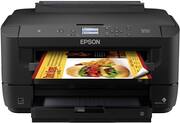
When opening the box for the WorkForce WF-720 it's like looking at a beast but one so beautiful. It's design is sleek and makes you feel as if it's worth more then what it costs. It's easy to set up as long as you are good at following directions. This magnificent piece of technology not only prints out pictures very well as if you had just gotten them developed; but the word printing is fast around four to five seconds with each page. Setting up the printing however from your cell phone takes a little patience. You need to add the printer, click on cloud print & enable the Epson printer. From here you will need to approve the device connection on the printer. You will need to make sure that both the printer and the cell phone are on the same wifi connection. Keep in mind that this printer only does the 2.4 ghz wifi connection and will not recognize the 5ghz connection. The reason why I say to be a little patient is because it takes the printer a little bit to print out the pictures from your cell phone through wifi. I have had many printers in the past but none have come close to this one. If you choose the wrong setting to say print off a picture the Epson Workforce will let you know with an error that you have chose the wrong paper but also it will allow you to go ahead and print if you'd like. I got this printer on December 23rd and have tried to find flaws with it but have come up short. This product exceeded my expectations not just on the look but also on the ease of navigating the device itself. “This is a review for the Epson WorkForce WF-7210 Wide Format All-in-One Printer that I received free of charge to do a beta test and review.”
Posted by whymann
- Rated 4 out of 5 stars
Good large format printer
The Epson WF-7210 has proven to be a great printer so far. It prints crisp text documents rapidly, and also performs well with color graphics. I've included a photo of both a sample menu as well as a full 8.5X11 photograph. The boarder-less printing functions well, and the photo quality was good. Black and white text is significantly faster than color. Full page photo printing set at high quality took over 3 minutes, but standard quality took a little over a minute and a half with comparable quality. It should be noted that when photo printing it is best to completely change out the paper in the cassette, and it pulled two pieces of paper when pulling the last piece of photo paper off of printer paper. The printer itself appears to be well constructed and has a solid, weighty feel. It functions well wirelessly, and printing from an iphone on the network functioned effortlessly. Good printer overall, would recommend. This is a review for the Epson WorkForce WF-7210 Wide Format All-in-One Printer that I received free of charge to do a beta test and review.
Posted by Chris
- Rated 5 out of 5 stars
Amazing printer
When I opened the box for the Epson - WorkForce® WF-7210 Wireless All-In-One Printer I was very impressed with how well it was packaged. Setting the workforce printer up was very easy thanks to the simple intructions that came with it. Installing it and connecting to my computer and wifi was a breeze as well. It has 2 different paper trays which cones in handy for my husband's business and my son's online public schooling as well. It handles many prints per day and the quality is amazing as well. It is a large printer, but very sleek and I love the display screen! Ink was very easy to install as well. It shows you when connected to wifi and wireless devices. I have already recommended it to friends and family. This is a review for the Epson WorkForce WF-7210 Wireless All-In-One Printer that I received free of charge to do a beta test and review.
Posted by Kaywal22
- Rated 5 out of 5 stars
Great printer
Using this for sublimation printer. Does a great job
Posted by Maxbat123
- Rated 4 out of 5 stars
Prints Ledger
Needed a ledger size printer for construction drawings while working from home. Printer did freeze several times during setup so hoping it gets better. I knew the printer would have a large footprint in my office and it does so please keep this in mind when purchasing.
Posted by Rossco135
- Rated 3 out of 5 stars
Not too Impressive
1. Neither paper tray is big enough for 11x17 printer paper. I bought the printer specifically to print 11x17 documents. 2. The Printer's Control Panel is so small, it is way too small. 3. Setting up the Wi Fi, for example was so tedious because the Control Panel is just too lousy.
Originally posted on epson.com
Posted by WORKFORCEWF7210
- Rated 3 out of 5 stars
Beast size
I bought this over 2 months ago and have used it to print documents letters envelopes and photographs. It has done well on all these tasks. It is a very large and loud printer. It can not make copies or scan documents. Very slow when printing pictures so I would only recommend the pictures for home personal use not large amounts of photographs.
Originally posted on epson.com
Posted by JerryS4605