Rating 4.3 out of 5 stars with 509 reviews
4.3- Picture Quality (168)
- Refresh Rate (49)
- Speakers (28)
- Color (22)
- Design (19)
- HDMI (49)
- Ports (20)
- Coil Whine (8)
- Price (4)
Customer Images
The vast majority of our reviews come from verified purchases. Reviews from customers may include My Best Buy members, employees, and Tech Insider Network members (as tagged). Select reviewers may receive discounted products, promotional considerations or entries into drawings for honest, helpful reviews.
- Rated 4 out of 5 stars
Phenomenal monitor but...
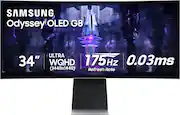
After an extensive comparison with its rivals, the Samsung Odyssey OLED G8 34" stands out as the pinnacle of gaming monitors, offering a perfect blend of style and substance. Its sleek design not only elevates any gaming setup but also packs a punch with features like high-quality built-in speakers and a convenient 65W USB-C port. I personally bought the LG 45" UltraGear OLED, Alienware - AW3423DWF 34" OLED, and the Samsung Odyssey OLED G8 34" to compare all three models side-by-side. The Samsung Odyssey OLED G8 34" won and here's why. Design and Features: The G8's design is nothing short of elegant, fitting seamlessly into a professional environment while boasting features tailored for the ultimate gaming experience. Its surprise package? The remarkably good built-in speakers and the versatile USB-C port, a boon for MacBook users. Gaming Performance: Paired with an RTX 4080, the G8 offers an immersive gaming experience. The visuals are crisp, colors pop, and the overall performance is fluid, making every gaming session an event to look forward to. Pros: - Crisp, vibrant display - High-quality built-in speakers - Sleek, professional design Cons: - Clunky UI - Wobbly stand without a stable desk - Micro display ports could be a turnoff Final Verdict: This monitor is a beast in the gaming world, and at its sale price of $899.99, it's an absolute bargain. While it has its flaws, they are overshadowed by its performance and design. A solid 4/5 stars from me.
Posted by Thomas
- Rated 5 out of 5 stars
Great Monitor
Absolutely superb monitor. Incredible color, pretty sharp resolution, the refresh rate is amazing to have, and overall feels like a very premium, well made monitor, as it should be. I bought one of these to replace my previous set up of two 27 inch 1440p monitors, and seriously, ultra wide is the way to go. I do not miss the second screen at all. Even with the price tag in mind, this monitor is absolutely stellar and IS worth the money. I really only have 2 complaints about it, and honestly, with everything that it does correct, I look past them most of the time. My first (and much smaller) complaint is the stand. It’s just okay. Doesn’t feel super smooth to adjust, and the base in particular just feels a little cheap. Completely serviceable though, and as a person who doesn’t need to constantly change the height or angle of the monitor, doesn’t bother me much. The software, on the other hand… it’s just bad. I do not like the smart hub features, and I also do not like how basic the settings menu is. The settings I can adjust feel very limited, and for a monitor that is going to resonate well with enthusiasts, I don’t think this should be the case. Even with that, though, once I got everything to where I wanted it to be, this display blows everything else out of the water. Getting work done and multitasking open programs is amazing, and ultra wide gaming is just as good. Very easy recommendation for anyone who wants an ultra wide and cares about the picture quality of their display.
Posted by Jack
- Rated 5 out of 5 stars
Excellent display, poor port options
I recently purchased an open-box monitor in good condition from Best Buy. The display is excellent, with a crisp and vibrant image quality that exceeded my expectations. Watching content or working on this monitor is a pleasure due to the sharpness and color accuracy. However, I do have a couple of caveats to mention. First, the monitor's port options are limited to a mini DisplayPort and micro HDMI, which are quite rare and inconvenient. It would have been much more user-friendly to include standard HDMI or DisplayPort options. Regarding the open-box condition, while the monitor functions perfectly, there were a few cosmetic issues. I noticed some scratches on the back and a bit of sticky residue on the display itself. Fortunately, these haven't affected the monitor's performance.
Posted by Verkent
- Rated 5 out of 5 stars
Happy gamer
Samsung Odyssey G8 Review: Gaming Excellence Redefined The Samsung Odyssey G8 stands out as a premium gaming monitor, blending top-tier performance with cutting-edge design. Design and Build: The monitor’s sleek, futuristic design is complemented by a robust build quality. The curved display provides an immersive viewing experience, drawing you deeper into your games. Display Quality: Featuring a QHD resolution and a high refresh rate, the Odyssey G8 delivers sharp, vibrant visuals. The color accuracy and contrast are exceptional, enhancing both gameplay and multimedia experiences. Performance: With a rapid response time and support for adaptive sync technologies like G-Sync and FreeSync, the Odyssey G8 ensures smooth, tear-free gaming. It handles fast-paced action effortlessly, making it perfect for competitive gaming. Features: The monitor boasts a variety of connectivity options, including HDMI, DisplayPort, and USB ports, making it versatile for multiple devices. The user-friendly on-screen display allows for easy adjustments to settings.
Posted by HoChief
- Rated 5 out of 5 stars
Beautiful QDOLED display. Amazing Gaming Monitor.
This is a beautiful display. It's QD-OLED, what do you expect. Whatever great things you ve heard about it, it's true. Colors are bright and fantastic, and blacks are true blacks. I so far haven't noticed any color fringing issues with texts yet. I bought it to play games on and to watch videos so your mileage may vary, but I honestly don't see any at all. I did have the same issue as some others have had with the monitor waking up and needing to hard reset my pc but (fingers crossed), I suddenly stopped having that issue for a few days now where it would happen consistently if the pc went into standby mode. Silent background update? Who knows. I am on the latest firmware which is relatively painless. You can download the latest firmware through the monitor menus. The G8 hasn't been headache free but it's a brand new product, there's bound to be some early adopter troubles. If that worries you, then wait a little bit while Samsung irons out the oddities... but with a pretty basic pc knowledge, it's been great. Previous daily driver was a 240hz IPS gaming monitor (AW2518H) and haven't noticed any frame rate differences between 240 vs 175 when gaming (CS and OW). Only time I'll notice a difference is the mouse cursor smoothness on the desktop lol. The near instant latency probably helps a lot with that.
Posted by JonathanC