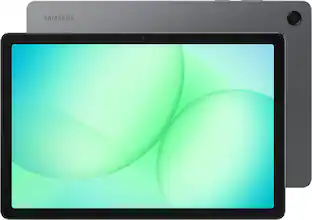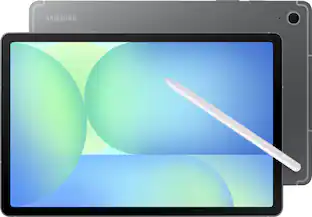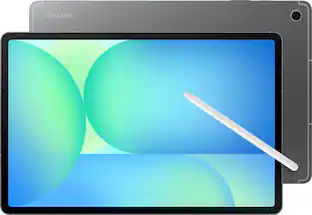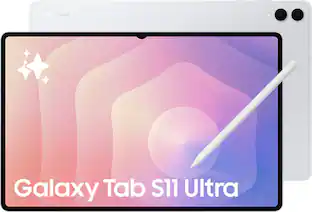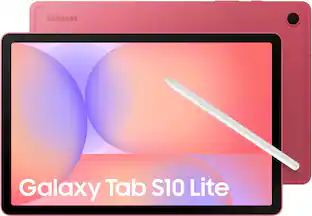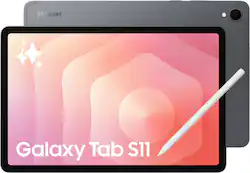
Samsung - Galaxy Tab S11 - 11" 512GB - Wi-Fi -with S-Pen - Gray
- Key Specs
- Screen Size: 11 inches (Size of the screen, measured diagonally from corner to corner.)
- Screen Resolution: 2560 x 1600 (Screens come in a range of resolutions (measured in pixels, horizontal x vertical). The higher the resolution, the greater the picture quality.)
- Processor Model: MediaTek Dimensity 9400+ (Your computer's processor is like its brain. Working in combination with system memory, the power of the processor determines the complexity of software you can run, how many programs you can have open at the same time, and how fast those programs will run. Most computers feature an AMD, Intel or Snapdragon processor.)
- Total Storage Capacity: 512 gigabytes
- Operating System: Android 16 (The operating system manages all software and hardware, including files, memory and connected devices. Most importantly, it lets you interact with your device and your programs in a visual way; otherwise, you'd be typing computer code to get anything done.)
- Voice Assistant Built-in: Bixby (A digital assistant built into the device that uses voice commands to answer questions and control smart devices.)
- Works With: Amazon Alexa, Arlo, Hue, Nest, Ring, SmartThings, Wink (Compatible with or able to be connected to other smart devices or applications.)
- Wireless Connectivity: Bluetooth, Wi-Fi (The manner in which a device sends data to another device over a short distance without the use of wires or cables.)
- Battery Chemistry: Lithium-ion
- 2-in-1 Design: false (A laptop and a tablet combined in one lightweight, portable device. Sometimes referred to as "convertible" or "hybrid" laptops, these devices deliver the processing power and keyboard of a laptop. When you're ready to play, either detach the screen or fold your 2-in-1 into tablet mode to comfortably watch movies, play games, read an e-book and more.)
- Security Features: Facial recognition, Fingerprint reader
- General
- Brand: Samsung
- Model Number: SM-X730NZAIXAR
- Product Name: Galaxy Tab S11 - 11" 512GB - Wi-Fi -with S-Pen
- Color: Gray
- Model Family: Samsung Galaxy Tab S11
- Year of Release: 2025
- Display
- Display Type: OLED
- Screen Type: AMOLED
- Screen Size: 11 inches (Size of the screen, measured diagonally from corner to corner.)
- Screen Resolution: 2560 x 1600 (Screens come in a range of resolutions (measured in pixels, horizontal x vertical). The higher the resolution, the greater the picture quality.)
- High Dynamic Range (HDR): false (An HDR-compatible 4K TV or other HDR-compatible product displays HDR video content when it's available from sources like 4K Ultra HD Blu-ray Discs and 4K streaming services.)
- Processor
- Processor Brand: MediaTek
- Processor Model: MediaTek Dimensity 9400+ (Your computer's processor is like its brain. Working in combination with system memory, the power of the processor determines the complexity of software you can run, how many programs you can have open at the same time, and how fast those programs will run. Most computers feature an AMD, Intel or Snapdragon processor.)
- Processor Model Number: 9400+
- Storage
- Total Storage Capacity: 512 gigabytes
- Memory
- System Memory (RAM): 12 gigabytes (Random-access memory (RAM) is a computing device's short-term data storage, which allows active information to be accessed quickly. The size and type of RAM determines how efficiently the device can handle large amounts of information at one time. For example, gaming or video editing requires more RAM for optimal performance.)
- Expandable Memory Compatibility: microSD
- Compatibility
- Operating System: Android 16 (The operating system manages all software and hardware, including files, memory and connected devices. Most importantly, it lets you interact with your device and your programs in a visual way; otherwise, you'd be typing computer code to get anything done.)
- Operating System Compatibility: Android
- Voice Assistant Built-in: Bixby (A digital assistant built into the device that uses voice commands to answer questions and control smart devices.)
- Works With: Amazon Alexa, Arlo, Hue, Nest, Ring, SmartThings, Wink (Compatible with or able to be connected to other smart devices or applications.)
- Connectivity
- Wireless Connectivity: Bluetooth, Wi-Fi (The manner in which a device sends data to another device over a short distance without the use of wires or cables.)
- Bluetooth Version: 5.4 (The Bluetooth specification formalized by the Bluetooth Special Interest Group. All versions of the Bluetooth standard are backwards compatible with previous versions.)
- USB Ports: 1 x USB-C 2.0 (The number and type of USB ports the product has.)
- Interface(s): USB-C (Refers to the types of connections that devices use to interact and communicate with each other.)
- Number of USB Ports (Total): 1
- Number of USB-C Charging Ports: 1
- Data Plan Required: false
- Power
- Charging Interface(s): USB-C (The connection for transmitting power to charge the device.)
- Battery Life (up to): 16 hours (Battery life will vary depending on the product configuration, product model, applications loaded on the product, power management setting of the product and the product features used by the customer. As with all batteries, the maximum capacity of this battery will decrease with time and usage.)
- Battery Capacity: 8400 milliampere hours (The amount of energy stored in the battery.)
- Battery Chemistry: Lithium-ion
- Camera
- Front-Facing Camera: true
- Front Facing Camera Megapixels: 12 megapixels (The more megapixels, the more detail that the camera facing the user can capture.)
- Rear-Facing Camera: true
- Rear Facing Camera Megapixels: 13 megapixels (The more megapixels, the more detail that the camera facing away from the user can capture.)
- Built-In Microphone: true
- Features
- 2-in-1 Design: false (A laptop and a tablet combined in one lightweight, portable device. Sometimes referred to as "convertible" or "hybrid" laptops, these devices deliver the processing power and keyboard of a laptop. When you're ready to play, either detach the screen or fold your 2-in-1 into tablet mode to comfortably watch movies, play games, read an e-book and more.)
- Keyboard Included: false
- Security Features: Facial recognition, Fingerprint reader
- Dimensions
- Product Height: 6.51 inches (The out of box height of the item. Height is measured as the vertical distance from the bottom of the item to the top as it would be primarily used or placed.)
- Product Width: 9.99 inches (The out of box width of the item. Width is measured as the horizontal distance from one side of the item to the other as it would be primarily used or placed.)
- Product Depth: 0.22 inches (The out of box depth of the item. Depth is measured as the distance from the front of the item to the back as it would be primarily used or placed.)
- Product Weight: 16.96 ounces (The out of box weight of the item.)
- Certifications Listings & Approvals
- ENERGY STAR Certified: true (Devices carrying the ENERGY STAR service mark, such as computer products and peripherals, kitchen appliances, and other products, generally use 20% to 30% less energy than required by federal standards.)
- Included
- Stylus Included: true
- Warranty
- Warranty - Parts: 1 year
- Warranty - Labor: 1 year
- Other
- UPC: 198957230165
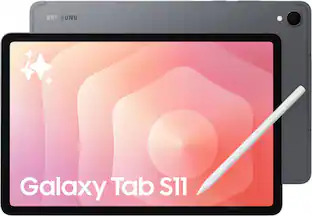
Power up your productivity with Galaxy Tab S11. With an incredible crisp display, uncompromising power, impressive durability and supersmart AI, Tab S11 takes your everyday efficiency to a whole new level. Wherever your day takes you, Tab S11 is built to be your powerful partner on the go. From touching up photos from your weekend with family to creating videos for your business, the brilliant 11” display and powerful performance of Tab S11 help you maximize what you can do, and without worry. With an IP68 durability rating, you can keep checking off your to do list confidently from virtually anywhere. The incredible Dynamic AMOLED 2X screen, surrounded by ultra slim bezels, gives you ample surface area to work and play without wasted screen space. Throughout your day, you can turn to your personal assistant with Galaxy AI to keep your notes, photos, schedule and more organized. Galaxy Tab S11 is more than your typical tablet it’s powerful and portable productivity, made smarter with AI.
- Slim design. Serious power.: At just 5.5mm thin, this sleek tablet delivers uncompromising power and productivity in a portable profile that slips easily into your backpack and it is ready to go wherever your busy day takes you.
- Brighter¹ for better visibility: Galaxy Tab S11 puts brilliance on display. With a 11” screen ² you get all the crystal clear space needed for maximum productivity. The Dynamic AMOLED 2X display is simply crisp and captivating. Plus, Vision Booster automatically adjusts brightness and contrast so you see it all clearly, even outdoors.
- Snappier multitasking, smoother workflows: Built to be your work and play powerhouse, Galaxy Tab S11 has a 3nm MediaTek processor that can handle multitasking with ease, whether you are streaming in 4K on the couch or powering through projects on the go.
- Stands up to the unexpected: Wherever your day takes you, your Galaxy Tab S11 won’t let a little water or dust hold you back. With an IP68 durability rating,³ it’s made to stand up to the unexpected, even 1.5 meters of fresh water, so you can work and play fearlessly.
- You note it. Galaxy Tab S11 Series organizes it: Capture ideas in meetings or brainstorming and skip the cleanup. Note Assist⁴ on Galaxy Tab S11 summarizes and formats them with Galaxy AI, ⁵ keeping everything neatly organized so you can find what you need in seconds.
- Hand drawn sketches to professional mock ups: Have an idea in mind but not the artistic skills to match? Just sketch it out on the large display of your Galaxy Tab S11 and let Drawing Assist ⁶ transform it into a polished creation.
- See it, share it and get streamlined assistance: Gemini Live does not just help you based on what it hears, but also on what it sees. ⁷ Planning a trip? Open Gemini Live, share your travel itinerary or point your camera at a map and get personalized recommendations for where to stay, eat and explore.
- Improved shape. More precision.: While Galaxy Tab S11 is redefining the way that you work and play, the improved S Pen is just an extension of that productivity and creativity. The hexagonal and cone shaped S Pen creates a natural writing experience on your tablet’s expansive screen so you can write, draw and create freely.
- Power that keeps going: From streaming your favorite series to tackling a long day of creative projects, with Galaxy Tab S11 you can enjoy up to 18 hours of power 1 to keep you going day to night.⁸
- Tap into AI: Easily tap into the AI assistance you need without interrupting your productivity. The AI Hot Key⁹ on Galaxy Tab S11 gives you quick access to Google Gemini ¹⁰ so you can get the answers, summaries, translations or creative help you need to manage a smarter workflow without missing a beat.
- Your Galaxy connected, your way: When you’re juggling a busy life, having your Tab seamlessly connected is a game changer. Copy presentations or videos from your phone to your Galaxy Tab S11 seamlessly. ¹¹ Need a bigger screen? Wirelessly add a second device to get a better view ¹² of your latest project. The Galaxy Connected Experience makes it easy to connect your devices your way.
Whats Included
- S-Pen
- Data Cable
- Ejection Pin
- Quick Start Guide
Disclaimers
- ¹Compared to Galaxy Tab S10 Series.
- ²Measured diagonally, the Galaxy Tab S11 screen size is 11" in the full rectangle and 10.9" accounting for the rounded corners. Actual viewable area is less due to the rounded corners.
- ³Consistent with IP68 rating, water resistant in up to 5 feet of water for up to 30 minutes. Rinse residue / dry after
- ⁴For text in Samsung Notes only (200 4,000 characters); requires Samsung account login and internet connection.
- ⁵Galaxy AI basic features provided by Samsung are free. Any Samsung enhanced AI features and all third-party AI features are subject to different terms and may be subject to fees. (Galaxy AI basic features are listed under "Advanced Intelligence" in Samsung Services Terms and Conditions.)
- ⁶Drawing Assist feature requires a network connection and Samsung account login. A visible watermark is overlaid on the image output upon saving in order to indicate that the image is generated by AI. The accuracy and reliability of the generated output is not guaranteed.
- ⁷Results for illustrative purposes and may vary. Check responses for accuracy. Compatible with certain features and with certain accounts. Internet connection required. Available on select devices, languages, and countries. Only available to users 18 years and older.
- ⁸Based on local, 720p resolution video playback, default video player (full screen), 162 nit brightness, earbud volume 7, Wi Fi and mobile network off. Results vary with settings, usage and other factors.
- ⁹AI Key function requires Samsung Book Cover Keyboard / AI Key or Samsung Book Cover Keyboard Slim / AI Key (sold separately).
- ¹⁰Results for illustrative purposes and may vary. Check responses for accuracy. Compatible with certain features and with certain accounts. Internet connection required. Available on select devices, languages, and countries. Only available to users 18 years and older.
- ¹Requires compatible Galaxy smartphones with Android 13, One UI 5.1.1 or later, with same Samsung account and Wi Fi network.
- ¹²Compatible with Galaxy S Series tablets running One UI 3.1 or later and select PCs with Wireless Display. Devices should be connected to the same Wi Fi network .
Q: Is a microphone built into this tablet?
A: Yes, this tablet has a built-in microphone.
Q: Can the storage capacity of this tablet be expanded?
A: Yes, the storage capacity can be expanded using a microSD card.
Q: Does this tablet come with a stylus?
A: Yes, this tablet comes with a stylus included.
Q: How many megapixels does the front-facing camera have?
A: The front-facing camera has 12 megapixels.
Q: How much system memory does this tablet have?
A: This tablet has 12 gigabytes of system memory.
Q: What is the capacity of the battery in this tablet?
A: The battery capacity is 8400 milliampere hours.
Q: Is facial recognition available on this tablet?
A: Yes, facial recognition is a security feature on this tablet.
Q: can i run microsoft office products like word excel and powerpoint?
A: Hey there Dude, thank you for taking the time to ask us your question about the Samsung Galaxy Tab S11. Yes, you can run Microsoft Office products (Word, Excel, PowerPoint) on the Galaxy Tab S11 series. You can download the native Android apps from the Google Play Store or Galaxy Store, and utilize Samsung DeX for a desktop-like experience. While basic viewing is free, editing requires a Microsoft 365 subscription. If you have any other questions for us or if you would like further assistance, please feel free to reach out to Support at your leisure. Thanks for choosing Samsung! - Debra