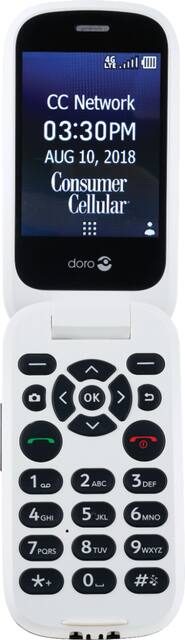
Unbranded - 7050 with 512MB Memory Cell Phone (Consumer Cellular)
- Key Specs
- Screen Size: 2.8 inches (Size of the screen, measured diagonally from corner to corner.)
- Built-in Storage: 0.51 gigabytes
- General
- Product Name: 7050 with 512MB Memory Cell Phone
- Brand: Unbranded
- Model Number: DORO 7050 BLACK
- Display
- Screen Size: 2.8 inches (Size of the screen, measured diagonally from corner to corner.)
- Network
- Carrier: Consumer Cellular
- Unlocked: false (Can be used with any carrier, typically by exchanging the phone's SIM card with another one compatible for the intended area of service. Can be used with a new or existing cellular service plan.)
- Connectivity
- Headphone Jack: true (The device features an interface that allows for the connection of headphones.)
- Compatibility
- Charging Interface(s): Micro-USB (The connection for transmitting power to charge the device.)
- SIM Card Slots: Single SIM
- Features
- Model Family: Doro 7050
- Usage Time(s): Standby: up to 400 hrs (All battery claims depend on network configuration and many other factors; actual results will vary. Battery has limited recharge cycles and may eventually need to be replaced. Battery life and charge cycles vary by use and settings.)
- Built-in Storage: 0.51 gigabytes
- Performance
- Operating System: KaiOS (The operating system manages all software and hardware, including files, memory and connected devices. Most importantly, it lets you interact with your device and your programs in a visual way; otherwise, you'd be typing computer code to get anything done.)
- Other
- UPC: 855785008020
Simplify daily communication with this black Doro flip phone for Consumer Cellular. It has a built-in calendar and contact book to help you stay organized, while its video and music players keep you entertained. This Doro flip phone has large keys that are easy to see to make dialing hassle-free.
- 4G LTE speed: Provides fast Web connection for downloading apps, streaming content and staying connected with social media.
- LCD display: Offers a clear view of content.
- 2.0MP rear-facing camera: Enjoy taking photos for social media or just for everyday memories.
- 512MB internal memory plus microSD slot: Provides a small amount of storage space for your contacts, music, apps and photos. Expand storage up to 64GB by adding a microSD card (sold separately).
Whats Included
- Doro 7050 with 512MB Memory Cell Phone
- Power adapter
Q: Dora 7050 phone how do I change the ring time for incoming calls?
A: THIS WORKS ONLY IF YOU ARE A CONSUMER CELLULAR CUSTOMER. I called Consumer Cellular, with whom I have my 'phone service for my Doro 7050. To extend the ring time to 30 seconds, I was told to type in this entire number, and then press "call" or "enter", and it would extend my ring time to 30 seconds: * * 61* 502 758 3001 **30# Then turn off your 'phone and turn it back on, again, and your ring time should be 30 seconds. I was also told that--sometimes--the above doesn't work for whatever reason, in which case I should call Consumer Cellular again, and ask them to change my ring time to 30 seconds manually (which will take 24-48 hours to take affect). After 24 or 48 hours, be sure to turn off your 'phone and then turn it back on.
A: I have called several times about this problem, but have not gotten a satisfactory solution. I've been told to update the software or shock the system by removing, then replacing the battery. Nothing works--I'm convinced that some of the phones are lemons.
Q: Can you hang up a call by closing the lid? Or do you have to press the power button to hang up?
A: I THINK MY HUSBAND JUST CLOSES IT
A: We have suffered through a half-dozen doro 7050's. We continue to use it because it is the only one I have found with a strong contrast of a white background and black buttons for our very sight-challenged father. It is amazing that manufacturers of sight-impaired phones don't realize this. At least monthly the problem of the phone just not making or receiving calls comes up. We have found that simply removing the battery for a minute and replacing and restarting usually does the trick. Kind of like the old ctrl-alt-delete for computers....Good luck.
Q: Can this phone block calls?
A: Yes
Q: When I call my Mother most of the time it goes straight to voice mail not even ringing, why???
A: Was having the same problem with my mom. Found out she had the volume turned down where she couldn't hear it ring because she was accidentally gripping the volume down button on the side. Trying to figure out a way around this.......
A: As far as I know, the phone does not permit voice commands. However, it is Bluetooth capable, so if it is connected to a Bluetooth device and the phone's contact list contains the phone numbers your parents wish to call, then it can be voice activated.
Q: Can I keep my phone number through t-mobile.
A: Call consumer cellular 888.345.5509 CC gives you a SIM card. Most people can transfer their existing cellphone number to Consumer Cellular. It depends on where you live and your old service provider. Follow these guidelines for a successful transfer: Do not cancel your number with your old service provider. Your phone number must remain active during the transfer process. Once the number is transferred to Consumer Cellular, it should automatically be disconnected by your old service provider. Once the transfer is complete and you are receiving calls to your Consumer Cellular phone, you may want to call them to confirm cancellation. If the number is in a contract, you may be charged an early termination fee by your old service provider. When you set up your Consumer Cellular account, you will need to have all of the account information for your old service provider, including the account number, account holder’s name, billing address, and any password or PIN on the old account. You may want to have an old invoice with you when you set up your new account.