
Apple - Magic Keyboard for iPad Pro 13‑inch (M5) - White
Apple - Magic Keyboard for iPad Pro 13‑inch (M5) - White
Color
White- Apple - Pencil Pro - White$99.00The price was $129.00

More Buying Options
About This Item
- Key Specs
- Model Compatibility: Apple iPad Pro (M5) 13" 2025, Apple iPad Pro (M4) 13" 2024
- Operating System Compatibility: Apple iPadOS
- Interface(s): USB (Refers to the types of connections that devices use to interact and communicate with each other.)
- General
- Brand: Apple
- Model Number: MWR43LL/A
- Product Name: Magic Keyboard for iPad Pro 13‑inch (M5)
- Color: White
- Material: Aluminum
- Compatibility
- Brand Compatibility: Apple
- Model Compatibility: Apple iPad Pro (M5) 13" 2025, Apple iPad Pro (M4) 13" 2024
- Operating System Compatibility: Apple iPadOS
- Maximum Compatible Display Size: 13 inches
- Connectivity
- Wireless: false
- Number of USB Port(s): 1
- Interface(s): USB (Refers to the types of connections that devices use to interact and communicate with each other.)
- Features
- Touchpad: true
- Adjustable Tilt: true
- Included
- Number Of Keys: 78
- Palm Rest Included: false (null)
- Dimensions
- Product Height: 1 inches (The out of box height of the item. Height is measured as the vertical distance from the bottom of the item to the top as it would be primarily used or placed.)
- Product Width: 9.6 inches (The out of box width of the item. Width is measured as the horizontal distance from one side of the item to the other as it would be primarily used or placed.)
- Product Depth: 11.9 inches (The out of box depth of the item. Depth is measured as the distance from the front of the item to the back as it would be primarily used or placed.)
- Product Weight: 2.3 ounces (The out of box weight of the item.)
- Warranty
- Warranty - Parts: Apple One (1) Year Limited Warranty
- Warranty - Labor: Apple One (1) Year Limited Warranty
- Other
- UPC: 195949483783
Magic Keyboard for iPad Pro delivers an amazing typing and trackpad experience in a sleek, portable design. The keyboard includes at 14-key function row, a USB-C connector for pass-through charging, and front and back protection for your iPad. The floating cantilever design smoothly adjusts to multiple viewing angles. A large glass trackpad delivers haptic feedback for precision-based workflows and Multi-Touch gestures.
Whats Included
- Apple Magic Keyboard for iPad Pro 13‑inch (M5)
- Apple Magic Keyboard for iPad Pro 13‑inch (M5)
Q: Does this one have a backlit keyboard yet?
A: To Pryzm's response: You can manually adjust the keyboard brightness using Control Center (and using screen brightness keys on the new Magic Keyboard). The keys CAN be backlit during the day.
Q: is there a place for apple pen storage?
A: The apple pen simply sits on the top side of the ipad when it is on the magic keyboard
Q: how do I pair my new magic keyboard to my new ipad pro
A: No pairing is necessary - you simply attach the iPad Pro with the magnetic hold and the keyboard just works. You can't use the keyboard without the iPad Pro being attached.
Q: Will it work with iPad Pro 12.9’
A: No, this will not work for the previous generation iPad Pro
Q: What's the weight compared to the older magic keyboard for the 12.9 iPad?
A: Weight 2.3 Lbs
Q: What are the dimensions and weight of the Magic Keyboard pro 13 inch?
A: Weight 2.3 Lbs Length 11.95 inches Height 0.98 inches Width 9.57 inches
Q: Does this include a screen protector?
A: If you mean a separate piece that goes over the screen, no. The screen folds down onto the keyboard while not in use. It is therefore protected at that time.
Reviews
Customer Images
The vast majority of our reviews come from verified purchases. Reviews from customers may include My Best Buy members, employees, and Tech Insider Network members (as tagged). Select reviewers may receive discounted products, promotional considerations or entries into drawings for honest, helpful reviews.
Compare similar products
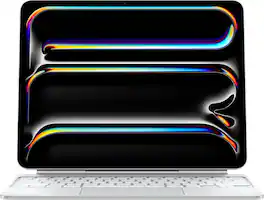
Magic Keyboard for iPad Pro delivers an amazing typing and trackpad experience in a sleek, portable design. The keyboard includes at 14-key function row, a USB-C connector for pass-through charging, and front and back protection for your iPad. The floating cantilever design smoothly adjusts to multiple viewing angles. A large glass trackpad delivers haptic feedback for precision-based workflows and Multi-Touch gestures.
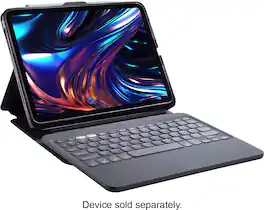
The Pro Keys 2 keyboard and case transforms your iPad into an efficient workstation so you can be productive wherever you go. Its laptop-style keys have been shaped and crafted for fast, easy typing. Pro Keys 2 has a detachable keyboard, multi-pairing capabilities, an adjustable stand and folio cover, backlit keys for lowlight conditions, and more. Pro Keys 2 is your work-from-anywhere, keyboard/case solution for your iPad.
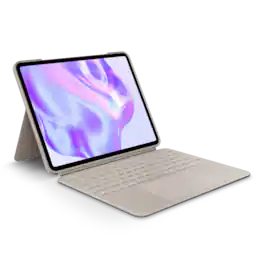
Type, sketch, view and read with the Combo Touch keyboard case. A flexible kickstand and a full-size, detachable keyboard give you multiple use modes for any task. Take iPad further with a bigger trackpad that gives you superior, intuitive tracking experience with familiar Multi-Touch gesture controls.

The Smart Folio for iPad Pro is thin and light and offers front and back protection for your device. It automatically wakes your iPad Pro when opened and puts it to sleep when closed. The Smart Folio attaches magnetically, with a new sliding design for greater adjustability to make reading, watching videos, and making FaceTime calls even more comfortable and immersive. The Smart Folio works with Apple iPad Pro (M5) 13" 2025.
| Pros for Apple - Magic Keyboard for iPad Pro 13‑inch (M5) - White | |||
|---|---|---|---|
| Keyboard Quality, Ease of use, Weight, Design, Battery Life | There were no pros for this product— | Keyboard Quality, Protection, Ease of use, Fit, Kickstand | Fit, Protection, Weight, Quality |
| Cons for Apple - Magic Keyboard for iPad Pro 13‑inch (M5) - White | |||
| Price, Stability, Hinge | There were no cons for this product— | Price, Weight, Case Material | There were no cons for this product— |