
Belkin - Thunderbolt 3 Dock Pro w/ Thunderbolt 3 Cable, Dual 4K @60Hz, 85W Upstream Charging - Docking Station - Aluminum
About This Item
- Key Specs
- Maximum Number of Displays Supported: 2
- Maximum Supported Resolution: 4K (2160p)
- Number of DisplayPort Outputs (Total): 1
- Number of Thunderbolt Ports (Total): 2
- Passthrough Power: false (Indicates whether the device allows power to passthrough, possibly with some loss, to another device, typically to charge that other device.)
- General
- Brand: Belkin
- Model Number: F4U097TT
- Product Name: Thunderbolt 3 Dock Pro w/ Thunderbolt 3 Cable, Dual 4K @60Hz, 85W Upstream Charging - Docking Station
- Color: Aluminum
- Display
- Maximum Number of Displays Supported: 2
- Maximum Supported Resolution: 4K (2160p)
- Maximum Supported Refresh Rate: 30Hz (The number of frames per second the device can support, expressed as a frequency. Higher rates help produce smooth, seamless pictures.)
- Ports
- Display Connector(s): 1 x DisplayPort, 3 x HDMI, 2 x Thunderbolt (The number and type of connectors used to connect to an external display.)
- Number of DisplayPort Outputs (Total): 1
- Number of HDMI Ports (Total): 3
- Number of Thunderbolt Ports (Total): 2
- Number of VGA Ports: 0 (VGA (Video Graphics Adapter or Video Graphics Array) is a display standard that transmits via analog signals. This type of interface is typically used to connect a computer to a display device such as a monitor, projector, or TV.)
- Number Of Ethernet Ports: 1
- Number of USB Ports (Total): 6
- USB Ports: 4 x USB-A 3.0, 1 x USB-A 3.1 (The number and type of USB ports the product has.)
- Headphone Jack: true (The device features an interface that allows for the connection of headphones.)
- Microphone Input: true (The device features an input for connecting an external microphone.)
- Memory Card Slot: true
- Memory Card Type: Secure Digital Extended Capacity (SDXC), Secure Digital High Capacity (SDHC)
- Power
- Powered: true
- Power Supply Included: false
- Power Supply Input: USB Type C
- Maximum Input Power: 85 watts (The maximum amount of power allowed to come into the device.)
- Passthrough Power: false (Indicates whether the device allows power to passthrough, possibly with some loss, to another device, typically to charge that other device.)
- Compatibility
- Maximum Data Speed: 40 megabits per second
- Brand Compatibility: Universal
- Model Compatibility: Universal
- Features
- Material: Aluminum
- Dimensions
- Product Height: 1.02 inches (The out of box height of the item. Height is measured as the vertical distance from the bottom of the item to the top as it would be primarily used or placed.)
- Product Length: 3.19 inches (The out of box length of the item. Length is measured as the longest dimension of the item.)
- Product Width: 7.87 inches (The out of box width of the item. Width is measured as the horizontal distance from one side of the item to the other as it would be primarily used or placed.)
- Product Weight: 14.89 ounces (The out of box weight of the item.)
- Other
- UPC: 745883779321
Connect multiple peripherals to your laptop with this Belkin Thunderbolt 3 Dock Pro docking station. The SD card slot offers easy access to mass storage devices, while the DisplayPort output lets you connect a UHD monitor for crisp, detailed visuals. This Belkin Thunderbolt 3 Dock Pro docking station has an Ethernet port for seamless connection to Internet networks.
- Designed for both Windows and Mac laptops: Brings benefits of Thunderbolt 3 technology and lets you connect all your peripheral devices.
- Dual displays compatible: Connect up to two displays with DisplayPort and Thunderbolt 3 port easy and fast.
- Thunderbolt 3 cable included: Allows you to charge the laptop with a power up to 85W without a separate power cable.
- USB-C compatible: Designed to work without a Thunderbolt port too.
- Five USB ports: Features one USB Type-A 3.1 Gen 2 port on front besides two USB Type-A 3.1 Gen 1 and two USB Type-C 3.1 Gen 2 ports at the back.
- High-definition dual-monitor support: 4K at 60Hz with dual monitors and 8K at 30Hz with a single monitor setup through Thunderbolt 3 port.
- Gigabit Ethernet connection: Provides up to 40 Gbps transfer rates.
- Minimalist exterior: The aluminum casing provides a sturdy and durable construction and stylish design.
- Designed for both Windows and Mac laptops: Brings benefits of Thunderbolt 3 technology and lets you connect all your peripheral devices.
- Dual displays compatible: Connect up to two displays with DisplayPort and Thunderbolt 3 port easy and fast.
- Thunderbolt 3 cable included: Allows you to charge the laptop with a power up to 85W without a separate power cable.
- USB-C compatible: Designed to work without a Thunderbolt port too.
- Five USB ports: Features one USB Type-A 3.1 Gen 2 port on front besides two USB Type-A 3.1 Gen 1 and two USB Type-C 3.1 Gen 2 ports at the back.
- High-definition dual-monitor support: 4K at 60Hz with dual monitors and 8K at 30Hz with a single monitor setup through Thunderbolt 3 port.
- Gigabit Ethernet connection: Provides up to 40 Gbps transfer rates.
- Minimalist exterior: The aluminum casing provides a sturdy and durable construction and stylish design.
Whats Included
- Belkin Thunderbolt 3 Dock Pro Docking Station
- Thunderbolt 3 cable
- Owner's manual
- Belkin Thunderbolt 3 Dock Pro Docking Station
- Thunderbolt 3 cable
- Owner's manual
A: Hi, Jesse! The Belkin F4U097 should be connected directly to a Thunderbolt 3 port on your computer. It may work with your setup, but the bandwidth and functionality could be limited. We don't recommend using any TB2 to TB3 Adapter on our Docks.
A: Yes, jdaley33. The Belkin Thunderbolt 3 Dock Pro, F4U097 is a multi-port dock that delivers top speeds, pixels and power in a single docking solution to turn a Windows or Mac computer into a powerful workstation with a single Thunderbolt 3 cable.
Q: Will this work with a DELL 5520 laptop?
A: Hi, Usafsniper308. The Belkin F4U097TT has not been tested to work with a DELL 5520 laptop but it has been tested to be compatible with the following operating systems: • Windows 8 • Windows 10 • macOS 10.12 Sierra • macOS 10.13 High Sierra • macOS 10.14 Mojave
A: Hi, Philip. The Belkin F4U097 supports the following: Single monitor: 5K at 60 Hz Dual monitors: 4K at 60 Hz It should work fine as long as the above-mentioned resolutions are supported.
Q: will this charge a hp spectre x360 laptop? does it come with it's own power cord?
A: Hi. The Belkin Thunderbolt 3 Dock Pro includes an AC adapter, and it can charge your laptop up to 85W using the Thunderbolt 3 port marked with a computer icon.
Q: Will this power two external monitors or do they still need to be plugged in on their own?
A: Hi Jax. The monitors still need to be plugged into a wall outlet when connected to the Belkin F4U097 dock.
Q: Can this docking station be used with an HP desktop (not laptop) computer?
A: Hi, TechNovice1984. You can use its DisplayPort™ to connect to a high-resolution monitor for external display. However, the host should be a USB-C laptop.
Q: Can this docking station run a 5k monitor? Or would it downgrade to 4k resolution ?
A: Hi there. The resolution will vary depending on the capabilities of the laptop and monitor that are connected to the Belkin F4U097. For a single monitor and Thunderbolt 3 laptop setup, the maximum resolution is 8K. For more details, you can check this link: https://www.belkin.com/us/p/P-F4U097/.
Reviews
Customer Images
The vast majority of our reviews come from verified purchases. Reviews from customers may include My Best Buy members, employees, and Tech Insider Network members (as tagged). Select reviewers may receive discounted products, promotional considerations or entries into drawings for honest, helpful reviews.
Compare similar products
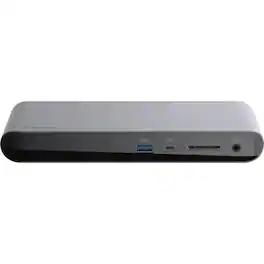
Connect multiple peripherals to your laptop with this Belkin Thunderbolt 3 Dock Pro docking station. The SD card slot offers easy access to mass storage devices, while the DisplayPort output lets you connect a UHD monitor for crisp, detailed visuals. This Belkin Thunderbolt 3 Dock Pro docking station has an Ethernet port for seamless connection to Internet networks.
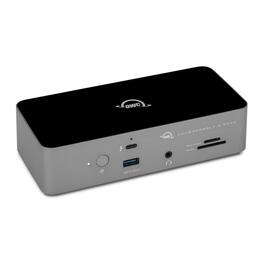
Whether you’re a tech enthusiast or creator working on your latest masterpiece, the Thunderbolt 5 Dock is the perfect all-in-one solution to streamline your setup and maximize your productivity. With the unrivaled speed of Thunderbolt 5, you’ll transfer data faster and gain more time for creating, editing, and producing. You’ll also unleash the full potential of everything you connect — from legacy devices to the latest Thunderbolt 5 SSDs — all while using just one Thunderbolt port on your Mac, iPad, PC, Chromebook, or tablet. Seamlessly connect a myriad of devices — memory cards, NAS storage, Thunderbolt and DisplayPort displays, desktop peripherals and more — with universal USB/USB-C compatibility. Experience sharper, smoother visuals on up to three 8K displays. With 11 versatile ports to boost your multitasking efficiency, you’ll do everything faster and easier, keep your workspace tidy, and keep your notebook charged with up to 140W of power.
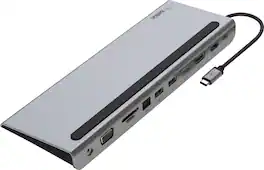
Turn your USB-C laptop into the ultimate workstation with this Belkin Laptop Dock. This all-in-one solution gives you access to ports that newer mac and PC laptops have eliminated in recent years, allowing you to connect to monitors, SD cards, thumb drives, and more through its USB C port. This Belkin USB-C Hub supports pass-through charging up to 100W so you don’t have to choose between port expansion and power. Gain up to 5 Gbps of bandwidth between connected devices, for quick data transfer between computer and peripheral devices. This computer docking station also supports high-definition display resolutions up to 4K through HDMI, DisplayPort, and VGA video ports. Plus, this docking station acts as an ethernet hub, with a 1 Gb Ethernet port, you’ll always have a safe and secure internet connection for gaming, streaming, video calls and more. Get all of the connections you need with this 11-in-1 USB C Hub. Included ports: 4K HDMI 1.4, 4K DisplayPort 1.2, VGA, 1x USB-C PD 3.0, 2x USB-A 3.0, 1x USB-A 2.0, 1x Ethernet, SD 3.0 card reader, MicroSD 3.0, and 3.5mm audio in/out. This product is compatible with the iPhone 17, 17 Pro Max and 17 Pro.

Universal docking for today's laptops. Connect your USB-C-enabled laptop to your displays, accessories, and wired network with the versatile, elegant, and space-saving HP USB-C Dock G5.
| Pros for Belkin - Thunderbolt 3 Dock Pro w/ Thunderbolt 3 Cable, Dual 4K @60Hz, 85W Upstream Charging - Docking Station - Aluminum | |||
|---|---|---|---|
| There were no pros for this product— | There were no pros for this product— | Overall Performance, Ease of use, HDMI, Ports, Compatibility | Overall Performance, Connectivity |
| Cons for Belkin - Thunderbolt 3 Dock Pro w/ Thunderbolt 3 Cable, Dual 4K @60Hz, 85W Upstream Charging - Docking Station - Aluminum | |||
| There were no cons for this product— | There were no cons for this product— | Cable Length, Power Supply, Price | There were no cons for this product— |