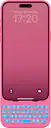
Clicks - Keyboard for Apple iPhone 15 Pro Max - Miami Beach
Color
Miami BeachAbout This Item
- Key Specs
- Brand Compatibility: Apple
- Model Compatibility: Apple iPhone 15 Pro Max
- Case Style: Keyboard
- Screen Protector: false
- Integrated Stand: false
- General
- Brand: Clicks
- Model Number: CK-5200-3
- Product Name: Keyboard for Apple iPhone 15 Pro Max
- Color: Miami Beach
- Compatibility
- Brand Compatibility: Apple
- Model Compatibility: Apple iPhone 15 Pro Max
- Features
- Case Style: Keyboard
- Screen Protector: false
- Integrated Stand: false
- Wireless Charging Compatible: Yes (Allows for wireless charging to pass through it. Some products do so by allowing power to flow through the material, while others may have a physical, proprietary method of doing so (ex. MagSafe).)
- Material: Polycarbonate, Faux leather
- Non-Slip Grip: false
- Belt Clip: false
- Dimensions
- Product Height: 0.47 inches (The out of box height of the item. Height is measured as the vertical distance from the bottom of the item to the top as it would be primarily used or placed.)
- Product Width: 3.15 inches (The out of box width of the item. Width is measured as the horizontal distance from one side of the item to the other as it would be primarily used or placed.)
- Product Depth: 8.03 inches (The out of box depth of the item. Depth is measured as the distance from the front of the item to the back as it would be primarily used or placed.)
- Product Weight: 0.5 ounces (The out of box weight of the item.)
- Warranty
- Warranty - Parts: 1 YEAR
- Warranty - Labor: 1 year
- Other
- UPC: 850063244015
Clicks extends the power of your iPhone with a physical keyboard. Use Clicks to free up your screen for content, tackle tasks on the go and take full control of your iPhone with keyboard shortcuts. By moving the keyboard off the screen, Clicks helps you gain up to 50% more display to immerse yourself in chats, browsing, live streaming and more. Real keys make typing feel natural so you can write long notes, edit documents, or take action on ideas, without having to wait to get back to your laptop or tablet. Use Clicks to access powerful iOS keyboard shortcuts for the first time on iPhone - just like on a Mac or iPad. Some popular iOS shortcuts include: Press CMD + H to quickly navigate to your home screen; Use CMD + Space to launch Spotlight search; Scroll through web pages with space bar. Clicks connects directly to iPhone so there's no battery to charge or Bluetooth connection.
- Precision tuned buttons: The perfect balance of click, resistance, and feedback for fast, accurate typing.
- Content First: Maximize your screen space for apps and content while you create with Clicks.
- Make Your Statement: Type with speed and precision on a keyboard built for feel and performance.
- Ultimate Control: Take action with access to iOS Shortcuts and voice input at the push of a button.
- Easy On and Off: Add a compact, lightweight keyboard when needed, or leave it on all the time - you decide!
- Unibody design: Fits snug and feels like a natural extension of your iPhone.
- Backlight: Toggle on the keyboard backlight for typing at night or in the dark.
- Pass through charging: Connect to iPhone with Lightning (iPhone 14, iPhone 14 Pro Max) or USB-C (iPhone 15, iPhone Pro, iPhone 15 Plus, iPhone 15 Pro Max)
- Wireless charging: Supports wireless charging.
Whats Included
- 1x Clicks for iPhone 15 Pro Max
- 1x Quick Start Guide
Product Manuals
Disclaimers
- Phone Not Included
Q: What is the keyboard's warranty period?
A: The warranty period for the keyboard's labor and parts is 1 year.
Q: Do the keys feel natural to type on?
A: Real keys make typing feel natural.
Q: What is the purpose of the keyboard?
A: Clicks extends the power of your iPhone by providing a physical keyboard, freeing up the screen for content and enabling efficient multitasking with keyboard shortcuts.
Q: How does the keyboard connect to the iPhone?
A: Clicks connects directly to the iPhone.
Q: Why is it beneficial to have a physical keyboard for an iPhone?
A: Clicks helps you gain up to 50% more display to immerse yourself in chats, browsing, live streaming, and more.
Q: What is the warranty period for the keyboard?
A: The manufacturer's warranty for parts and labor is 1 year.
Q: How much additional display space does the keyboard provide?
A: Clicks helps you gain up to 50% more display space.
Q: How does the keyboard connect to the iPhone?
A: Clicks connects directly to the iPhone.
Reviews
Customers are saying
Customers are pleased with the keyboard quality and overall design, with some users noting its resemblance to classic devices. However, some customers find the keyboard difficult to use and feel that it adds too much bulk to the iPhone 15 Pro Max. The high price point has also been a concern for some customers.
Customer Images
The vast majority of our reviews come from verified purchases. Reviews from customers may include My Best Buy members, employees, and Tech Insider Network members (as tagged). Select reviewers may receive discounted products, promotional considerations or entries into drawings for honest, helpful reviews.
Compare similar products

Clicks extends the power of your iPhone with a physical keyboard. Use Clicks to free up your screen for content, tackle tasks on the go and take full control of your iPhone with keyboard shortcuts. By moving the keyboard off the screen, Clicks helps you gain up to 50% more display to immerse yourself in chats, browsing, live streaming and more. Real keys make typing feel natural so you can write long notes, edit documents, or take action on ideas, without having to wait to get back to your laptop or tablet. Use Clicks to access powerful iOS keyboard shortcuts for the first time on iPhone - just like on a Mac or iPad. Some popular iOS shortcuts include: Press CMD + H to quickly navigate to your home screen; Use CMD + Space to launch Spotlight search; Scroll through web pages with space bar. Clicks connects directly to iPhone so there's no battery to charge or Bluetooth connection.

Make It Yours. Swap your style with Looks case inserts. Cost-efficient solution to change the look of your phone without buying a new case! Our graphic inserts are printable films that slide underneath your clear phone case.

With over 10 million sold and no stop in sight, CASETiFY's best-selling Impact Case with MagSafe for Apple iPhone 15 Pro Max is sleek, stylish, and protective thanks to EcoShock. Don't underestimate the slim form factor and superior protection of this Impact Case CTF-28429001-16005982. It has been rigorously tested to withstand multiple drop angles and up to 109 times to ensure your Apple iPhone 15 Pro Max is protected at every angle. The upgraded phone case features new side sockets that seamlessly attach phone charms.

Compatible with iPhone 15 Pro Max. Innovate with MagSafe with the Strong Magnetic Ring Retain full use of your chargers and stands with Vena. The strong magnetic ring case is designed to seamlessly integrate with MagSafe products, wireless chargers, and magnetic phone mounts securely and hassle-free. 6FT Shockproof Drop Protection with CornerGuard ® Technology Technology The high-quality shock absorbent TPU does not stretch out over time. With CornerGuard technology, the iPhone 15 Pro Max ring kickstand case protects your phone and disperses the force from shock and impact. It also includes a raised bezel around the camera to protect the lens. Sturdy and Foldable Stand Enjoy hands-free video viewing at your desired angle and comfort on your iPhone 15 Pro Max with the discreet, sturdy, and adjustable kickstand. With a pocket-friendly design, the kickstand lays flush with the case and does not get in the way when not in use. Translucent Matte and Tactile Buttons With Vena’s magnetic ring kickstand case, you don’t have to give up your iPhone 15 Pro Max’s sleek and lightweight feel. The case's minimalist profile with a flush kickstand and metal buttons retains the tactile button feedback without any bulk. Designed in Minnesota. Your lifestyle inspire us to create innovate products to suit you. At VENA, it's not about us, it's about YOU.
| Pros for Clicks - Keyboard for Apple iPhone 15 Pro Max - Miami Beach | |||
|---|---|---|---|
| Design, Keyboard Quality | There were no pros for this product— | Design, Protection, Fit, Grip, Case Quality | There were no pros for this product— |
| Cons for Clicks - Keyboard for Apple iPhone 15 Pro Max - Miami Beach | |||
| Price, Ease of use, Size | There were no cons for this product— | Price, Bulk, Action Button | There were no cons for this product— |