Rating 4.4 out of 5 stars with 63 reviews
4.4- HDMI (15)
- Compatibility (5)
- Quality (5)
- Charging (4)
- Ease of use (4)
- Display (3)
The vast majority of our reviews come from verified purchases. Reviews from customers may include My Best Buy members, employees, and Tech Insider Network members (as tagged). Select reviewers may receive discounted products, promotional considerations or entries into drawings for honest, helpful reviews.
- Rated 5 out of 5 stars
Works great
Works great with samsung phones. Charges while playing content from your phone. Might get alittle hot on the hdmi end.
- Rated 5 out of 5 stars
Perfect invention.
Excellent way to charge and output to any HDMI source from your phone. Excellent A/V quality with Zero Latency and high speed charging simultaneously.
Posted by BB8R2D2
- Rated 5 out of 5 stars
Great USB-C Hdmi Cable
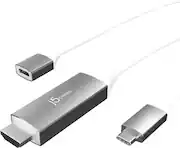
The j5create - USB-C® to 4K HDMI™ CableUSB-C® to 4K HDMI™ Cable With PD100W Pass-Through works great. All I have to do is plug my Samsung Galaxy Z Fold 3 phone into it to watch movies from on our XR77A80CJ Sony 77" Class - A80CJ Series - 4K UHD OLED TV. I love that it charges my phone at the sametime. This is a great option if you have limited internet and can't connect your phone wirelessly.
Posted by Toocool105
- Rated 4 out of 5 stars
Useful if you aren't ready for a USB-C monitor.
Couldn't find a USB-C monitor I liked enough to spend a few hundred dollars on, so when I saw this I thought I'd give it a try. It's actually pretty useful and works with my Samsung Galaxy Book Pro 360, iPad Air 4, and Samsung Note 20 Ultra. Only thing I would maybe change is just a shorter power cable, or a male connection so you can plug it directly into a power brick, as it is, I have the length of it's cable plus the length of the laptop power cable hanging behind my desk.
Posted by GregB
- Rated 5 out of 5 stars
One-cable simplicity
I needed a monitor today and had no time to wait for a monitor with a USB-C connection, so I had to buy an HDMI monitor. I hate having multiple cables connected to my MacBook Pro so this cable was my solution for the HDMI monitor and having a single USB-C cable connected to my MacBook for power and video.
Posted by TheFrameGuy