Rating 4.6 out of 5 stars with 984 reviews
4.6- Buttons (190)
- Ease of use (101)
- Price (39)
- Software (30)
- Weight (27)
- Size (39)
- Cord (6)
- Grip (5)
Customer Images
The vast majority of our reviews come from verified purchases. Reviews from customers may include My Best Buy members, employees, and Tech Insider Network members (as tagged). Select reviewers may receive discounted products, promotional considerations or entries into drawings for honest, helpful reviews.
- Rated 5 out of 5 stars
Not a gamer, but I love this mouse
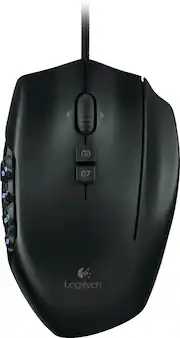
I'm a Mac OS based graphic designer who was tired of the crummy controls, poor hand grip, skipping and unpredictable response of the various wireless mouse options I already had. This was not the one I intended to buy, but everything else was sold out-- and this was on a great sale. I bought it half-expecting to take it back, but it's the only mouse I use anymore. (I still have the Apple Magic mouse and an iHome wireless). PROS: nice long cord, incredible sensitivity, vast customization options, nice weight and size, well-place buttons, fits my hand nicely, never skips, really cool programmable 12-key thumbpad that I actually use, nice scrollwheel sensitivity, perfect tracking on all surfaces I've tried (including very glassy countertops) CONS: I'm still not in love with the G-shift button, because I'd rather have my ring finger next to the mouse. On some really long days, my little finger can get sore from mouse control use. Also, Logitech Gaming software requires reauthorization EVERY TIME I start up the computer-- annoying, but not enough to detract from the overall goodness of this mouse. Conclusion: I will never use a wireless mouse again unless I absolutely have to. The quality, sensitivity, and control are way better wired. And the 20+ buttons on this mouse make it possible to program macros for all kinds of things that used to require taking my hand off the mouse. BONUS: the mouse has a mode which illuminates the keys cycling through the rainbow. I constantly get questions from people who can't figure out what it is-- it appears to pulse slowly on the desk.
Posted by odh3
- Rated 5 out of 5 stars
Better Than Naga
I've owned Razer Nagas for at least 6 years. Somewhat recently, I purchased a Naga Epic Chroma and almost instantly regretted it. Perhaps no wireless mouse can handle being used frequently every day. Regardless, it had no longevity and was a constant pain. I resorted to using it only while plugged in, making it like a corded mouse, only worse. I eventually took advantage of Razer's warranty and replaced it with a regular Chroma Naga. This one lasted almost a year before I started having problems with it (the shortest amount of time of any Naga I kept). It eventually failed at tracking and would move erratically. Razer has a nice feature where you can calibrate per mousepad, and that seemed to work at first, but eventually, it just failed again. Now this: The Logitech G600 outperforms the Naga and is much easier to use. Unlike with Razer products, you don't even need the software if you don't want it! It worked immediately upon connection and so far is much more ergonomic and useful. Although I haven't found a purpose for it yet, the G-Shift feature is a fantastic addition. I'm sure I can use it in one of my MMOs that require a ton of keybinds, but I'm currently playing ones that restrict the amount you can use. It was easy to rebind the keys, although it is a bit confusing on the program's layout to see which bind goes where (see attached photo). The drop-down menus for each key align in an unintuitive way. The grid buttons seem much more ergonomic and way easier to differentiate and hit the correct ones. The Naga's are smooth and rounded, which feels nice but makes it incredibly difficult to find the right button. The G600's are each shaped differently and form two rows, the top six and bottom six. I also much prefer the plastic textured coating on this mouse to the Naga. The Naga has one that touts its grippy-ness, but the slightly pebbled texture rubs off fairly quickly with constant use, finger pressure, and hand grease, revealing a smooth, almost slippery, texture underneath. I haven't noticed any signs of that on this one yet, but I will keep an eye out for it. It's much more pleasing to touch, as well. It feels smoother but is also definitely matte. I'm very happy with the G600 and I'm so glad I found it on sale. It more than justified the purchase! Google alerted me to the sale. I'm a heavy Google user, so maybe that's why, but I think there's also a way to track an item's price and receive notifications on price drops.
Posted by verawr
- Rated 5 out of 5 stars
Perfect fit & just the right weight.Top Quality!
I play MMO games on a regular basis and love the control I have with the extra buttons on the side. My previous mouse was a little too big for my hand and the main two buttons were way too sensitive. Having made up my mind to buy a Logitech mouse, I caught this mouse on sale at Best Buy for $40.00. I have medium sized hands and this fits perfectly. This mouse is well made with quality materials and the weight is just right for me. It's not too heavy or too light. The cord is covered with a strong & flexible braided material. I own a Logitech G710+ Keyboard and a Logitech G430 Gaming Headset. The Logitech Gaming Software controls settings for both. I plugged the G600 in and it too got added to the Logitech software. It is loaded with different settings and configurations along with different colored backlights for the keypad. I am very satisfied with my G600.
Posted by USAFSP4Life
- Rated 5 out of 5 stars
You can't beat this mouse!
I am an avid World of Warcraft player with very particular taste for what constitutes as a good mouse. I have owned mice triple the price of this one. Programmable side buttons: At first I was apprehensive about the buttons not being labeled 1-12 like my old mouse but I ended up not caring because I never NEED to look at the buttons like I did on my old mouse. Each button has a very distinct "feel" that makes them easy to distinguish. The leftmost buttons are raised on the left edge. The middle buttons are more flat. The rightmost buttons are raised on the right edge, and in addition to that the first row of buttons are raised at the top, and the second row of buttons are raised at the bottom. The third and fourth rows are the same way. It makes it very easy to know what button I am pressing without wasting time making sure I'm pressing the right button. G-Shift Button: This was the other feature of the mouse I was worried about before purchasing. I worried that I would accidentally press the g-shift button and get annoyed by that. That isn't the case. It takes more effort to press mouse buttons down than you may realize. I may have had an acclimation period of how to rest my hand on this mouse, but I can't remember because it has been too long. Now the feature of G-shift is what makes this mouse better than others. All I need to do is hold the rightmost button down on the mouse and all of my keys are remapped. I now have double the buttons. For the first time since I started playing World of Warcraft, I have more keybindings than I do abilities. Logitech has their own configuration software where you can customize all of the buttons keybindings. Not much to say here, it's pretty straightforward. I'm writing this review almost 2 years later. The mouse is still going strong.
Posted by Makenna
- Rated 5 out of 5 stars
Great All Around Gaming Mouse
On the Logitech G600, you don't even need the software if you don't want it! It worked immediately upon connection and so far is much more ergonomic and useful. Although I haven't found a purpose for it yet, the G-Shift feature is a fantastic addition. I'm sure I can use it in one of my MMOs that require a ton of keybinds, but I'm currently playing ones that restrict the amount you can use. It was easy to rebind the keys
Posted by TTech