“I SET UP MY NEW FIRESTICK WITH ALEX VOICE REMOTE. ALL WORKING EXCEPT MY VOLUME CONTROLS. I HAVE ALL INSIGNIA TVS (PURCHASED FROM BEST BUY). HOW DO I GET THE VOLUME TO WORK???? DID ALL THE ADVICE ON SCREEN TO FIX THE PROBLEM WITH NO RESULTS.”
Answer This Question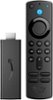
1-3 of 3 Answers
You can go back and reprogram it don't use Alexa you have to manually program the volume
Sorry, there was a problem. Please try again later.A lot of remote don't worry the volume on that brand
Sorry, there was a problem. Please try again later.Hello RNGRL, you want to know how you will be able to your volume control to work with your Amazon- Fire TV Stick (3rd Gen) with Alexa Voice Remote (includes TV controls). Go to the settings of your Amazon- Fire TV Stick (3rd Gen) with Alexa Voice Remote (includes TV controls), select equipment control, select manage equipment, select TV, select change TV, this will allow you to set up the TV with your Amazon- Fire TV Stick (3rd Gen) with Alexa Voice Remote (includes TV controls). Hope this have answered your question. Have an amazing day!
Sorry, there was a problem. Please try again later.