“For the yeti nano I have been trying for hours on getting it to work with my steelsieries headset and it won’t work pls I need help. Also I did switch up audio settings to try to make it work. What happens is I can’t hear.”
Answer This Question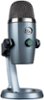
1-1 of 1 Answer
You can connect your headset to the bottom of the Yeti Nano with a 3.5 mm headphone connection. Set your PC audio to the Yeti nano mic to put audio through its 3.5 mm headphone out, to your headset. You can use the volume knob on the mic for your headset volume. For software: https://www.bluemic.com/en-us/products/sherpa/ Or if you need support: https://support.bluedesigns.com/hc/en-us - Will, Blue.
Sorry, there was a problem. Please try again later.