1-2 of 2 Answers
It’s the icon on the dial that looks like two intersecting circles. You can see all of the icons on the box as well.
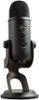
Sorry, there was a problem. Please try again later.Hello Nel! If you look at the back of your Blue Yeti Professional Multi-Pattern USB Condenser Microphone, you'll a wheel where it says Pattern, and there you'll be able to select the Stereo Pattern all the way to the left (records left and right), next one would be Omnidirectional (records all around the mic), then Cardioid (records in front of the mic), and last to the right would be Bidirectional (front and back recording).
Sorry, there was a problem. Please try again later.