“Exactly what memory card do I need to buy for this? I can’t find the information on this anywhere other than one is not included. This should be clearly stated.”
Answer This Question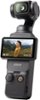
1-3 of 3 Answers
Hi there, thank you for your inquiry regarding the memory card compatibility for your device. Here are the recommended microSD cards that will work well with DJI Osmo Pocket 3: -SanDisk Extreme Pro 32GB V30 A1 UHS-I Speed Grade 3 -Kingston Canvas Go!Plus 64GB UHS-I Speed Grade 3 -Kingston Canvas Go!Plus 128GB UHS-I Speed Grade 3 -Kingston Canvas Go!Plus 256GB UHS-I Speed Grade 3 -Kingston Canvas Go!Plus 512GB UHS-I Speed Grade 3 -Kingston Canvas React Plus 64GB UHS-II Speed Grade 3 -Kingston Canvas React Plus 128GB UHS-II Speed Grade 3 -Kingston Canvas React Plus 256GB UHS-II Speed Grade 3 -Lexar Pro 256GB SDXC UHS-I V30 R160/W120 (1066x) -Lexar Pro 512GB SDXC UHS-I V30 R160/W120 (1066x) -Lexar SILVER PLUS microSDXC UHS- I 64GB -Lexar SILVER PLUS microSDXC UHS- I 128GB -Lexar SILVER PLUS microSDXC UHS- I 256GB -Lexar SILVER PLUS microSDXC UHS- I 512GB -Lexar SILVER PLUS microSDXC UHS- I 1TB If you have any more questions or need assistance, feel free to ask!
Sorry, there was a problem. Please try again later.Micro SD. Get a good quality one with lots of storage if you are filming a lot. Leave the card after you format it and transfer files to your computer or external hard drive to edit. If you remove the card to transfer files, you risk corruption the SD card. This happened to me once. I luckily was able to get all my files from the app that comes with it. Make surecto set that up.
Sorry, there was a problem. Please try again later.Micro SD card
Sorry, there was a problem. Please try again later.