“I have a older Sony Smart tv. Lost the original remote. Cannot get the enhancement demo loop off of screen, keeps popping up every time the tvis turned on. The tvi is probably 8 yrs old. The model number for tv is KDL40R510C,and the remote number is RMTTX”
Answer This Question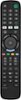
1-1 of 1 Answer
I understand how frustrating that can be! Here’s how you can turn off the demo mode on your Sony TV model KDL40R510C: 1. Using the TV Buttons: - Press and hold the CH/INPUT button on the TV for more than 10 seconds. You should see a message saying "Demo mode: Off" appear on the screen 2. Using the Replacement Remote: - If you have the Insignia™ replacement remote, press the Home button. - Navigate to Settings > Preferences > Retail mode settings. - Set both Picture reset mode and Demo mode to Off. If these steps don’t work, you might need to reset the TV to its factory settings. Here’s how: 1. Factory Reset: - Press the Home button on the remote. - Go to Settings > System Settings > Customer Support > Factory Settings. - Follow the on-screen instructions to complete the reset. I hope this helps! Let me know if you need any further assistance.
Sorry, there was a problem. Please try again later.