“I can't get a NS-RMTSNY21 link to a Sony Visio TV after several efforts. Any ideas.”
Answer This Question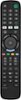
1-1 of 1 Answer
Hello Keeffg54, We are sorry to read you are experiencing this issue with one of our products. Please follow the steps below: 1. Make sure that your TV is on and not in standby mode. 2. On your new remote, hold down red and blue buttons until the power button LED blinks twice. 3. Point your new remote towards the TV, then press and hold the power button. 4. As soon as your TV turns off, immediately release the power button. The LED blinks twice. Note: You have three seconds to release the power button before your remote sends a different code to your TV. 5. Use the power button to turn on your TV, then test the other buttons. 6. If one or more buttons don’t work as you expect, repeat steps 1 through 5 using the MENU or INFO button instead of the power button. For more questions and product support you may contact our customer service at 1-(877)-467-4289 Monday to Saturday 8am - 9pm CST. Chelsea Insignia Support Please give us a visit at: https://www.bestbuy.com/site/brands/best-buy-brands/pcmcat1596746025285.c?id=pcmcat1596746025285
Sorry, there was a problem. Please try again later.