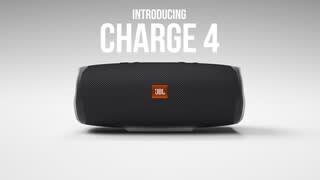
A:AnswerOur JBL Charge 4's Bluetooth range is normally up to about 10-15 m. More than that the signal will get unstable. Please also consider that blockages such as walls and other wireless signals can affect the connectivity.
A:AnswerYou can stream on both of them using our JBL Connect + feature. Press the hourglass button on our speaker to connect it with other Speakers that have the same feature.
A:AnswerJBL Charge 4 doesn't have a remote. You can control the speaker (pause/ play/ skip/ adjust volume) using your connected device or the speaker itself.
A:AnswerAbsolutely! You can connect two JBL Charge 4 using the Connect+ feature. Simply pair one speaker to a source or phone then press the Connect+ button on each speaker.
A:AnswerYou can connect a phone to a single JBL Charge 4 then press the Connect+ button on both Charge 4 so that the same music will play at the same time.
A:AnswerThe Bluetooth range varies. However, you should get up to 15 meters (just under 50 ft) when using the product indoors. If you are using the speakers outside, conditions vary based on surroundings. For the best connectivity results, please make sure that the device you are paired to is within 16-20 ft.
A:AnswerHi, No, there is no phone dock on this speaker. It is just a speaker that can play music from your music playlist on your phone or laptop or desktop. ~ V
A:AnswerWe can't guarantee that the JBL Charge 4 can fit your bicycle bottle cage. You can try to estimate the fitment with the help of these values:
Dimensions (cm) 22 x 9.5 x 9.3
Dimensions (in) 8.66 x 3.74 x 3.66
A:AnswerNo, It can't be used as a speaker phone. It is compatible with IOS and it can definitely be paired to an iPhone,
However the JBL charge 4 doesn't have a Mic, you will not be able to use it as a speaker phone
A:AnswerJBL Charge 4 is a Bluetooth speaker, and it should pair with your Echo Dot device. Check out the steps here on how to do so: https://amzn.to/2XYCjhk