1-1 of 1 Answer
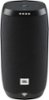
Hi there, we’re here to help. It’s unusual for your JBL Link 10 to not be able to turn off although sometimes the hardware needs a reset to function properly. Follow these steps for a quick hardware reset: 1. Open the charging cover. 2. Find a paperclip or something similar that is small enough to fit the small hole. 3. Short press the button with your paperclip. 4. The speaker will shut down and startup again. 5. This will NOT delete any settings or information for your JBL LINK 10 Hope this helps. If you need further help you can contact our Customer Support Team by visiting this link: https://support.jbl.com/us/en/
Sorry, there was a problem. Please try again later.