Skip to contentGo to Product Search
Gift Ideas
Main Content

Questions & Answers

$247.95
Save $72.04
The comparable value is $319.99
Page Showing 81-90 of 90 questions
  • Questionwill the bluetooth pair with my hearing aids?

    Asked by Ronrules.

    • Answer You can turn on the 'Listen Together with Hearing Aid' setting on the LG 43” Class UA7000 Series LED AI 4K UHD Smart webOS TV (2025), Model # 43UA7000PUB, to connect a hearing aid to HDMI or pair it with Bluetooth® to output sound simultaneously with the internal speakers and the hearing aid...^Ivan.

      Answered by LG Digital Customer Care

  • QuestionWill this TV work with a DVD player and/or a VHS cassette player?

    Asked by Joep.

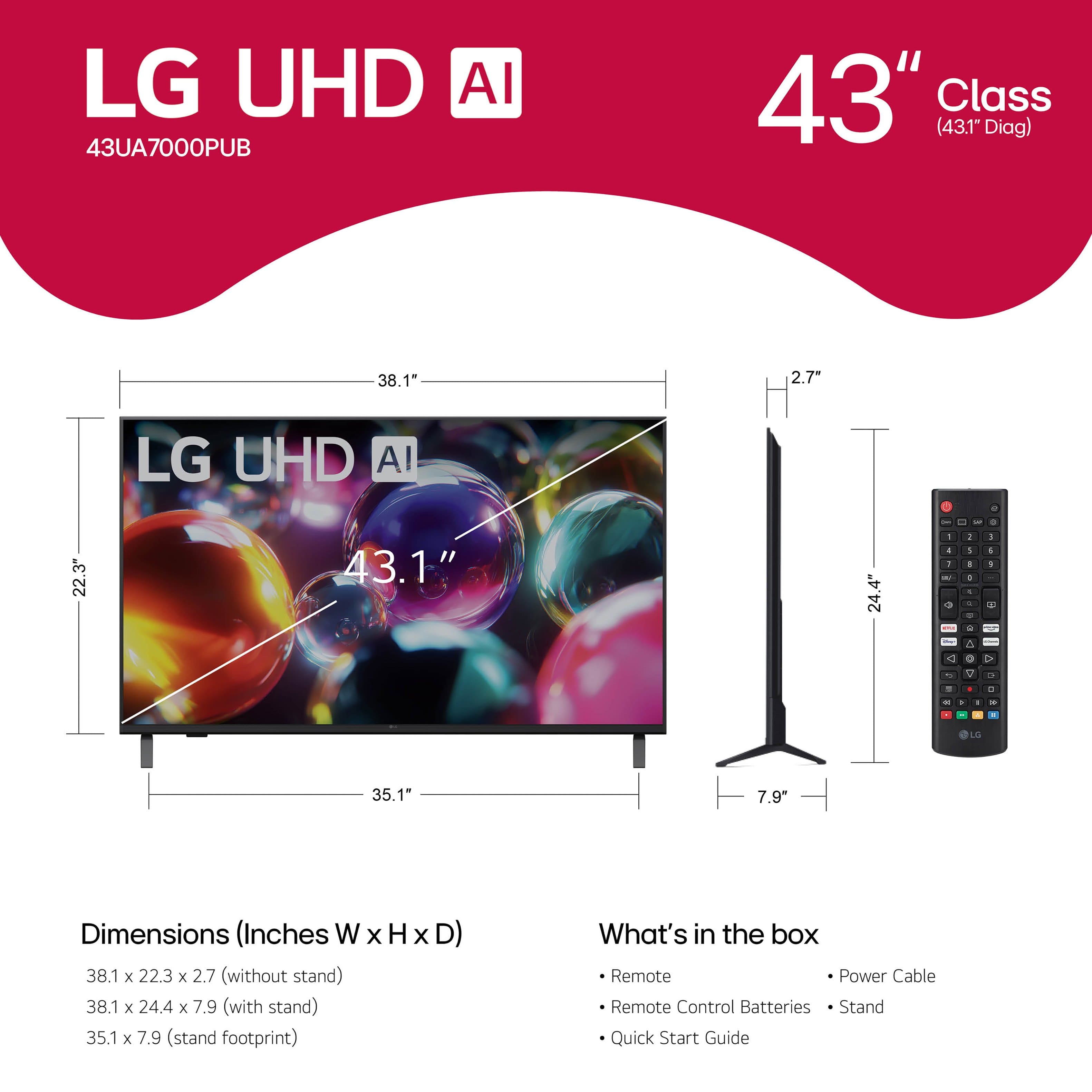
    • Answer The LG 43” Class UA7000 Series LED AI 4K UHD Smart webOS TV (2025), Model # 43UA7000PUB, does not have analog inputs (the older RCA AV barrel ports, aka Composite ports) for connecting a VHS Cassette Player or a progressive scan DVD Player that connects via the older Composite or Component ports. However, if your DVD Player is an Upscaling DVD Player that has an HDMI output, you can connect it to the HDMI inputs on the TV...^Ivan.

      Answered by LG Digital Customer Care

  • QuestionWhat apps are pre installed?

    Asked by Anonymous.

    • Answer Most of the popular streaming apps are preinstalled on the LG 43” Class UA7000 Series LED AI 4K UHD Smart webOS TV (2025), Model # 43UA7000PUB. Please visit our site at https://us.lgappstv.com/main/appSearch for a complete listing of apps that are preinstalled on our TVs that are compatible with our webOS TV platform, and compatible additional apps that can be downloaded and installed on the TV...^Ivan.

      Answered by LG Digital Customer Care

  • QuestionWill I be able to stream Xfinity

    Asked by Pizzaking.

    • Answer The Xfinity Stream app can be downloaded and installed on the LG 43” Class UA7000 Series LED AI 4K UHD Smart webOS TV (2025), Model # 43UA7000PUB, through the LG Content Store (App Store) feature on the TV's home screen...^Ivan.

      Answered by LG Digital Customer Care

  • QuestionWill I be able to stream YouTube TV?

    Asked by Myhumbleopinion.

    • Answer The YouTube TV app is compatible with the webOS 25 TV Platform (i.e., Operating System) that the LG 55” Class UA77 Series LED AI 4K UHD Smart webOS TV (2025), Model # 55UA7700PUB runs on and it can be downloaded and installed on the TV through the LG Content Store (App Store) feature on the TV's home screen...^Ivan.

      Answered by LG Digital Customer Care

  • Questiondoes this tv stay on for about 16/7 operation

    Asked by tv2025.

    • Answer Hello there. Thank you for your inquiry about the LG 43” Class UA7000 Series LED AI 4K UHD Smart webOS TV. We understand your question regarding the 16/7 operation of the unit. This specific TV model is designed for home consumer use and is not rated for continuous commercial operation. Running the TV for extended periods, such as 16 hours a day, may affect its long-term performance and lifespan. We recommend using it as intended for regular home entertainment. https://www.bestbuy.com/product/lg-43-class-ua7000-series-led-ai-4k-uhd-smart-webos-tv-2025/JJ8VPZW5KG If you have any further questions or would like to explore other options, please send us a private message on Social Media @LGUSSupport and our team will be more than happy to explore possible solutions. We appreciate your patience. —Renzo

      Answered by LG Digital Customer Care

  • QuestionDoes this have an audio jack for headphones?

    Asked by Glitter.

    • Answer Hi there. The LG 43UA7000PUB does not have a built-in headphone jack, but you can still connect wireless headphones via Bluetooth or use external audio systems through optical or HDMI ports. If you need further assistance, please send us an email at [email protected]. We’re here to assist you. -Charles

      Answered by LG Digital Customer Care

  • QuestionDoes it have a sleep timer?

    Asked by KAT.

    • Answer Hi, Kat. Yes, your LG 43UA7000PUB TV has a sleep timer. To set the sleep timer on your LG TV, press the Settings button on your remote, go to All Settings, navigate to General, select Timers, and then choose Sleep Timer to set how long the TV stays on before turning off automatically. If you need further assistance, please send us an email at [email protected]. We’re here to assist you. -Charles

      Answered by LG Digital Customer Care

  • QuestionWill I be able to get Hulu live in this tv

    Asked by Anonymous.

    • Answer Hulu is a preinstalled app on theLG 43” Class UA7000 Series LED AI 4K UHD Smart webOS TV (2025), Model # 43UA7000PUB, and you can upgrade it to Hulu + Live TV. You can go to the Hulu website and log in to your account, hover over the account icon at the top right of the page, click on "Account" and select the "Manage Plan" option, then choose the Hulu + Live TV plan of your choice...^Ivan.

      Answered by LG Digital Customer Care

  • Questiondefinitions of remote buttons

    Asked by Bookitty.

    • Answer Does it have a headphone jack

      Answered by Anonymous