“My washing machine was working fine, and now, it seems to not want to come on. Troubleshoot!”
Answer This Question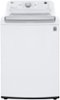
1-1 of 1 Answer
Here are the troubleshooting steps for an LG WT7150CW washing machine that is not turning on: Check Power Supply Ensure the washing machine is plugged into a grounded electrical outlet that is receiving power. Test the outlet with another appliance. Reset the circuit breaker or replace any blown fuses for the washing machine circuit. Inspect the power cord for any damage and test for continuity using a multimeter. Replace if faulty. Perform a Hard Reset Unplug the washer from power. Press and hold the Power/Start button for 5 seconds, then release. Press and hold the Play/Pause button for 5 seconds. Plug the washer back in and attempt to power it on. Check Control Panel/User Interface Ensure no buttons on the control panel are stuck or the Control Lock is not engaged. Try opening and closing the door to reset the controls. Check if any error codes are displayed on the control panel. Lid Switch Issue For this top-load washer, ensure the lid is properly closed and engaging the lid switch. Use a multimeter to test the lid switch continuity. Replace if defective. Control Board Failure If the control panel lights up but the washer doesn't respond to button presses, the main control board may have failed and need replacement. If none of these basic troubleshooting steps resolve the issue, you may send us a private message on Facebook or Twitter. ^Jolly
Sorry, there was a problem. Please try again later.