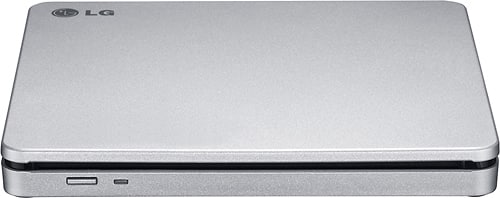
Questions & Answers
- Model:
- AP70NS50
- |
- SKU:
- 1802033
Q: QuestionIs this compatible with macOS Sequoia 15.1.1?
Asked by Fluff.
- A:Answer Yes, that's what I'm running on my Mac Studio
Answered by Don300
Q: QuestionWhat type of USB Input does this have?
Asked by ChadD.
- A:Answer USB/C to USB/A
Answered by Don300
Q: Questioncan I use it with a DVD?
Asked by neo.
- A:Answer Hi there, Neo! Thank you for your inquiry about the AP70NS50 unit. We appreciate your interest! Yes, the AP70NS50 can be used with DVDs. To get started, simply connect it to your device using the appropriate USB connection and ensure that your media player software is configured to recognize the DVD format. If you have any more questions or need further assistance, please don’t hesitate to send us a private message on Social Media @LGUSSupport. Our team is here to help you explore all the possibilities with your unit. We appreciate your patience! —Avril
Answered by LG Digital Customer Care

Q: Questionis it compatible to apple laptop ?Imac
Asked by t.
- A:Answer Hi there! Thank you for reaching out to us about the AP70NS50. We understand the importance of compatibility, and we're here to help. The AP70NS50 external drive is compatible with most Apple laptops, though certain macOS versions may require additional driver updates to function optimally. You may access this link for more information, go to "All Specs":https://www.lg.com/us/burners-drives/lg-ap70ns50-external-dvd-drive. Please send us a private message on Social Media @LGUSSupport with your macOS version, and we'll be glad to assist further. We appreciate your patience and look forward to helping you enjoy your device to the fullest. —Avril
Answered by LG Digital Customer Care

Q: Questiondoes this software require a subscription?
Asked by KEN.
- A:Answer Hello there, Ken! Thank you for your question about the AP70NS50 external DVD writer. The software that typically accompanies this model does not require a subscription; it is often included with the product and can be used without ongoing fees. However, specific features or additional software options may have their own terms, so it’s always a good idea to check the documentation provided with the product. You may access this link related to your concern and check "All Specs" :https://www.lg.com/us/burners-drives/lg-ap70ns50-external-dvd-drive . If you have any further questions or need assistance, please send us a private message on Social Media @LGUSSupport, and we’ll be happy to help. We appreciate your feedback! —Avril
Answered by LG Digital Customer Care

Q: Questionwill it work on windows11
Asked by Anonymous.
- A:Answer Hello there. Thank you for reaching out! We understand you're looking to confirm if the LG External DVD Drive, Model AP70NS50, is compatible with Windows 11 based on the specifications of this model. While this drive is officially listed as compatible with older operating systems like Windows 7 and 8, it should still work with Windows 11, as most external DVD drives are typically supported by newer versions of Windows through plug-and-play functionality. If you encounter any issues or need assistance, feel free to send us a private message on Social Media @LGUSSupport, and we'll be happy to guide you further. https://www.lg.com/us/burners-drives/lg-ap70ns50-external-dvd-drive#pdp_specs We appreciate your patience and look forward to assisting you! —Renzo
Answered by LG Digital Customer Care

Q: QuestionWill this drive work with my desktop Mac?
Asked by Strider.
- A:Answer Hi there, thank you for your question about the AP70NS50 drive. This model is compatible with Mac desktops, but you may need to format the drive for optimal use with macOS. If you encounter any issues or need guidance on formatting, please feel free to send us a private message on social media at @LGUSSupport, and we’ll be happy to assist you further! Thank you for your patience! —Avril
Answered by LG Digital Customer Care

Q: QuestionIs this drive compatible with other software (i.e. Nero Platinum) for burning movie discs
Asked by NeroHero.
- A:Answer Hello there. Thank you for reaching out about the LG Drive model AP70NS50. We understand that you want to know about its compatibility with other software for burning movie discs. This drive is generally compatible with a variety of disc burning software, including Nero Platinum. For the best experience, ensure that you have the latest software updates and drivers installed. If you encounter any issues or have further questions, please send us a private message on social media @LGUSSupport, and we’ll be happy to assist you. We appreciate your patience. —Renzo
Answered by LG Digital Customer Care

Q: QuestionWill this disc drive copy a music cd and upload it to my Apple music library on my Apple mac pro?
Asked by Anonymous.
- A:Answer Thank you for your interest in the LG Portable DVD. Yes, the LG AP70NS50 external DVD drive should be able to copy music CDs and allow you to import the audio tracks into your Apple Music library on your Mac Pro. You can download its owner's manual through this link for more information: https://www.lg.com/us/support/product/lg-AP70NS50.AUSR10B. For additional assistance, please reach out to us on social media @LGUSSupport so we can help you further. ^Cris
Answered by LG Digital Customer Care

Q: QuestionWill this work on an apple iMac desktop 2023
Asked by Rohn.
- A:Answer Hello Rohn! We'd be happy to help you out. Excellent question. Yes, The LG Super Multi Blade DVD, Model AP70NS50, is Mac compatible. For more questions, reach out to us on social media @LGUSSupport. We're eager to assist! ^Joslyn
Answered by LG Digital Customer Care

Q: QuestionDo it works for MacBook laptops
Asked by J.
- A:Answer Hi there. Thank you for reaching out with your question about the LG model AP70NS50. We understand how important it is to ensure compatibility with your MacBook. The LG AP70NS50 is a DVD writer (or optical drive) that is generally compatible with both Windows and macOS systems. To use it with your MacBook, you’ll need to connect it via USB. Ensure that you have the appropriate software or drivers installed if required, and macOS should recognize the drive automatically. If you encounter any issues or have further questions, please send us a private message on Social Media @LGUSSupport. We’re here to help! We appreciate your inquiry and look forward to assisting you. —Renzo
Answered by LG Digital Customer Care

Q: Questionwill this unit be compatible with 2023 Chevy Tahoe ?
Asked by jimbob.
- A:Answer Thank you for reaching us regarding LG Portable DVD. The LG AP70NS50 is an external DVD writer and is not directly compatible with a 2023 Chevy Tahoe. You can download its owner's manual through this link for more information: https://www.lg.com/us/support/product/lg-AP70NS50.AUSR10B. For additional assistance, please reach out to us on social media @LGUSSupport so we can help you further. ^Cris
Answered by LG Digital Customer Care

Q: QuestionCan this be used with a usb port in a car with no cd player
Asked by Bill.
- A:Answer Thank you for reaching us regarding LG Portable DVD. No, the LG AP70NS50 external DVD drive cannot be directly used with a USB port in a car that has no CD player. You can download its owner's manual through this link for more information: https://www.lg.com/us/support/product/lg-AP70NS50.AUSR10B. For additional assistance, please reach out to us on social media @LGUSSupport so we can help you further. ^Cris
Answered by LG Digital Customer Care

Q: QuestionDoes it work with windows 11 pro
Asked by RoyU.
- A:Answer Thank you for reaching us regarding LG Portable DVD. Yes, the LG AP70NS50 external DVD drive is compatible with Windows 11 Pro. You can download its owner's manual through this link for more information: https://www.lg.com/us/support/product/lg-AP70NS50.AUSR10B. For additional assistance, please reach out to us on social media @LGUSSupport so we can help you further. ^Cris
Answered by LG Digital Customer Care

Q: QuestionIs this device compatible with a Chromebook?
Asked by RobT.
- A:Answer Hello there. Thank you for your question about the LG AP70NS50 DVD writer. The LG AP70NS50 is an external DVD writer that is generally compatible with most operating systems via a USB connection. Chromebooks, however, can have limited support for external devices like DVD writers due to their operating system's capabilities. For full functionality, you might need to use specific applications or extensions available on the Chrome Web Store that support optical drives. Additionally, ensure that your Chromebook recognizes the drive and that any required drivers are installed. If you have any further questions or need additional assistance, please send us a private message on Social Media @LGUSSupport. We’re here to help! —Renzo
Answered by LG Digital Customer Care

Q: QuestionWill this work in a car to play cd's by plugging into usb port?
Asked by cricet.
- A:Answer Hello there, thank you for your inquiry about the AP70NS50. This model is not applicable for use in a car via USB to play CDs, as it requires a dedicated car CD player to function. If you have any further questions or need assistance, please send us a private message on Social Media @LGUSSupport. We’re here to help! —Avril
Answered by LG Digital Customer Care

Q: QuestionI bought a HP Pavillion Desktop computer with Windows 10 and it does not have a drive for me to add programs to it. Will this drive do it?
Asked by Wondering.
- A:Answer Hi there! Thank you for your question about the LG AP70NS50 external drive. Yes, this external drive is a great solution for adding programs to your HP Pavilion Desktop. It connects via USB, allowing you to read and write CDs and DVDs, which can be useful for installing software, backing up data, or playing media. If you need further assistance, please send us a private message on Social Media @LGUSSupport. We’re happy to help! —Avril
Answered by LG Digital Customer Care

Q: QuestionWill this work with windows 11?
Asked by Gary.
- A:Answer No problem using Windows 11.
Answered by Buyelsewhere
Q: QuestionWill this work with MacBook Pro?
Asked by Froggie.
- A:Answer Yes, I have had no issue using it with my MacBook Pro
Answered by EKPfam
Q: QuestionWILL THIS LET ME PUT A CD PROGRAM INTO TO MY DESKTOP COMPUTER
Asked by BUTTON.
- A:Answer Thank you for reaching us regarding LG Portable DVD. Yes, the LG AP70NS50 is an external DVD drive that can be used to read CD programs on your desktop computer. You can download its owner's manual through this link for more information: https://www.lg.com/us/support/product/lg-AP70NS50.AUSR10B. For additional assistance, please reach out to us on social media @LGUSSupport so we can help you further. ^Cris
Answered by LG Digital Customer Care

Top Rated
- Black Friday Deal$17.99Your price for this item is $17.99
- $31.99Your price for this item is $31.99$45.99The comparable value for this item is $45.99
- $27.99Your price for this item is $27.99$32.99The comparable value for this item is $32.99
- $29.99Your price for this item is $29.99
- $35.99Your price for this item is $35.99$39.99The comparable value for this item is $39.99
- $28.99Your price for this item is $28.99
- $39.99Your price for this item is $39.99