1-1 of 1 Answer
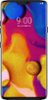
You can tap O > Settings > General > Language & Input Language > Add Language and select a languge on the LG - V40 ThinQ with 64GB Memory Cell Phone (Unlocked) - Aurora Black. You can touch and hold the three vertical bars and drag the top of the language list to set it as a defualt language. Polish is included on the list of languages...^IFV
Sorry, there was a problem. Please try again later.
