“Been fooled before & I still see conflicting answers even here. Do arrow keys emulate PgDn/PgUp keys? I use Word and MUST have PgDn/PgUp. Example: I've tried multiple other pointers. They all worked in PowerPoint but did NOT work PgDn and PgUp in Word.”
Answer This Question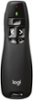
$29.99
Save $10
The comparable value is $39.99
Deal ends in 11:08:50
1-2 of 2 Answers
I just tried it with a word document. It advances the page, but not the whole way. In other words, it did not advance the whole page, just about 3/4 of it. I used it to advance from one photo to another in a folder in documents.
Sorry, there was a problem. Please try again later.This is designed to work in PowerPoint, not Word or Excel. No, the screen advance and back up buttons do not trigger Page Up/Down in Word. I think you will need to try a presentation remote that includes a mouse control, and Right/Left buttons. I have seen two but do not recall the brand or model.
Sorry, there was a problem. Please try again later.