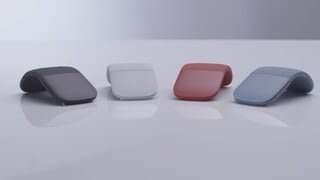
A:AnswerNo middle button or scroll wheel, but the entire pad of this mouse that covers the left, and right click buttons, functions as a scroll wheel. Simply use two fingers, placed on the pad, and move in any direction to scroll!
A:AnswerYes. It is enabled with Bluetooth. However, if you need to change settings like scroll behavior, DPI, and three finger gestures, you will need the Microsoft Mouse and Keyboard Center app for Windows. Some of these settings may be changed in Android settings.
A:AnswerI have an ASUS chromebook with bluetooth and I'm trying to pair my microsoft surface mobile mouse with it. In the bluetooth setting I see 'serching for devices" but the mouse does not show up there. I have no issues using this mouse with my windows 10 laptop, so I think the mouse is not compatible
A:AnswerIf you mean does it have a laser pointer feature, no. It's an optical mouse, which means it has a low-power laser source instead of the older track wheel type.