“My laptop has internal Wifi card already but I want to increase the wifi connection. Can I buy this product for that purpose? My laptop has internal Wifi card already but I want to increase the wifi connection. Can I buy this product for that purpose?”
Answer This Question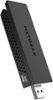
1-10 of 11 Answers
Yes, i you can disable the internal device.
Sorry, there was a problem. Please try again later.Yes, that's exactly what I purchased this for. My internal wifi card was only 2.4ghz channel and I have an 11AC (5ghz) router.
Sorry, there was a problem. Please try again later.yes, if your internal WiFi card is G or N. 802.11n gets 450Mbps and 802.11ac can get to 1300Mbps. it will increase the speed of your WiFi connection if you have a router and ISP that can support that speed.
Sorry, there was a problem. Please try again later.It depends on what kind of card your laptop has, and perhaps the router as well. If you have a newer laptop with an N-adapter built in, this adapter might not improve things much unless you also have a Netgear router.
Sorry, there was a problem. Please try again later.My internal wifi card had bad connectivity to my 802.11n router. This card did increase my performance, and I suspect it will be even better when I purchase an 802.11ac router.
Sorry, there was a problem. Please try again later.Yes, but you will lose a lot of the speed if you don't have USB3.0 on your laptop. If you do then you should not have a problem and it might help in some instances since you can move the device around on its extension cable
Sorry, there was a problem. Please try again later.Yes - this is exactly why I bought it, and it worked GREAT. Could not get a signal w/ the integrated wifi adapter.
Sorry, there was a problem. Please try again later.I think so. My desktop has a built in wifi adapter and this Netgear AC1200 works on it. I believe the installation program disables the original wifi adapter.
Sorry, there was a problem. Please try again later.Yes you can. I did the same, upgrading to this Netgear 1200. You can disable the internal card with your device manager, part of your Windows OS.
Sorry, there was a problem. Please try again later.Yes you can.
Sorry, there was a problem. Please try again later.