“We have wi fi though out the Home and would like to hook up a voip phone with an Ethernet plug through the wireless signal. Is there a device that can do this? Ie. Wireless to Ethernet rather than Ethernet to wireless.”
Answer This Question
1-5 of 5 Answers
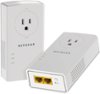
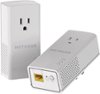
It sounds like what you need is somewhere to plug the voip in to ethernet, near the voip device. This would accomplish that. You would need to connect one of these units to your Internet (router) via ethernet cable. Then, locate the second unit near your voip device and connect those two via ethernet
Sorry, there was a problem. Please try again later.Any of the Netgear Powerline products will extend your ethernet connection as long as your house is on the same power system. Then you can use your Voip phone plugged into ethernet from your router.
I would recommend:
Sorry, there was a problem. Please try again later.I use it for landline, but I do have another device (linksys) that is a wireless extender (doesn't matter what brand of wireless router you have) that has incoming/outgoing traffic through the wireless and ethernet ports on the bottom that I could plug into a device that doesn't have a wireless interface (eg. older printer, temp/humidity sensor, etc.) that does what you are looking for. I am sure Best buy has a similar model (bought mine a while ago at costco on sale), just ask a sales associate... they are bound to have a more updated model with antenna and ethernet bridge.
Sorry, there was a problem. Please try again later.I have one end of my PL1200 connected into a managed switch that that is cabled into a router LAN port, so I am effectively connected from a device (computer) --> PL1200....PL1200 --> smart switch --> router port. Note that your originating device (phone) must have it's own MAC & IP, the MACs associated with the 2 PL1200s are used form inter PL security only. The end device MAC is what will be used by the overall LAN.
Sorry, there was a problem. Please try again later.The NetGear Powerline 1200 Gigabit adapter will work. You simply plug it into wall near wireless modem and plug the modem into that outlet. Then, you plug the 2nd outlet in wherever you want and then plug any device into that 2nd outlet with normal ethernet wire and you get speeds just about the same as being plugged directly into the modem/router. I don't know how this does it via electrical outlets but it works like a champ.
I would recommend:
Sorry, there was a problem. Please try again later.