“does this work for nikon 5200 aan how do you sync it?”
Answer This Question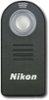
1-5 of 5 Answers
The ML-L3 can be used with the D5200 and can be activated by choosing a release mode. The ML-L3 can be triggered when using the 2s release or the Quick Response Release.
Sorry, there was a problem. Please try again later.I am using it with D5200. Works fine for me. U can press shutter release mode select button which is next to LV switch and select quick response or delayed remote (and other shutter release options as well) to use this device.
Sorry, there was a problem. Please try again later.Here's a link to Nikon compatible cameras: http://www.nikonusa.com/en/nikon-products/product/remote-cords/ml-l3-wireless-remote-control-(infrared).html#tab-ProductDetail-ProductTabs-CompatibleWith
Sorry, there was a problem. Please try again later.Compatible with 5300. You push a button, the same for the 10 second shutter, select the icon corresponding to the remote and push OK. That is it.
Sorry, there was a problem. Please try again later.I am not sure. I believe for the 5200 you need the WR R10 and the WR T10
Sorry, there was a problem. Please try again later.