Black Friday is hereShop new DoorbustersShop now

Skip to content
Gift Ideas
45575 Dulles Eastern Plz
Ste 188
Sterling, VA 20166
Opens at 9 am
Find Another Store
Main Content

Questions & Answers

Your price for this item is $20.99
Clearance
The comparable value price is $21.99
Page Showing 1-20 of 86 questions
  • QuestionDoes it work with D5100?

    Asked by Anonymous.

    • Answer Yes, the ML-L3 is compatible with the D5100.

      Answered by NikonStaff

  • QuestionDoes this Nikon ML-L3 remote fit for Nikon D3400?

    Asked by TW.

    • Answer This remove will work for a Nikon D3400. It's also worth noting the D3400 has built-in Bluetooth and there are several apps you can download to your mobile device that enable it to act as a remote shutter release and more.

      Answered by Epicurean

  • QuestionIs this remote compatible with Nikon D5600

    Asked by Tic.

    • Answer You need WR-T10 Wireless Remote Controller

      Answered by AD2017

  • QuestionDoes this work with the D7000

    Asked by Anonymous.

    • Answer Yes it will work with the D7000

      Answered by NikonStaff

  • Questionwill this work with the d3400 Nikon camera.

    Asked by sugarhillbill.

    • Answer According to Nikon's website (nikonusa.com) it should work

      Answered by Anonymous

  • QuestionWill this remote work with a Nikon D5600?

    Asked by Shooter.

    • Answer The ML-L3 Wireless Remote is not compatible with the D5600. When paired with a compatible iOS or Android smart device the camera can be triggered remotely via Nikon's SnapBridge app.

      Answered by NikonStaff

  • QuestionDoes this work with the new Nikon D3500?

    Asked by JCortez.

    • Answer No. The Nikon ML-L3 is not compatible with the Nikon D3500 DSLR camera. For a remote release option check out Nikon's SnapBridge application, which offers remote shooting and easy wireless transfer. The SnapBridge app allows the camera to seamlessly connect to a compatible smart device running the Snapbridge application through Bluetooth Low Energy (BLE) technology. Images can be instantly transferred when using the Snapbridge app and images can also be taken with the camera, remotely, through the smart device.

      Answered by NikonStaff

  • QuestionIs the Nikon ML-L3 Wireless Remote compatible with the Nikon D500?

    Asked by Anonymous.

    • Answer No. The correct wireless remote option for the Nikon D500 DSLR camera is the WR-R10 Wireless Remote Controller (receiver) and the WR-T10 Wireless Remote Controller (transmitter). Using the WR-R10 Wireless Remote Controller and the WR-T10 Wireless Remote Controller together allows you to wirelessly control the shutter release on the D500 camera. This camera shutter can also be released remotely when it is paired with a compatible smart device that is running the SnapBridge application.

      Answered by NikonStaff

  • QuestionDoes it work with the D3300?Will it work for my D3300?

    Asked by Anonymous.

    • Answer There is a remote setting in the D3300 that allows the use of the ML-L3. It is 100% compatible with the camera. If you own the camera, please check out page 97 of your camera's manual as it details out Remote Control Photography.

      Answered by NikonStaff

  • QuestionDoes this work with the Nikon D3400

    Asked by JP.

    • Answer Yes is works with the Nikon D3400 Camera.

      Answered by Sigmastar

  • QuestionIs this remote compatible with D5500

    Asked by Anonymous.

    • Answer Yes. Check info here:http://www.nikonusa.com/en/nikon-products/product/remote-cords/ml-l3-wireless-remote-control-%28infrared%29.html#tab-ProductDetail-ProductTabs-CompatibleWith

      Answered by Jdd84

  • QuestionIt is compatible with d7200

    Asked by Anonymous.

    • Answer It should, works fine with my D7100. Just need to go into settings to enable it.

      Answered by mike

  • QuestionDoes it work with D3200 ?

    Asked by Anonymous.

    • Answer Yes, works wonderfully with D3200. You will have to go into the settings menu on the camera or push the self timer button on back of camera to select the quick response remote every time you turn the camera on when wanting to use the remote.

      Answered by TAP40

  • QuestionHi does this work with the Nikon Coolpix S9500? If not do you know if they make one thx

    Asked by Leslie.

    • Answer Hello; Nikon has always done a poor job of providing info on wireless remotes, even when a third party option was the only one available. The Ml-L3 Wireless Remote Control does not work with the Nikon Coolpix S9500 as per the available documentation. Your camera model does provide a very cool alternative solution though with the built in WI-FI feature on the camera. If you have a smart phone, you can download the “Wireless Mobile Adapter Utility” app which when set up will allow you to take pics remotely with your smartphone. You will even be able to view what your camera sees thru the viewfinder on your smartphone screen. https://www.nikonusa.com/en/learn-and-explore/a/tips-and-techniques/using-your-nikon-cameras-built-in-wi-fi.html

      Answered by Kevin

  • QuestionWill this work with D90

    Asked by Joe.

    • Answer Yes, the ML-L3 Wireless Remote is compatible with D90!

      Answered by NikonStaff

  • QuestionDoes this work with Coolpix L840? If not, are there any shutter remotes that do work with the L840(wired or wireless)?

    Asked by Anonymous.

    • Answer No, the Nikon ML-L3 Wireless Remote Control is not compatible with the Nikon COOLPIX L840 digital camera. The Nikon ML-L3 only works with select Nikon D-SLR, Nikon 1 and COOLPIX A and P-series cameras. There are no compatible shutter remotes available for the Nikon COOLPIX L840.

      Answered by NikonStaff

  • Questiondoes it work with the d3100??

    Asked by Anonymous.

    • Answer No, this remote is not compatible with the D3100. You can use the MC-DC2 remote cord.

      Answered by NikonStaff

  • QuestionHi Would this Wireless Remote work with a Nikon CoolPix L340 camera? It doesnt have WIFI

    Asked by tob.

    • Answer The Nikon COOLPIX L340 Digital Camera does not have wireless transfer capability. To transfer images connect the camera to a computer via the provided UC-E16 USB cable or take the memory card out of the camera and place it in a memory card reader on the computer. This camera does not have a compatible remote accessory, however, it does have a couple of timer options, so that you can be in an image you're taking. For Nikon cameras that have wireless transfer capability, check out current Bluetooth-capable Nikons like the COOLPIX B500 or the COOLPIX A900, which can be remotedly triggered with a connected and compatible smart device that's running the SnapBridge Application.
      Answered by NikonStaff

  • QuestionWhat battery does it use? need a model number to price out battery

    Asked by Anonymous.

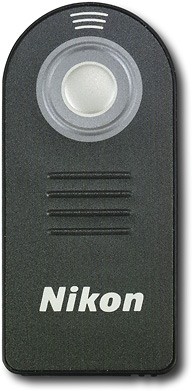
    • Answer The ML-L3 Wireless Remote Control uses a 3V CR2025 battery.

      Answered by NikonStaff

  • QuestionWhat do you set the camera to for the ML-L3 remote to work? Nikon D90

    Asked by Jaycolquitt.

    • Answer To set the Nikon D90 DSLR for remote use with the ML-L3 Wireless Remote Control turn the the Nikon D90 on and press the button with the remote icon above it. This button can be found right next to the top LCD screen. While holding down this button turn the nearby Command dial. This will allow you to choose from six options for shutter release; to use the remote release options use delayed emote or Quick Response remote. The camera's shutter will then be able to be released with a single press on the ML-L3 button. To learn more please contact Nikon Support.

      Answered by NikonStaff












