“How can I connect my hue to my arris router? It only has 1 outlet for cable in back of router and my google system is plugged into it”
Answer This Question
1-5 of 5 Answers
You can use a switch to add more ports or you can use another router just put it in bridge mode and connect the router to your existing router to have more ports.
Sorry, there was a problem. Please try again later.If your “Google system” has a free port on it, you should be able to plug the bridge into that. If not, you would need to buy a small unmanaged switch like the Netgear GS-108, plug the switch into your Arris modem and then plug both the “Google system” and the Hue bridge into the ports on the switch. I use these GS-108 switches wherever I want to turn one port into 7 ports....like near a TV where I have several devices that can either operate wired or wirelessly. If I have a wire, it is always better to connect everything with a cable. It is faster and more secure.
Sorry, there was a problem. Please try again later.Get an ethernet hub which will give you more jacks.. or a new router. 1 jack is shockingly low.
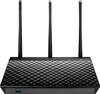
Sorry, there was a problem. Please try again later.If your Arris Router only has one Ethernet port in the back, then you will need to purchase a wireless router with 4 Ethernet ports in it or a Switch to give you more ports. if this Arris Router is not wireless, then a wireless router is the answer. Asus makes the easiest routers to configure on the market and they are carried here. Depending on the size of your home as well, you can either go with the Asus AC1750 Dual Band Wireless AC Router, or just go all the way with the Asus Rt-AC5300 ROG Rapture Tri-Band Router. I have both of these and the first is wirelessly connected to the second to increase the signal in my Garage. I hope this answers your question.
I would recommend:
Sorry, there was a problem. Please try again later.I use a 5 port switch to provide Ethernet to all my devices. Inexpensive and it works.
Sorry, there was a problem. Please try again later.