A:AnswerHi there most cable companies now have the traditional or digital options I'm almost 99% sure you can do it,nope im 100% sure you can do it i checked and just download your app on tv and your service has that service included in your subscription hope the helps you
A:AnswerI think it would work excellent. It certainly beat paying 1 to 2k for a monitor with the same features. It may not have the fancy 0.1 millisecond response time, but for gaming and as a second monitor I say it a steal if a deal
A:AnswerYou got 3 ports use all 3 and then use a hdmi switcher to combine two technically you could do just one hdmi port and then use the adapter to switch between devices since the devices number is being controlled by the adapter not the tv
A:AnswerCopilot
Certainly! Adjusting the picture settings on your Samsung Q60C QLED TV can enhance your viewing experience. Here are some steps you can follow:
Picture Mode: Press the menu button on your remote control and select the “Picture” option. You’ll find different picture modes to choose from, such as Standard, Movie, Dynamic, and Game. Experiment with these modes to find the one that suits your preference.
Brightness and Contrast: Within the Picture settings, adjust the brightness and contrast sliders. Increasing brightness can make the image clearer, while adjusting contrast affects the difference between dark and light areas.
Color Settings: Fine-tune the color settings. You can adjust color temperature, saturation, and tint. If you want a warmer or cooler color tone, explore these options.
Backlight: The backlight setting controls the overall brightness of the screen. Increase it for a brighter image or decrease it for a dimmer one.
Advanced Settings: Explore advanced options like gamma correction, local dimming (if available), and motion settings. These can further enhance picture quality.
Remember that the available settings may vary by model and year. If you’d like more specific guidance, consider checking the user manual or watching video tutorials on adjusting settings for your exact TV model12. Enjoy your Q60C QLED TV!
A:AnswerI bought 2 Samsung 32 Qled and Samsung Neo Qled 65"
TVs and I had to order 2 of these from Amazon.com to connect our 2 existing DVD players.
RCA to HDMI Converter, AV to HDMI, Composite CVBS to HDMI Adapter Support 1080P Supporting PAL/NTSC for TV/PS2/PS3/ STB/Xbox VHS/VCR/Blue-Ray DVD Players
Visit the SunimDHi Store.
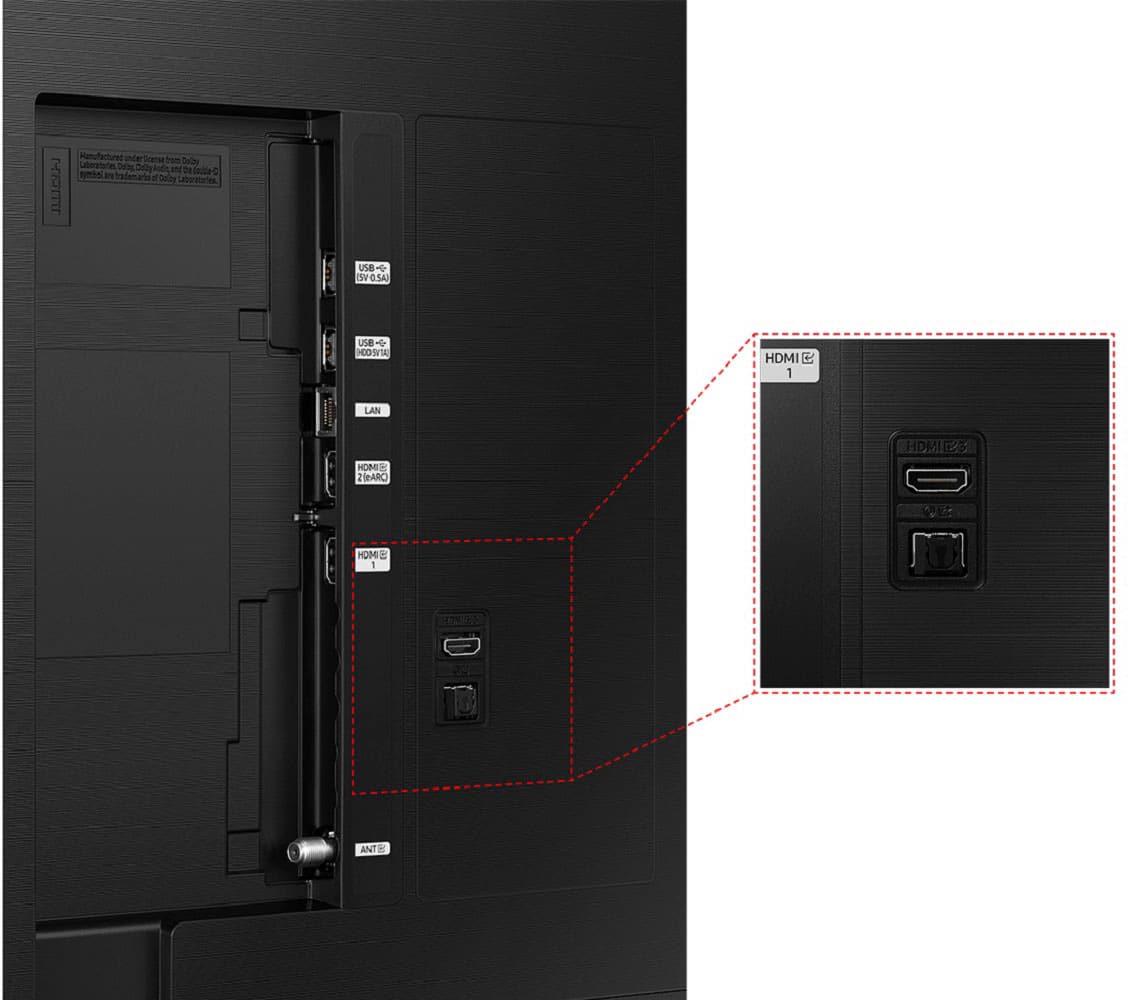
The new TV's don't have the HDMI to AV HDMI to 3RCA red, yellow, and white connection on back, only HDMI.
A:AnswerSpike - Please give us the opportunity to better assist with this by reaching Samsung Support at: 1-800-SAMSUNG, 8AM - 12AM EST, 7 days a week, or Chat with us on Samsung.com: https://www.samsung.com/us/support/contact/ ~ Samsung Specialist
Answered by Samsung 2 months ago
Samsung Representative
A:AnswerA Music Choice subscription is currently available for purchase on Vizio and Samsung Smart TVs. Please search the app store to download the Music Choice app on your Smart TV to get started.
How do I subscribe to Music Choice through my Smart TV?
www.musicchoice.com/help-center/music-choice/smart-tv
www.musicchoice.com/help-center/music-choice/smart-tv
A:AnswerErnie - Please give us the opportunity to better assist with this by reaching Samsung Support at: 1-800-SAMSUNG, 8AM - 12AM EST, 7 days a week, or Chat with us on Samsung.com: https://www.samsung.com/us/support/contact/
~ Samsung Specialist
A:AnswerFor your Samsung 32" Class Q60C QLED 4K UHD Smart Tizen TV, you’ll want a wall mount that matches its VESA Mounting Pattern. Here are the details:
Screen Size: 32" Q60C
VESA Mounting Pattern: 100 mm x 100 mm
Mounting Screw Type: M4 (length between 19 mm to 22 mm)
For larger versions of this TV model, like the 43", 50", and 55" versions, use a mount compatible with a 200 mm x 200 mm VESA pattern. If you have the 65" or 70" model, opt for a mount that fits a 400 mm x 300 mm pattern.
The 75" version requires a 400 mm x 400 mm pattern, while the 85" uses a 600 mm x 400 mm pattern1. Make sure to choose a reliable wall mount that meets these specifications!
*If you’re looking to upgrade your entertainment area with a new smart TV, a TV mount is a great way to do it. While a mounted TV is sleek and removes yet another surface for clutter to accumulate, putting new holes in the wall is never fun. Finding the right TV mount for your space and your screen—both in sturdiness and in ergonomics—is well worth the better viewing experience.
Mounting your TV means you can tilt the screen to avoid glare or accommodate variable seating, and it frees up more space for storing your game consoles and sound bars. Here’s everything you need to know to select the best TV wall mount for your home.
For more great additions to your viewing setup, check out our picks for the best Amazon Fire TVs and Fire TV sticks, the best OLED TVs, and the best fireplace TV stands.
The Best TV Mounts
Best Overall: Pipishell Full-Motion Wall Mount
Best for Large TVs: Echogear Full Motion TV Wall Mount
Best Premium Option: Sanus Premium Full-Motion TV Mount
Best Tilt-Only Option: Sanus Tilt TV Mount
Best Fixed Option: Mounting Dream Flat Screen TV Mount
What to Consider
Mount Type
Most modern TVs are compatible with VESA mounts—a standard mounting system from the Video Electronics Standards Association that lines up perfectly with the mounting holes on the back of your TV or monitor. To be clear, this is the system that attaches your TV to your mount and not the system that attaches your mount to the wall. More on that later.
If your TV isn’t VESA-compatible, which is extremely rare, you may need to buy a proprietary mount from the company that made your TV.
Within the realm of VESA-compatible mounts, you’ll see TV mounts that are stationary and hold the TV as flush with the wall as possible, as well as dynamic options that let you tilt, rotate, or otherwise articulate your display. While movable options are handy for smaller TVs in kitchens, for instance, the maneuverability might not be as handy as it seems for very large TVs.
That said, if you have a lot of glare in your living room or frequently move between a few seating areas, the ability to tilt the TV back and forth can be helpful.
Weight Capacity and TV Size
All of the TV mounts we recommend have trustworthy weight ratings on the product descriptions. Keep in mind that the mount is only as strong as its connection to the wall—always make sure you use a stud finder to find wall studs, especially if you opt for a cantilevered option that puts added weight on the TV mount arm when it’s fully extended.
While most TV mounts list both the weight capacity and the TV size limit, not all 65-inch TVs weigh the same. Instead of wasting time trying to weigh your TV, refer to the product specs for your TV to find the exact weight—look for the product weight, not the packaged weight.
How We Selected
We used our knowledge of mounting, as well as our understanding of trustworthy tech companies, to recommend several reliable TV mounts. While we recommend getting help if you’ve never done it before, we did our best to find TV mounts that are relatively easy to install and include all the necessary hardware. We prioritized VESA mounts, offering options that accommodate TVs as large as 90 inches so you can achieve that sleek living room you’ve been striving for.
1. BEST OVERALL
Pipishell Full-Motion Wall Mount
$55 AT AMAZON
$126 AT WALMART
PROS
Pro
Full-motion
Pro
Easy installation
Pro
Supports a wide range of TVs
CONS
Con
Might block easy cable access for TVs with ports on the back
If you want a solid TV wall mount that can move in many directions, this Pipishell full-motion wall mount should check just about every box. It swivels, tilts, and rotates while supporting a wide range of TV sizes and weights, which is handy if you plan on upgrading your TV anytime soon.
It comes with hardware for mounting it on concrete and brick if you choose, and the price is right for a reliable TV mount.
KEY SPECS
Type Full-motion mount
TV Size Compatible with TVs from 37 to 70 inches
Weight Limit Supports up to 132 pounds
Mounting Hardware Wood studs, concrete, and brick
3. BEST PREMIUM OPTION
Sanus Premium Full-Motion TV Mount
$400 AT AMAZON
$300 AT WALMART
$400 AT B&H PHOTO
PROS
Pro
Full motion
Pro
Cable management
Pro
Sturdy build and minimal design
CONS
If you’re looking for a top-of-the-line mount for your top-of-the-line TV, this Sanus Premium TV mount fits the bill. This mount will certainly cost you a pretty penny, but it comes with a variety of features to justify it.
For one, it can hold huge TVs and quite a bit of weight. It also has some of the widest range of motion out of any of our picks, with 28 inches of extension from the wall, as well as swivel and tilt capabilities. It’s designed to be easy to move but still stay in place once it’s adjusted, and it also has cable management and a slim design for a clean look.
KEY SPECS
Type Full-motion mount
TV Size Compatible with TVs from 42 to 90 inches
Weight Limit Supports up to 125 pounds
Mounting Hardware Wood studs and concrete
4. BEST FOR LARGE TVS
ECHOGEAR Full Motion TV Wall Mount
Now 15% Off
$110 AT AMAZON
PROS
Pro
Full-motion
Pro
Supports large TVs
Pro
Cable management
CONS
Con
Smaller TVs won’t fit
If you have a huge TV, you’re going to need a mount that can support its size and the weight. Luckily, the Echogear full-motion TV mount has you covered. This mount can handle TVs up to 90 inches and 125 pounds with ease.
The full range of motion allows you to pull the TV out up to 22 inches from the wall and swivel it up to 130 degrees. The built-in cable management also helps you to keep things neat and tidy.
KEY SPECS
Type Full-motion mount
TV Size Compatible with TVs from 42 to 90 inches
Weight Limit Supports up to 125 pounds
Mounting Hardware Wood studs and concrete
7. BEST FULL-MOTION MOUNT
Vogel's Full-Motion Wall Mount
$305 AT AMAZON
PROS
Pro
Full motion
Pro
Easy to install
Pro
Minimalist design
CONS
Con
Doesn’t support a lot of weight
If you’re looking for a full-motion mount that works well and looks great, then Vogel’s full-motion TV mount is a great option. It comes in both black and white styles, so it can be matched to your décor, and it also has an attractive ultra-thin profile.
This is a great mount for those who want something low-profile with high functionality. This mount allows you to tilt your TV 20 degrees, swivel 180 degrees, and extend it up to 20 inches away from the wall. It even comes with an AR app to help you with installation.
KEY SPECS
Type Full-motion
TV Size Compatible with TVs from 26 to 55 inches
Weight Limit Supports up to 40 pounds
Mounting Hardware Wood studs, concrete, and brick
DOUGLAS HELM
Douglas Helm is a freelance writer who specializes in the technology space
A:AnswerCertainly! The Samsung 32" Class Q60C QLED 4K UHD Smart Tizen TV offers several ways to connect external audio devices while still using its internal speakers:
Wired Connections:
HDMI (eARC): Connect your external speaker to the TV’s HDMI IN (eARC) port, and then connect the HDMI OUT (TV-ARC/eARC) port of the speaker to the TV. You can adjust settings in the TV menu to enable eARC mode for optimal audio output1.
Optical: Use a digital optical cable to connect the Digital Audio In (Optical) port on the external speaker to the Optical Out port of the TV. The Sound Output setting will automatically switch to the connected device1.
Wireless Connection:
Bluetooth: Pair your Samsung TV with compatible Bluetooth devices such as speakers or earphones. Ensure that the speaker is connected to a wireless network1.
Remember to check the TV’s user manual for specific instructions based on your preferred connection method. Enjoy your audio experience!
A:AnswerI apologize, but it seems that changing the actual guide colors on the Samsung Q60C QLED TV is not directly possible. However, you can try adjusting the accessibility settings to improve readability:
High Contrast Mode:
Access the system settings by pressing the MENU button on your remote.
Select “System” and then choose “Accessibility.”
Enable “High Contrast” to set a high-contrast background and font in Smart Hub1. This might help with readability.
Xfinity X1 Guide (if applicable):
If you’re using an Xfinity X1 system, you can explore customization features:
Adjust the background darkness level for better text readability.
Use Enhanced Text Readability to change font sizes.
Explore Voice and Audio Guidance options2.
Unfortunately, the blue background color from the legacy Xfinity guide is no longer available, but I hope these settings can help improve your experience. If you continue to have difficulties, consider reaching out to Samsung or Xfinity support for further assistance.
Learn more 1
samsung.com 2
forums.xfinity.com 3
html-easy.com 4
bestbuy.com