Year-End SaleEnds 1/1/26. Limited quantities. No rainchecks.

Main Content

Questions & Answers

Your price for this item is $249.99
The comparable value price is $379.99
Page Showing 61-80 of 206 questions
  • QuestionDo you have to pay an extra fee monthly to get connected to Verizon cable?

    Asked by JM.

    • Answer Hi JM, Verizon Cable is not included with the U7900 TV. However, it is not an additional cost to connect to a cable box outside of the cable subscription fee, cable boxes, and cables. ~Samsung Advisor

      Answered by Samsung

  • QuestionIs the hulu app installed on the u7900f tv?

    Asked by Bridger.

    • Answer Hi Bridger, Yes, the Hulu+ app is pre-installed on the U7900 TV. ~Samsung Advisor

      Answered by Samsung

  • Questioncan i stream the xfinity app on this tv

    Asked by dan.

    • Answer Hi Dan, Yes, the Xfinity app is available for download on the U7900 TV. ~Samsung Advisor

      Answered by Samsung

  • QuestionDoes this TV have picture in picture capabilities?

    Asked by Sportsman.

    • Answer Hi Sportsman, Multi-View or PIP begins with our Q7F Series and is not available on the U7900. ~Samsung Advisor

      Answered by Samsung

  • QuestionCan I disable the smart features on this TV? My mom has dementia and in her assisted living facility they use directv so I want it to work with one remote (preferably directv remote) and not show her any smart features. They will only confuse her.

    Asked by Andy.

    • Answer Hi Andy, Yes, you can disable the Smart Features, or when prompted, choose not to sign into a Samsung account, which will prevent any Smart Features from being accessed. I hope this helps! ~Samsung Advisor

      Answered by Samsung

  • QuestionCan I access ESPN+ and Peacock on this TV?

    Asked by RobertR.

    • Answer Hi Vsdaddy, Yes, ESPN+ and Peacock are available for download on the U7900 TV. ~Samsung Advisor

      Answered by Samsung

  • QuestionCan I get paramount and peacock

    Asked by Magoo.

    • Answer Hi Magoo, Yes, Paramount+ and Peacock are available for download on the U7900 TV. ~Samsung Advisor

      Answered by Samsung

  • QuestionWhat are the box dimensions

    Asked by Anonymous.

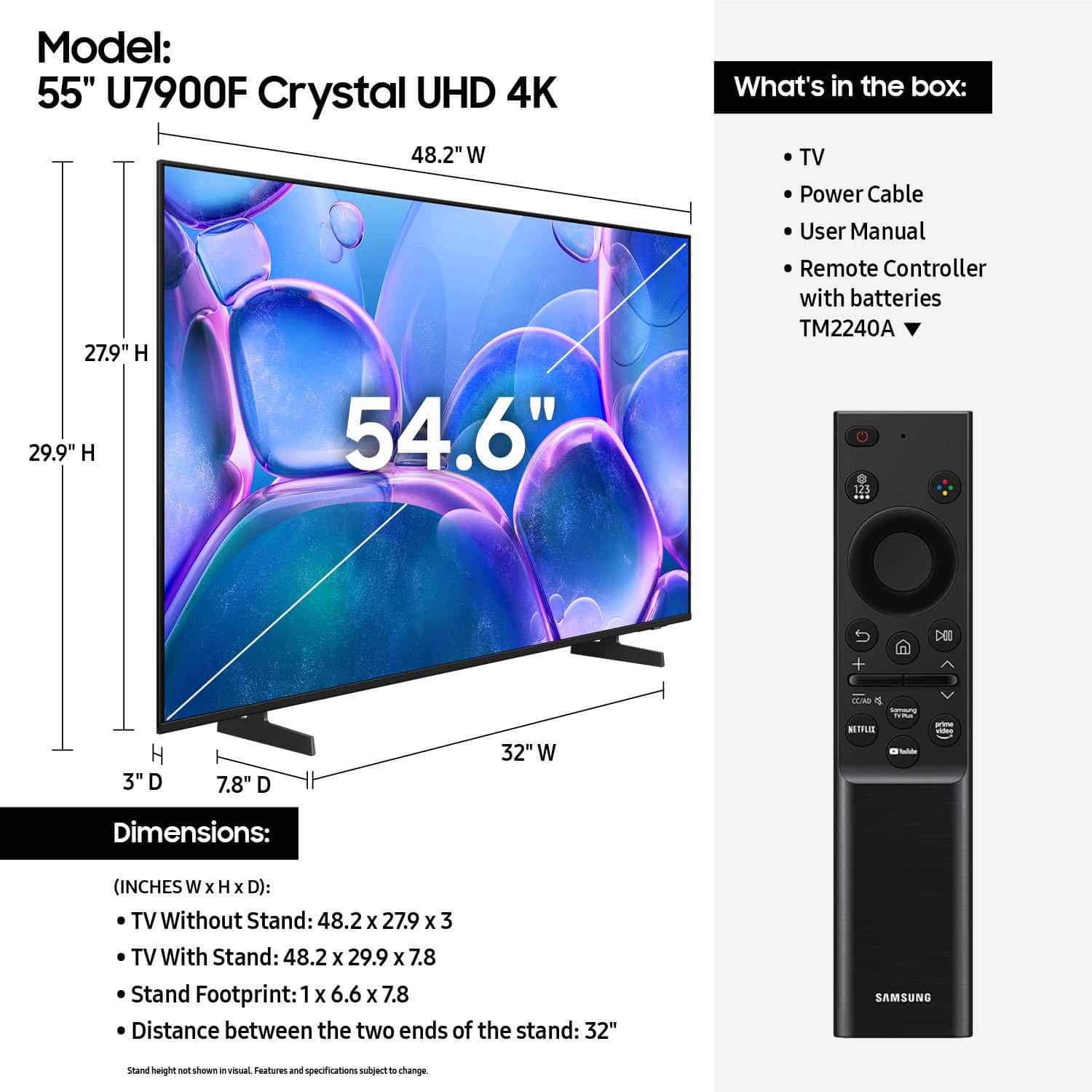
    • Answer Hi, The 55" U7900 TV box dimensions are 53.3" x 31.9" x 5" (WxHxD). ~Samsung Advisor

      Answered by Samsung

  • QuestionWill next generation ps5 be compatible and make the most of the gaming system?

    Asked by Brack.

    • Answer I’m running it with a ps5 and it looks great. I’ve had zero issues and the two devices communicate well. I can press the ps button on the remote to boot my console and the tv will follow by turning on and switching inputs which simplifies a lot. No complaints from a casual gaming perspective.

      Answered by SamP

  • QuestionWhat size bolts are required to mount tv to bracket

    Asked by Mark.

    • Answer Hi Mark, The 55" U7900 TV requires 4 M8x23-25mm screws. ~Samsung Advisor

      Answered by Samsung

  • QuestionDoes it come with a stand?

    Asked by tw.

    • Answer Yes, it comes with feet that easily snap on. There is no confusion about which direction to install either, it has the word "front" on them with an arrow pointing in the direction to be installed.

      Answered by AngelicS

  • QuestionDoes the professional mounting for $179.99 include the mounting bracket? Or are we supposed to buy one separately?

    Asked by Nory.

    • Answer Hi Nory, According to the Best Buy website, the mount is a separate purchase. You can find more information available on their website: https://www.bestbuy.com/site/tv-home-theater-services/tv-mounting-packages/pcmcat748300648009.c?id=pcmcat748300648009#1 ~Samsung Advisor

      Answered by Samsung

  • QuestionMy tv goes a red background after it’s been off for while and I have rebooted it ! How do I fix that so it doesn’t do that

    Asked by Stef.

    • Answer Hi Stef, If your TV powers on but you’re seeing a black or red screen, it could be caused by your external device or the connection itself. Please try the following steps to help determine the cause: 1. Press the Home button on your Samsung remote. – If the menu appears, the TV is powered on but may be on the wrong source or not receiving a signal. – If the menu does not appear, the TV may be experiencing power issues. 2. Check the red standby light near the bottom of the screen. – The light is on when the TV is off (standby), and off when the TV is on. – If the light is off and there’s no menu or picture, the TV may not be receiving power. 3. Check your input source. – If your cable box or streaming device is connected to HDMI 1, ensure the TV source is also set to HDMI 1. – If it’s already set correctly but there’s still no picture, unplug and reconnect the HDMI cable at both ends. If any cable is damaged, it will need to be replaced. Power cycle the device and TV after reconnecting. 4. Try a different HDMI port or cable. – Connect a different external device to see if the issue is limited to one source. – If a new device works, you’ve narrowed down the issue. 5. Run HDMI Troubleshooting. Go to: Home > left directional key > Connected Devices > Connection Guide > Video Device > HDMI Troubleshooting (approx. 2 min). 6. Check for firmware updates. If your screen stays on long enough, we recommend checking for updates, which may resolve any HDMI communication bugs: Home > left directional key > Settings > Support > Software Update > Update Now If the problem persists after these steps, please call us at 1-800-SAMSUNG, 8AM – 12AM EST, 7 days a week. LiveChat agents are also available via the ‘Support’ section on our website. ~ Samsung Advisor

      Answered by Samsung

  • QuestionDoes this TV have RS-232 Control?

    Asked by Craig.

    • Answer Hi Craig, No, the U7900 TV doesn't have RS-232 Control. ~Samsung Advisor

      Answered by Samsung

  • QuestionIs there a guide for local tv stations accessible on the remote?

    Asked by Angel.

    • Answer Hi Angel, Yes, you can access a guide for local channels. ~Samsung Advisor

      Answered by Samsung

  • QuestionDoes remote have voice command button?

    Asked by German.

    • Answer No

      Answered by AyshaJ

  • QuestionHow much does this tv weigh?

    Asked by Mary.

    • Answer Roughly 30lbs. It’s not heavy but you’re still going to need some help with wall mounting since it’s pretty awkward to carry alone once you get up to the 55”

      Answered by SamP

  • QuestionDoes the tv come with Disney plus and can I download apps on it ?

    Asked by Anthonya.

    • Answer They support every streaming app I’ve tested it with including Disney+. The AppStore is solid

      Answered by SamP

  • QuestionCan I use an antenna on the antenna input on this tv?

    Asked by sc.

    • Answer Yes

      Answered by EdCas

  • QuestionWill they remove my old unit after installation?

    Asked by nick.

    • Answer Hi Nick, If you’re looking for haul-away services for TVs or appliances, please visit your local Best Buy or see the full service details here: https://www.bestbuy.com/site/recycling/tv-appliances-haul-away/pcmcat174900050009.c?id=pcmcat174900050009 ~ Samsung Advisor

      Answered by Samsung