A:AnswerHi Al,
To turn on Multi-output audio, go to Settings> All Settings> General and Privacy> Accessibility> Multi-output Audio. Then, you will connect your Bluetooth headphones. You should now be able to listen via headphones and the TV speakers simultaneously.
~Samsung Advisor
A:AnswerHi Nick,
We do not offer a 60" OLED TV. We do offer a 55" and 65" inch here: https://www.bestbuy.com/site/samsung-65-class-s90d-series-oled-4k-uhd-smart-tizen-tv-2024/6576598.p?skuId=6576598
~Samsung Advisor
A:AnswerHi PWH,
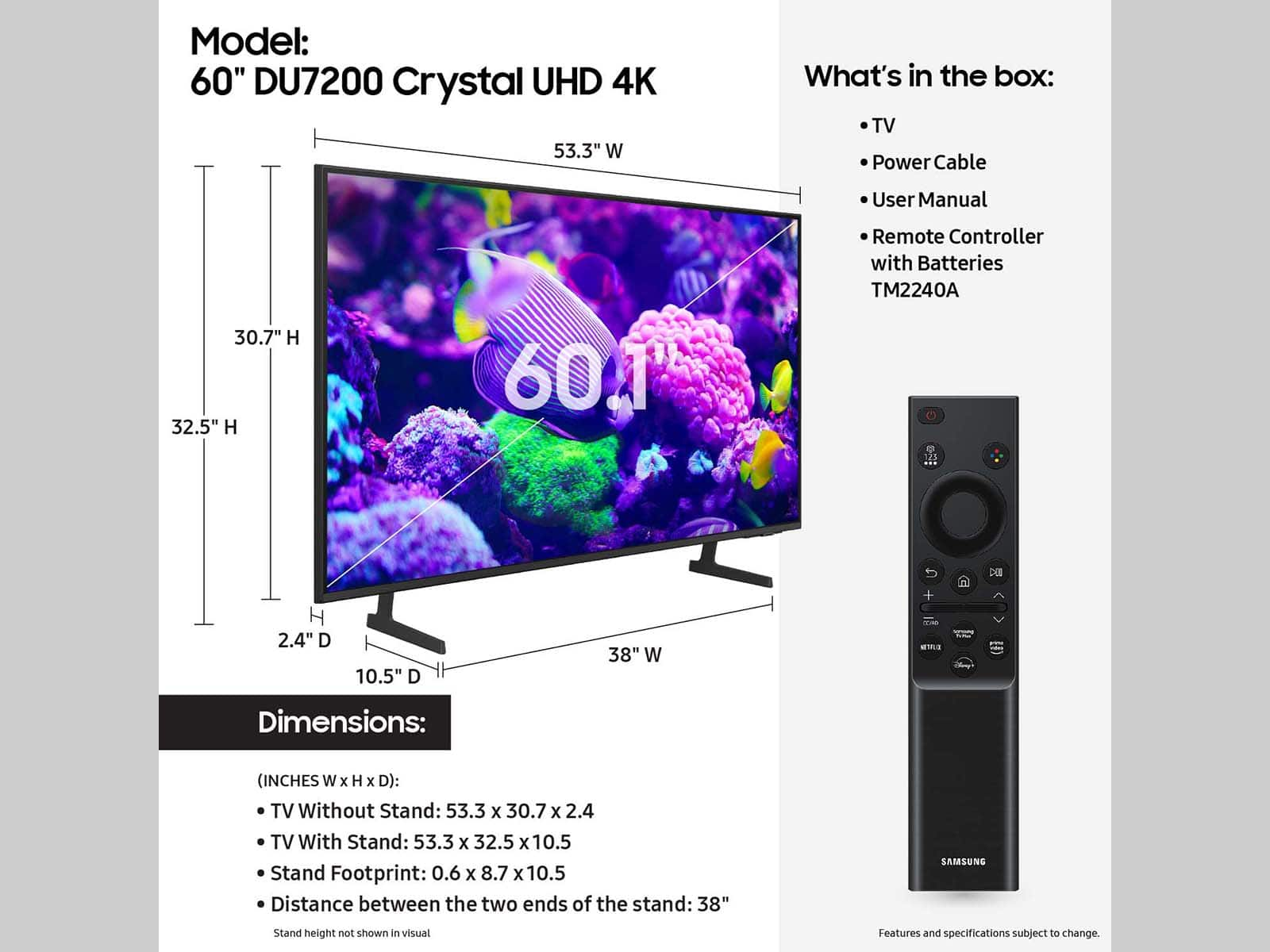
Yes, you can wall mount the 60" DU7200 TV. You will need an external wall mount compatible with a VESA Map of 400mm x 300mm.
~Samsung Advisor
A:AnswerHi Kathy,
You can absolutely install the TV yourself, but it can depend on the individual person. For information on setup, please refer to the below.
To download the manual and quick start guide, please follow this link: https://www.samsung.com/us/support/downloads/?model=N0060577&modelCode=UN60DU7200BXZA or by going to our website and clicking Support.
~Samsung Advisor
A:AnswerIt does not. I searched for 58-inch models and was only able to locate 2 or 3 companies that offer that specific size. In my case my spouse allowed me to get the 60-inch Samsung DU7200 which unfortunately is more expensive than the 65-inch, but it was the best decision we made. Good luck in your quest.
A:AnswerThe analog converter should work as long as these two things are properly connected.
1. Make sure that the hdmi cable from your analog converter is connected to the tv’s HDMI ARC port ( of the 3 hdmi ports its the one located on top of all hdmi slots)
2. Most analog converters I know require a power supply. Usually its a usb/micro usb connection hooked from the analog converter to a usb wall charger or simply plugging the other end to the tv’s USB port. Which this tv does have.
I hope this helps.
A:AnswerHi,
The DU7200 TV does not come with a built-in voice assistant. You can, however, connect it to a standalone Alexa device.
I hope this helps!
~Samsung Advisor
A:AnswerHi,
This greatly depends on your environmental conditions. Be sure to contact an authorized Samsung service center for information if you intend to install your TV in a location with heavy dust, high or low temperatures, high humidity, etc. The operating temperature is between 50˚F to 104˚F. Operating humidity is between 10% - 80%. Storage temperature ranges between -4˚F to 103˚F. Conditions falling outside these ranges may lead to serious damage to your TV.
~Samsung Advisor