A:Answerrkk0206 - Please give us the opportunity to better assist with this by reaching Samsung Support at: 1-800-SAMSUNG, 8AM - 12AM EST, 7 days a week, or Chat with us on Samsung.com: https://www.samsung.com/us/support/contact/
~ Samsung Specialist
A:Answerrkk0206 - Please give us the opportunity to better assist with this by reaching Samsung Support at: 1-800-SAMSUNG, 8AM - 12AM EST, 7 days a week, or Chat with us on Samsung.com: https://www.samsung.com/us/support/contact/ ~ Samsung Specialist
A:AnswerHi Cookie - We’d like the chance to assist you further. Please contact Samsung Support at 1-800-SAMSUNG (available daily from 8 AM to 12 AM EST) or connect with us via live chat at Samsung Support: https://www.samsung.com/us/support/contact/
~ Samsung Specialist
A:AnswerMulti View, available on Samsung’s Q7F Series and above, allows you to display two types of content on-screen at once. You can view an app or HDMI source on the left, while mirroring your smartphone or casting from a compatible app on the right. While two HDMI sources can’t be displayed together, Multi View gives you the flexibility to combine streaming, live TV, mobile content, and more – side-by-side.
~ Samsung Specialist
A:AnswerHi Dan - The HW-S800D (Black) or HW-S801D (White) Soundbar would be a great addition to Samsung's S95F TV. With 3.1.2 Channel audio, built-in Wireless Dolby Atmos, and Adaptive Sound, your audio is analyzed in real time to pull out the most important audio based on the type of content. And with Q-Symphony, our S-Series Soundbar will synchronize with the speakers of your TV for an immersive 3D sound experience.
~ Samsung Specialist
A:AnswerThe S95F TV features built-in Bixby and Alexa, both of which will both allow you to utilize hands-free voice commands by enabling the Voice Wake-Up feature. To activate this function, go to: Settings > All Settings > Advanced Features > Voice > Voice Wake-up = ON.
~ Samsung Specialist
A:AnswerHi Dominique - Learn Menu Screen is an accessibility feature that helps users navigate on-screen menus with audio guidance. When enabled, your TV will announce the name and function of each menu item as you scroll through the settings – without making any actual changes.
To enable this feature, go to: Settings > All Settings > General & Privacy > Accessibility > Learn Menu Screen. To exit Learn Menu Screen, press the Return key twice.
~ Samsung Specialist
A:AnswerThe S95F TV comes with a 1-year Parts & Labor Manufacturer’s Warranty when purchased brand-new from an authorized dealer. For additional warranty options offered by Best Buy, we recommend contacting them directly.
~ Samsung Specialist
A:AnswerRick - Please give us the opportunity to better assist with this by reaching Samsung Support at: 1-800-SAMSUNG, 8AM - 12AM EST, 7 days a week, or Chat with us on Samsung.com: https://www.samsung.com/us/support/contact/
~ Samsung Specialist
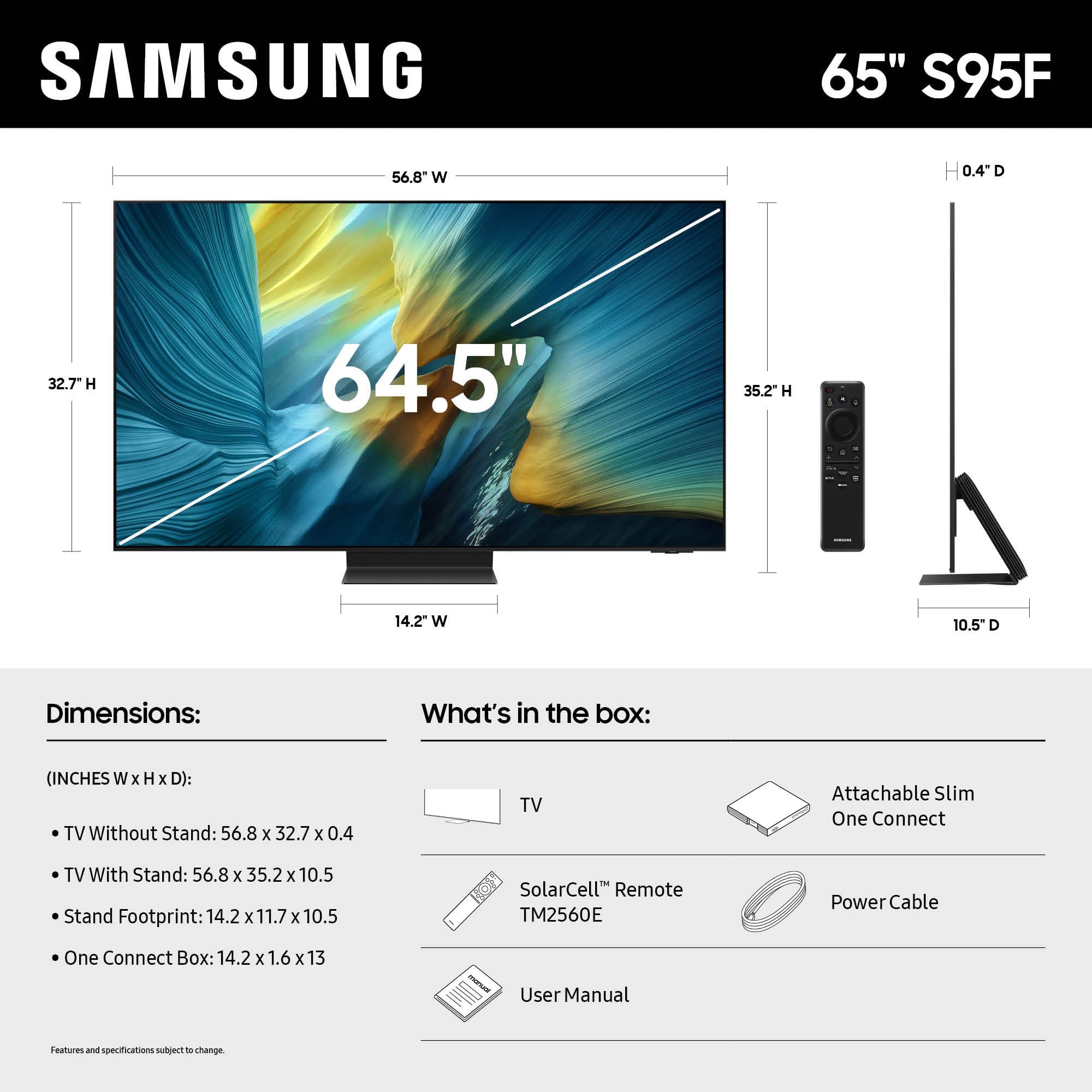
A:AnswerPeterabbid - You can find this information on this model’s product page – just click Specifications and scroll down to Dimensions: https://www.bestbuy.com/product/samsung-65-class-s95f-series-oled-4k-uhd-samsungvision-ai-smart-tizen-tv-2025/J3ZYG2VV3P
~ Samsung Specialist