“I purchased this 128 GB drive about six months ago from Best Buy. Now both my computers are unable to read the drive, where do I go for replacement?”
Answer This Question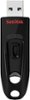
1-5 of 5 Answers
Perhaps take to Geed Squad to see if the connector can be replaced. Also, as you most likely know, always use the "safely remove hardware" mode - even though sometimes you just want to rip that device out.
Sorry, there was a problem. Please try again later.I think you should go to the store that you bought it and explain to them the situation unless of course you bought it online. If that's the case you should call customer service for better assistance.
Sorry, there was a problem. Please try again later.Take it to BEST BUY. Seems obvious to me.
Sorry, there was a problem. Please try again later.have the geek squad check it out to see if it is recoverable. you may have to purchase another one as this one may have crashed. Check with them to see it it is covered under a warranty.
Sorry, there was a problem. Please try again later.You need to up grade the BIOs on your computer ! So it can see the larger disks
Sorry, there was a problem. Please try again later.