“I have an HP laptop with headphone jack. I bought this Skullcandy product but it does not broadcast sound from the laptop. I tried it with a phone where it was working fine. Please help.”
Answer This Question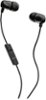
1-2 of 2 Answers
My HP laptop has 3 different jacks to choose from. Make sure that you are plugged into the "headphone out" jack and not a "microphone in" jack. Also, you can go into your "settings" menu, select audio, and make sure your sound settings are correct and not muted.
Sorry, there was a problem. Please try again later.Please visit our product support pages for troubleshooting steps. If this does not resolve your issue please reach out to our customer service team.
Sorry, there was a problem. Please try again later.