“How much does it cost to get the battery replaced at Best Buy? When I have my speaker fully charged, the next 5-10 minutes it says low battery.”
Answer This Question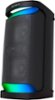
1-1 of 1 Answer
Hi Matt, We're sorry to hear about the battery life issue you're experiencing with your Sony SRSXP500. This is definitely not the news that we would like to hear. Please allow us to help you and turn this into a better experience. Let's try to isolate and resolve this issue by following the troubleshooting steps below: -The rechargeable built-in battery may be empty or running low. Connect the speaker to an AC outlet with the supplied AC power cord (mains lead) for battery charging. Make sure that the AC power cord (mains lead) is connected securely to the speaker. Then, make sure that the AC power cord (mains lead) is connected securely to an AC outlet. -The Auto Standby function may have activated. After about 15 minutes in certain circumstances, such as when the volume of the audio input is low, the power will automatically turn off. Raise the volume of the connected device for use, or set the Auto Standby function to off. If the issue persists after performing these steps, we recommend reaching out to Bestbuy to have it replace if it's within the return policy or contact us directly for further assistance. Unfortunately, due to the current Bestbuy phishing protocol for your protection, we cannot provide a direct email or phone number for customer support as of now. Please find Sony Electronics' Support information: Go to our support website > click on “Support” > scroll down click on “Contact Support” > click on [Product Type] and from there you'll see different ways to reach us. Regards, Sam
Sorry, there was a problem. Please try again later.