1-5 of 5 Answers
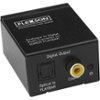
You C-A-N connect it to a 'smart' TV, but requires additional equipment/cables. Likely your TV has inputs/jacks for HDMI, optical out, and coaxial out. This receiver ONLY has analog (RCA-type) jacks, so you will need something like this (https://www.bestbuy.com/site/insignia-optical-coaxial-digital-to-analog-converter-black/4226000.p?skuId=4226000), plus either a coaxial cable or optical (Toslink) cable. Many similar devices are available. NOTE: The audio from this Yamaha receiver will be stereo only, not 'home theater' 5 or 7 channel. There are other ways to connect your TV to this receiver, but this is one of the simpler solutions.
I would recommend:
Sorry, there was a problem. Please try again later.You can also connect to your headphone jack of you're TV(smart TV) with a 3.5 Head phone plug on one end of the the cable (to your TV) and on the other end of the the y cable connect your red and white to your in, line 3 of your receiver. The easiest ( least expensive) way to connect this Yamaha to your TV I got my receiver's volume all the way up and my TV at only 10 out of 100 for normal TV watching and 20/25 for movies and it sounds great! don't forget to turn the Receiver down before you switch over to blue tooth
Sorry, there was a problem. Please try again later.I connect mine using bluetooth.
Sorry, there was a problem. Please try again later.Depends on the TV. With the Samsung 800 series TV using an optical output I could only get Youtube to produce audio through my Yamaha. Bluetooth is not compatible eithrer./
Sorry, there was a problem. Please try again later.Some SMART tv's have RCA analog audio outputs. Check and see if yours does. If so, then this amplifier will be fine to power speakers.
Sorry, there was a problem. Please try again later.