Customer Ratings & Reviews

- Model:
- 8X6-00041
- SKU:
- 6478004
Rating by feature
- Value
Rating 4.4 out of 5 stars
- Quality
Rating 4.8 out of 5 stars
- Ease of Use
Rating 4.8 out of 5 stars
Customers are saying
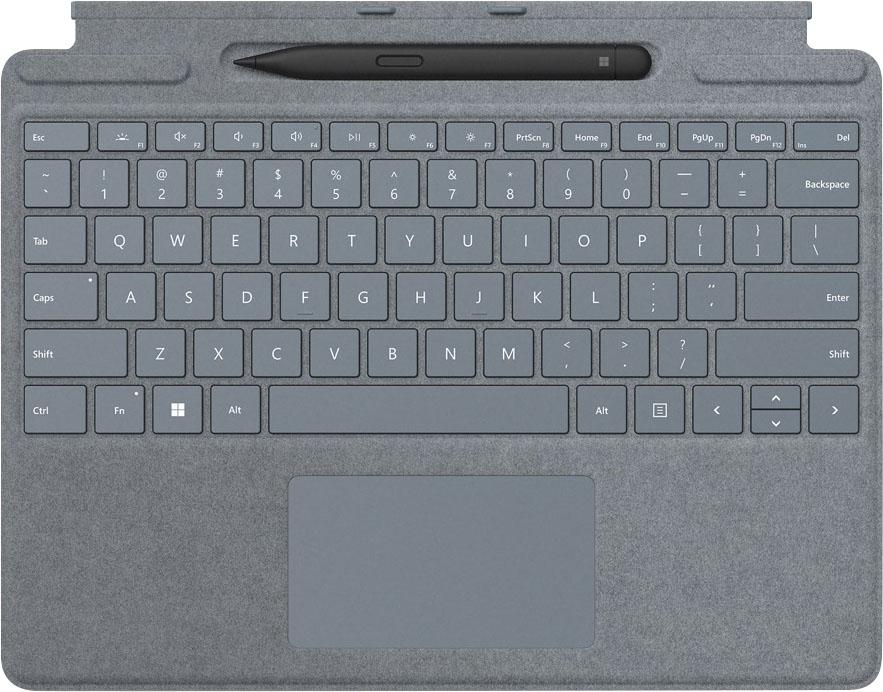
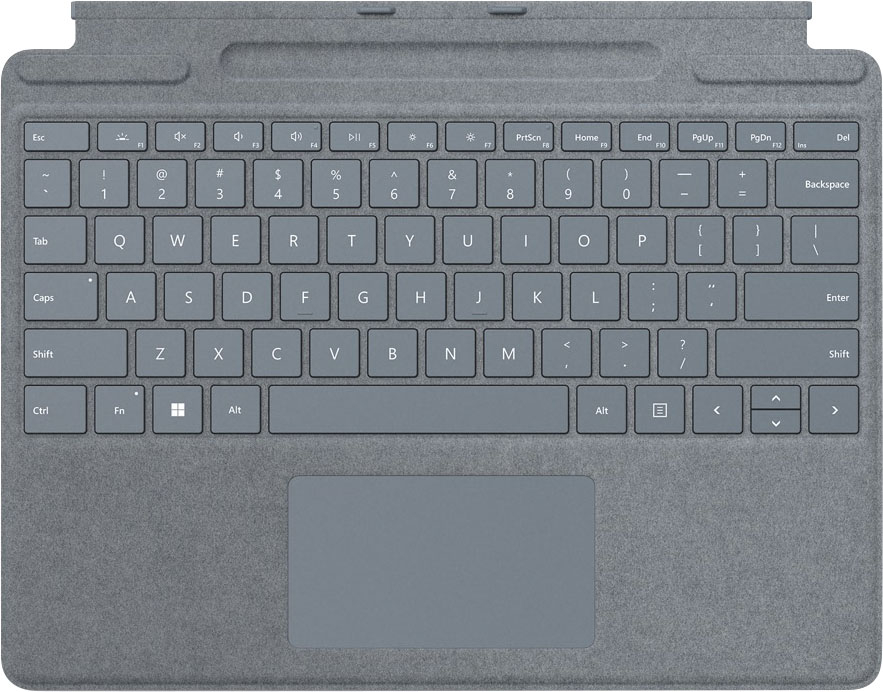
Customers are impressed with the Surface Slim Pen 2 and Pro Signature Keyboard for Pro X, 8, 9 for its pen storage, color options, ease of use, and durability. Some customers find the price to be a bit high, and there have been a few complaints about the trackpad size and connectivity issues.
This summary was generated by AI based on customer reviews.
Excellent keyboard
||Posted . Owned for 3 weeks when reviewed.This reviewer received promo considerations or sweepstakes entry for writing a review.Initially, I figured it would be too small and uncomfortable, but that surprisingly is not the case. Definitely recommend.
I would recommend this to a friendPen bonus!
||Posted .This reviewer received promo considerations or sweepstakes entry for writing a review.Love these keyboards how they just attach and the new Pro ones that come in matching color with a pen!! My daugher was very excited for this
I would recommend this to a friendNice bundle
||Posted . Owned for 1 month when reviewed.This reviewer received promo considerations or sweepstakes entry for writing a review.This came as a bundle with the Surface I recently purchased. Works as expected.
I would recommend this to a friendExcellent keyboard and pen
||Posted . Owned for 1 month when reviewed.This reviewer received promo considerations or sweepstakes entry for writing a review.Excellent keyboard and pen for surface pro 9. this is essential accessories.
I would recommend this to a friendGreat keyboard!
||Posted . Owned for 2 weeks when reviewed.This reviewer received promo considerations or sweepstakes entry for writing a review.Love the new keyboard and the pen that comes with it!
I would recommend this to a friendSurface pro 9
||Posted . Owned for 3 weeks when reviewed.This reviewer received promo considerations or sweepstakes entry for writing a review.It’s been fine so far. Haven’t had it long enough to determine any issues.
I would recommend this to a friendEssential accessory
||Posted . Owned for 1 week when reviewed.This reviewer received promo considerations or sweepstakes entry for writing a review.Very good accessory even though it would be nice if it came included. Works very well.
I would recommend this to a friendI like it!
||Posted . Owned for 1 month when reviewed.This reviewer received promo considerations or sweepstakes entry for writing a review.Very good product! But should be included with the surface!
I would recommend this to a friend- Pros mentioned:Color
Beautiful
||Posted . Owned for 1 month when reviewed.This reviewer received promo considerations or sweepstakes entry for writing a review.Absolutely love the color. It looks great, it’s sleek and very functional. Also charges the pen in a convenient spot.
I would recommend this to a friend - Pros mentioned:Keyboard quality, Pen

Essential for Surface Owners
|Posted .This reviewer received promo considerations or sweepstakes entry for writing a review.The Surface Keyboard and Pen are both essential accessories for any surface, but even more so this time around with the Surface Pro 8. Having that 120hz display on the Pro 8 makes such a big difference to draw and write on with the Surface Slim Pen 2. It is buttery smooth with no latency or lag and more accurate to make those small details shine with every stroke. At first glance I really didn't think the pen would be all that comfortable in my hand but I was seriously wrong. I've enjoyed using it for hours on end to navigate my surface, draw, and jot down notes with ease. This pen also has a haptic motor built in which makes it feel like you're writing on real paper. You can customize the strength of the motor in your settings menu to your preference. When it comes to the pens battery life, There's no need to worry. The keyboard has a cool little magnetic compartment on the top where the pen is stored and charges securely. The keyboard feels much more durable than the previous models while still being extremely lightweight and even has a bigger touchpad too. The keys feel great and click with the perfect amount of feedback. It plugs into the surface easily by clicking into place using a magnetic connection. When your surface is not in use the keyboard protects the screen making it even more portable. Overall, I highly recommend this bundle to any Surface Pro 8/Pro X owner for a true premium experience.
I would recommend this to a friendBrand response from MicrosoftOutreachTeam
Posted .Hi – Thanks for sharing; we hope you continue to enjoy using your new Surface Pro Signature Keyboard with Surface Slim Pen 2. Erica, Microsoft Outreach Team

- Pros mentioned:Color, Keyboard quality, PenCons mentioned:Compatibility, Price
Great typing experience but crazy expensive
||Posted . Owned for 1 week when reviewed.This reviewer received promo considerations or sweepstakes entry for writing a review.The Microsoft Surface Pro keyboard with Slim Pen 2 is a must-have for any Surface user. The pen is very responsive and precise, and this means it can be great for taking notes or drawing. The keyboard is also a great addition to the Surface, with a comfortable typing experience and backlit keys for use in low-light environments. For my taste, the Sapphire color adds a touch of elegance to the overall appearance of the Surface, even if using the black/graphite Surface Pro. While the price tag may be a bit steep, the quality of the product justifies the cost. Overall, I would recommend this product for anyone looking to enhance their Surface experience, while also fully understanding that there are no other options (unless considering off-brand solutions found online which I don't recommend). Pros: The pen is highly responsive and precise, making it great for note-taking and drawing. The keyboard provides a comfortable typing experience and has backlit keys for use in low-light environments. The Sapphire color adds an elegant touch to the overall appearance of the Surface. Cons: The price may be considered expensive for some users. Compatibility limited to the X, 8, and 9 models, so users with other Surface models will need to look elsewhere. Overall, the Microsoft Surface Slim Pen 2 and Signature Keyboard offer great functionality and style, but users should consider the compatibility and price before making a purchase.
I would recommend this to a friend - Pros mentioned:Keyboard quality
Absolute Must-Have for Surface Pro 8
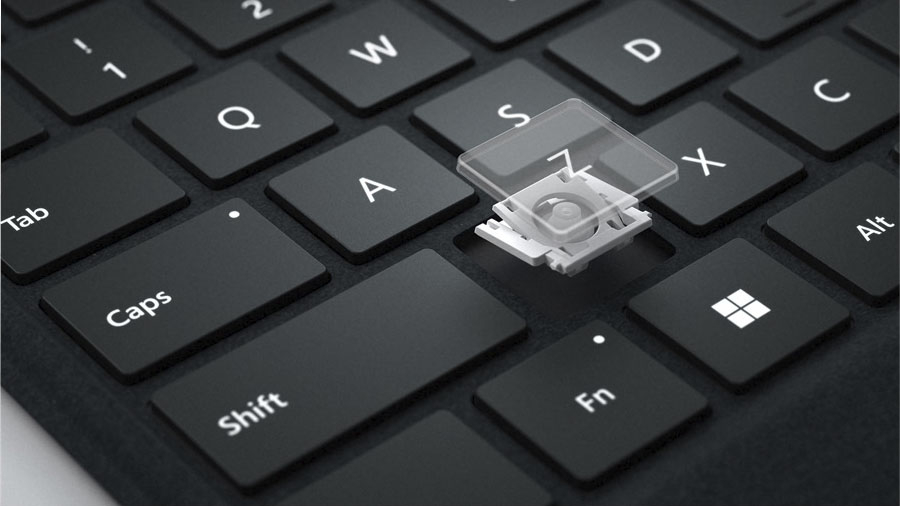
|Posted .This reviewer received promo considerations or sweepstakes entry for writing a review.If you have purchased (or are considering a purchase of) a Surface Pro 8, I would strongly recommend you factor in the cost of this Signature Keyboard (either this one with the Slim Pen or just the keyboard by itself). The Surface Pro 8 is a great device, but it is severely limited in its capabilities and function without adding this keyboard. Given the cost, Microsoft really should have included the keyboard with the Surface Pro 8. Regardless, this keyboard is probably the best keyboard that exists for any tablet (with the possible exception of the iPad Magic Keyboard). It is thin, lightweight, very sturdy, and the keys are nicely spaced. === PROS === - The keyboard is very slim and adds minimal bulk to the Surface Pro 8 when closed. - The keyboard is covered in a very soft Alcantara material that resists fingerprints and smudges. - All the keys you would need are included on this keyboard, including an Escape key, function keys, a Windows key, and keys to adjust volume, brightness, etc. - The keyboard is backlit with three levels of backlight brightness. Brightness can be adjusted using the F1 key. - You can use the keyboard in two positions: at a slight angle with the Slim Pen storage tray hidden, or flat with the storage tray exposed. In the angled position, the top of the keyboard perfectly hides the bottom bezel of the Surface Pro 8 screen, with your Windows task bar directly above the keyboard. - The typing experience is great: not too cramped, and there is a nice amount of travel in the keys. The keyboard does not flex or bend in either position (angled or flat) - it remains sturdy while you type. - The inclusion of the Slim Pen storage tray is a nice addition, especially if you don't use the Slim Pen very often. It's nice to be able to hide it away and not worry about it falling out or getting lost. - The trackpad is very responsive and functional and works perfectly with Windows gestures such as pinching and swiping with multiple fingers. - The Slim Pen works very nicely and is perfect for taking notes, drawing, etc. I have used it in a couple of work meetings now to take notes in Microsoft Whiteboard. For this purpose, it's great, but I wouldn't necessarily use the Slim Pen just to navigate around Windows 11. It really excels as a writing or drawing tool. === CONS === - The keyboard must be attached for it to work (it is not wireless). Not a huge deal, but it would be nice to have use of the keyboard if you plan to connect the Surface Pro 8 to an external display. - I like the trackpad, but I wish it were just a bit larger. Also, it has a "diving board" design, meaning that only the bottom portion of the trackpad is easily clickable. I wish the entire trackpad were clickable. - The backlighting is nice to have, but it doesn't get very bright. - I wish Microsoft would have found a way to include an additional USB-C port on this keyboard that could be used for charging, similar to what Apple did with the iPad Magic Keyboard. === OVERALL === This is an absolute must-have accessory for the Surface Pro 8. If you don't think you'll use the Slim Pen, save yourself a bit of money and buy just the keyboard (instead of this package with the keyboard + pen). As I mentioned previously, the Surface Pro 8 is severely limited as a Windows device without the addition of this keyboard. Luckily, Microsoft has created arguably one of the best tablet keyboards on the market -- one that should have been included with the Surface Pro -- so you will not regret your purchase. Highly recommended.
I would recommend this to a friendBrand response from MicrosoftOutreachTeam
Posted .Hi Ryan – Thanks for sharing your experience! We appreciate your feedback. We hope you continue to enjoy using it. Erica, Microsoft Outreach Team
The pen is garbage, but the keyboard is alright
||Posted . Owned for 3 weeks when reviewed.This reviewer received promo considerations or sweepstakes entry for writing a review.The keyboard is cool. The backlighting only works when it wants to, and the pen is absolute garbage.
I would recommend this to a friend- Pros mentioned:Keyboard quality, Pen
Love the new design, stronger and stiffer!
|Posted .This reviewer received promo considerations or sweepstakes entry for writing a review.Love the redesigned keyboard with the pen storage option. Microsoft took into consideration the previous complaints and recommendations from its users on losing their pens, and came up with keyboard storage option for the pen that also charges it. No more batteries! The magnet in the pen storage is very powerful and there is no way the pen is going to fall off if you leave it in the keyboard slot and walk around with the tablet in hand. Also, the redesigned slim pen is amazing, no lag in the response at all and has a real feel to it when using it for notes taking. I am a big fan of One Note and love taking notes with my pen and definitely loved the new design and how responsive it is when you take notes or draw on the screen. Also, it has Haptic feedback which is not that noticeable unless you pay close attention to it. I had it turned all the way up in the settings. Haven't noticed any apps supporting the Haptic feedback on their menus yet. The signature keyboard itself is made of different material (carbon fiber ?) and is lot stiffer than the older generation keyboards and doesn't bend when you put pressure on it. The keys itself has the feel of a real keyboard that I am used to, so definitely a major improvement in the keyboard design. One major fix (that I disliked in the previous gen) is the keyboard doesn't cover the taskbar anymore when in raised position, so I can still use my fingers or pen to tap on the taskbar icons.
I would recommend this to a friend - Pros mentioned:Keyboard quality, Pen
Excellent add-on. But too expensive.
|Posted .This reviewer received promo considerations or sweepstakes entry for writing a review.I got the Poppy Red keyboard cover for my 2021 Surface Pro X (SPX) and I love it. Naturally, it mates perfectly to the SPX and transforms it from a relatively heavy 1.7lb tablet to a 2.5lb lightweight laptop. The Poppy Red isn't as red as in the pictures which was kind of disappointing. The Alcantara material is dense and very soft, and it does a good job keeping dirt and grime away. When the time comes to clean it, Microsoft recommends mixing two parts of water to one part of mild soap and rubbing it gently. The keyboard is well-spaced out, comfortable to type on fast, and the keys have good feedback. The travel distance is actually pretty decent considering how slim the keyboard cover is as is the uptake rate. I also liked how quiet it was. The glass touchpad is super smooth and my fingers glide across it effortlessly. I set up my own custom 3- and 4-finger gestures and taps and everything worked flawlessly. The Surface Slim Pen 2 fits neatly into its slot and doesn't fall out thanks to the strong magnet. I've used several different types of digital pens before (Galaxy Note, HP Chromebook, HP Spectre, Apple iPad) and I have to say that this Surface Pen is the best so far. It's light, very responsive, and easy to use. At $279.99 (as of 2021-10-19), this add-on is quite expensive and Microsoft should really either add it to the SPX package (my first choice) or lower the price way down. Despite the hefty price tag, I must recommend this to owners of the SPX because it extends the usefulness of the SPX and user experience so, so much.
I would recommend this to a friendBrand response from MicrosoftOutreachTeam
Posted .Hi – Thanks for sharing your experience. We're thrilled that you love the functionality of your new Surface Pro Signature Keyboard. We hope you continue to enjoy using it. Erica, Microsoft Outreach Team
- Pros mentioned:Keyboard quality, Pen
Perfect Pair
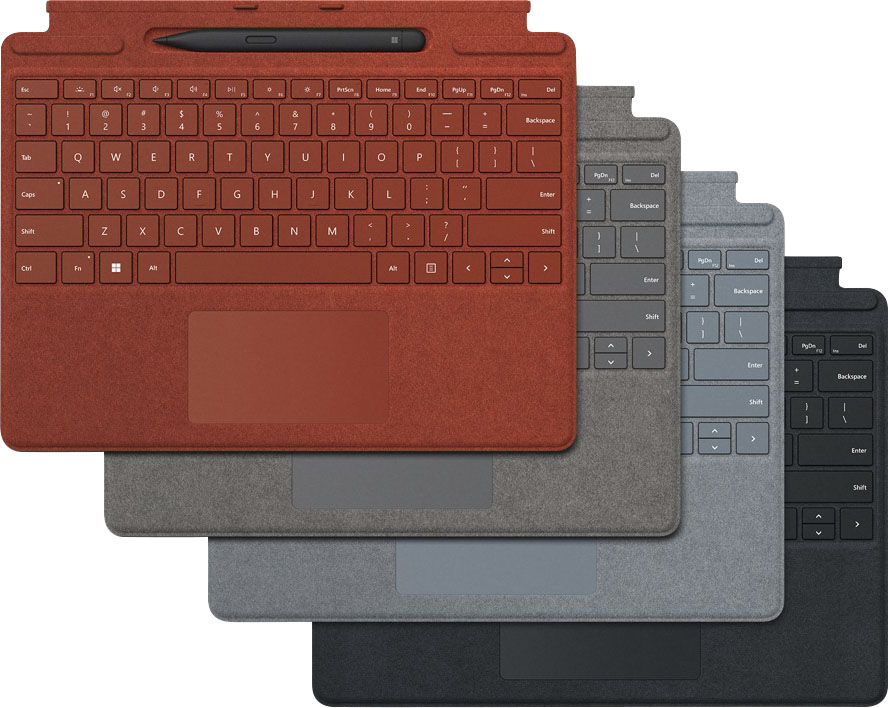
|Posted .This reviewer received promo considerations or sweepstakes entry for writing a review.----- Summary ----- Verdict: The latest Surface devices are impressive on their own, but the Surface Pro Signature Keyboard with Slim Pen 2 pairs perfectly for increased versatility and productivity. The keyboard and pen provide an exceptional typing and writing experience. As a Surface Pro X owner, I’m bummed that the Slim Pen 2’s haptic feedback that simulates the feeling of pen on paper is incompatible, but I’d still recommend it. For Pro 8 owners, I can’t think of any cons. Well done, Microsoft. Pros: - Keyboard is full-size and comfortable to type on - Trackpad is large and provides precise control - Storage tray for the pen is built into the keyboard and charges the pen - Keyboard doubles as a cover for the Surface’s screen - Pen is comfortable to hold and accurate - Four color options with a nice “Alcantara” material covering each Cons: - Haptic feedback on the Slim Pen 2 isn’t compatible with the Surface Pro X ----- Details ----- With its sleek and compact design, the Surface Pro Signature Keyboard transforms the Surface Pro 8 or Pro X into a full laptop without the bulk. The comfortable typing experience impressed me. Unlike other tablet keyboard accessories I’ve tried, my hands don’t feel cramped and my typing is accurate. It’s just like a full-size keyboard that you’d expect on a traditional laptop. The trackpad is about the same size and just as precise as you’d find on a laptop as well. Powerful magnets snap the keyboard onto a Surface device and show or hide the built-in Slim Pen 2 storage tray. It’s quite clever because showing or hiding the pen storage tray also adjusts the angle of the keyboard. In addition to providing a place for the pen to securely sit, the storage tray wirelessly charges the pen. I frequently take notes on my Surface Pro X, and the performance of the Slim Pen 2 is fantastic. It’s comfortable to hold and has pinpoint accuracy. My one complaint is that the friction of the pen tip doesn’t feel like writing on paper. The Slim Pen 2 has a built-in haptic motor that supposedly makes it feel similar to writing on paper, but that feature is only compatible with the Surface Laptop Studio and Surface Pro 8, so as a Surface Pro X owner, that was a bummer. That aside, my Surface Pro X wouldn’t be complete without the keyboard and pen. They work harmoniously with the Surface Pro and are a joy to use. An added benefit of the Surface Pro Signature Keyboard is that it serves as a screen cover for the Surface Pro 8 or Pro X. There’s a light magnetic pull that helps keep it closed. The back of the Surface device doesn’t get covered at all, but I think that would make it more difficult to snap on and off, so I understand why it doesn’t. The aluminum body on the Pro 8 and Pro X seems very durable, but if potential damage is a concern, I’d recommend storing it in a sleeve or backpack during transit. The Slim Pen 2 is black, but there are four color options available for the Surface Pro Signature Keyboard. I chose Ice Blue, and the other options are Poppy Red, Platinum, or Black. Each is covered in a nice “Alcantara” material which is a suede-like microfiber. The keyboard has a premium look and feel, and I appreciate the different color options which provide a touch of customization to my Surface Pro X.
I would recommend this to a friend - Pros mentioned:Ease of use, Keyboard quality, Pen
Very nice!
|Posted .This reviewer received promo considerations or sweepstakes entry for writing a review.I love this keyboard and pen combo. THE GOOD ~ Easily attaches ~ Responsive ~ Holder for pen ~ Can be used with pen exposed or securely stowed (see pics) ~ Nice texture OVERALL Normally, in my reviews, I post the Good, the Bad and the Meh (things that could go either way). So far, I haven't found any reasons NOT to like this portable keyboard and pen combo. It attaches to the table very easily. It can be laid out flat or on an angle for those people like me who prefer the keys slightly slanted. One thing I really like is that if you're not planning on using the pen and you have the keyboard out, you can flip up the small portion of the keyboard where the pen nests and it keeps your pen charged, but safe from accidentally falling out. If you look at the two pictures, you can see what it looks like fully open and with the pen stored. The texture is like suede. The grey next to the silver matches well, too. Would I recommend this? Definitely. I think anyone with a Surface Pro should get this add-on. It really adds a lot of functionality and utility to the tablet. Besides that, it helps protect the screen from accidental bumps or scratches.
I would recommend this to a friend - Pros mentioned:Keyboard quality, Pen
Must Have Accessory!!!
|Posted .This reviewer received promo considerations or sweepstakes entry for writing a review.Keyboard and Stylus – Even though the on-screen keyboard on the surface pro 8 works well, the optional Signature Keyboard and the slim pen is amazing and, in my opinion, a must buy. The keyboard clips on to the bottom of the Surface with magnets and the pen stays attached to the keyboard. I have always loved and have been amazed by the pen and keyboard combo from Microsoft. They keyboard is nice and firm, and the keys are responsive and can be lifted a bit to provide a better tying angle. The keyboard also has built-in storage and charger for the pen. They keyboard has a beautiful Alcantara finish and a large and responsive touch pad. The Slim Pen 2 also got some upgrades from the previous model. The pen is slimmer and a bit more tapered at the tip, so it provides for better handling. The pen also provides haptic feedback when used on the screen which was cool and just works so well with the screen. The pen can be used to write notes, feels so much better then writing on paper, or even just have fun and be artistic, (if my 7-year-old can do that on that with the pen, imagine what you can do, see picture) and serves as a screen protector for your tablet/laptop when not in use.
I would recommend this to a friendBrand response from MicrosoftOutreachTeam
Posted .Hi – Thanks for sharing your experience! It's great to hear that it’s a good fit for your needs. We hope you continue to enjoy using it. Erica, Microsoft Outreach Team
- Pros mentioned:Keyboard quality
Completes your tablet experience and well made.
|Posted .This reviewer received promo considerations or sweepstakes entry for writing a review.A new generation of Surface Pro tablets have reached the market, and are excellent Windows 11 machines on their own. But for me, I need a keyboard to do certain things on to be most comfortable, and I’m trying to get back into drawing as well, so a digital pen is something I also needed to make a complete two-in-one system. Years ago, I tried an older model Surface and keyboard and frankly didn’t like it. The keyboard was squishy and gave too much – the new Signature keyboard is WORLDS better than those older versions. This one is much sturdier and doesn’t give when typing so long as you don’t have lead fingers. It connects to your Pro tablet via two very strong magnetic connections that fit right up to the tablet, which powers the keyboard as well. It’s size fits with the Surface tablet at around 11 inches wide by 8 ½ inches tall, but it shrinks by an inch to 7 ½ inches tall when you “fold” the top of it into the tablet, which hides the Surface Pen 2 from view in the slot it sits and charges in. A very neat idea, as when folded, it also raises the tablet slightly to give you a better typing angle, while hiding the pen. A felt-like material covers the keyboard and feels nice, and a good sized glass touchpad give you plenty of room for maneuvering around your screen. There’s a good sense of feedback when typing – they are not flat or mushy… they give you a good sensory feedback that you are indeed, typing. There is a back light available with various brightness settings, so typing in lower light areas isn’t a problem. When closed, the keyboard protects the screen, but does not cover the back in any way, so I still suggest using a case or sleeve. The keyboards are available in Black, Poppy Red, or Ice Blue. I tend to get a little dirt on my stuff (oops), so usually pick black to hide it, but you do have those choices. The Microsoft Surface Slim Pen 2 is an oval-shaped digital pen at around 5 ½ inches in length, with a solid tip, and button on the pen itself as well as one at the other end that “clicks”. It came as a bundle with the keyboard (you save money this way as opposed to ordering them separately, though you don’t have to order them together – a separate usb charging cradle is available for it if you like, too). It charges within the keyboard in a dedicated slot, and you can get up to 15 hours of use on a full charge; I have tried it out for a few hours at a time and it didn’t show any signs of running out of juice. When you remove it from it’s charging cradle, a tiny menu will pop up on your screen for a few seconds where you can pick a White Board to write on, or a snipping tool for screen shots, as well as pen settings and more info keys. Otherwise, you can click the top “eraser” button and a white board app will appear on your Windows 11 screen so you can take notes or doodle to save for later (or use in other ways via settings). The side button will allow for “select” and right-clicks in certain applications. With over 4,000 points of pressure, you shouldn’t have an issue when drawing on your tablet with this, giving varying levels of light/dark and effects with this level of control. There are haptic feedback vibrations in this pen, but they work (for now) only with Surface Pro 8 and Studio tablet and devices, (Mine is an X). I have fairly chunky hands, and find the pen to be pretty comfortable to use. I mean, I like HUGE pens when I write but no digital pen is that big – in terms of styluses and digital pencils/pens, this is one of the more comfortable ones I’ve used, and is the most fluid and natural feeling when using on a tablet surface. As I said before, the Surface tablets are very nice, but I think you get the best out of them when used with the Microsoft Signature Keyboard and Pen 2. I recommend both of these to compliment the tablet if your budget allows.
I would recommend this to a friendBrand response from MicrosoftOutreachTeam
Posted .Hi Greg – We appreciate you taking the time to tell us your thoughts. It’s great to hear that your new Surface Pro Signature Keyboard and Slim Pen 2 are working well for you. We hope you continue to enjoy using them. Erica, Microsoft Outreach Team
- Pros mentioned:Keyboard quality
Requisite Accessory for Microsoft Surface Computin
|Posted .This reviewer received promo considerations or sweepstakes entry for writing a review.Pros: * Material Design. The keyboard (and my selected color) perfectly complement the Surface Pro X with which it is paired. I've owned previous versions of the keyboard (with older versions of the Surface) and think this material will hold up better to wear. To be clear, the material of any Surface Keyboard I've used has been exceptional; but they don't always clean well. I think this keyboard will do fine and only time will tell. * Pen. Though it is an included accessory I didn't anticipate using much, it is definitely is pretty well designed. It is even more responsive and intuitive than predecessors and tucks away nicely into the keyboard (accessory). It is magnetic and can be placed on the side of a Surface computer or kept safely in the cubby located on the Surface Keyboard. The pen's tips can be replaced as needed depending on the use. It also features buttons along the side and at the end. These buttons serve to execute short-cuts. The end, depending on the application, can be used as an "eraser" with even greater ease than a real pencil and its eraser end. I'm glad the pen is included as I really forgot about how convenient it can be to draw up sketches or jot down notes in OneNote. * Strong Magnets. The Surface Keyboard is connected to a Surface computing device along the long edge using a proprietary connector, some guidance tabs, and strong magnets. The keyboard in previous iterations could fall off with enough centrifugal force when handling the Surface. This version is significantly stronger and is almost too difficult to remove. I'm not worried about it falling off when I don't expect it to. * Comfortable. The keyboard itself has nice tactile feedback while using. Though it has been a while since I have used a mobile computing device like a Surface, I have to say that it was quite easy to get into the groove typing away. I've always been a fan of desktop ergonomic keyboards but switched to a traditional keyboard a few years ago for work reasons. I think this made the transition to the Surface Keyboard easier as the keyboard and its keys are spacious enough to feel like a full-size keyboard. * Large Touchpad. I've never been a fan of touchpads. In fact, I paired my Surface Pro X with a Microsoft Arc mouse for regular use. But before I purchased the Arc mouse, I got a lot of time in with the touchpad. I have to say that the increased surface area, the haptic feedback for button interactions, and the gesture movements work quite well. While I prefer the use of the Arc mouse for some functions (easier for me to play some games or interact with Excel cells), I think I could comfortably say that I don't need it. The touchpad is better than I expected (remember). Cons: * I really can't think of any cons for this accessory. Wish: * Though the materials used to construct this keyboard I am sure will wear well, I think it would be fun if Microsoft offered a keyboard with a metallic backside. That would be neat. Although I am sure there are weight implications, etc. Use: I use this device when I am on the go and need a full computing device. The Surface Keyboard is a necessity for use of this device as a work computer, IMO. You could pair Bluetooth keyboards or make use of a dock via the USB-C connector on the Surface computers, but a regular keyboard would be too unwieldy and not travel well. The Surface Keyboard provides svelt form and function with the added benefit of providing protection for your Surface.
I would recommend this to a friend