Customer Ratings & Reviews

- Model:
- 8X6-00097
- SKU:
- 6517744
Rating by feature
- Value
Rating 4.4 out of 5 stars
- Quality
Rating 4.8 out of 5 stars
- Ease of Use
Rating 4.8 out of 5 stars
Customers are saying
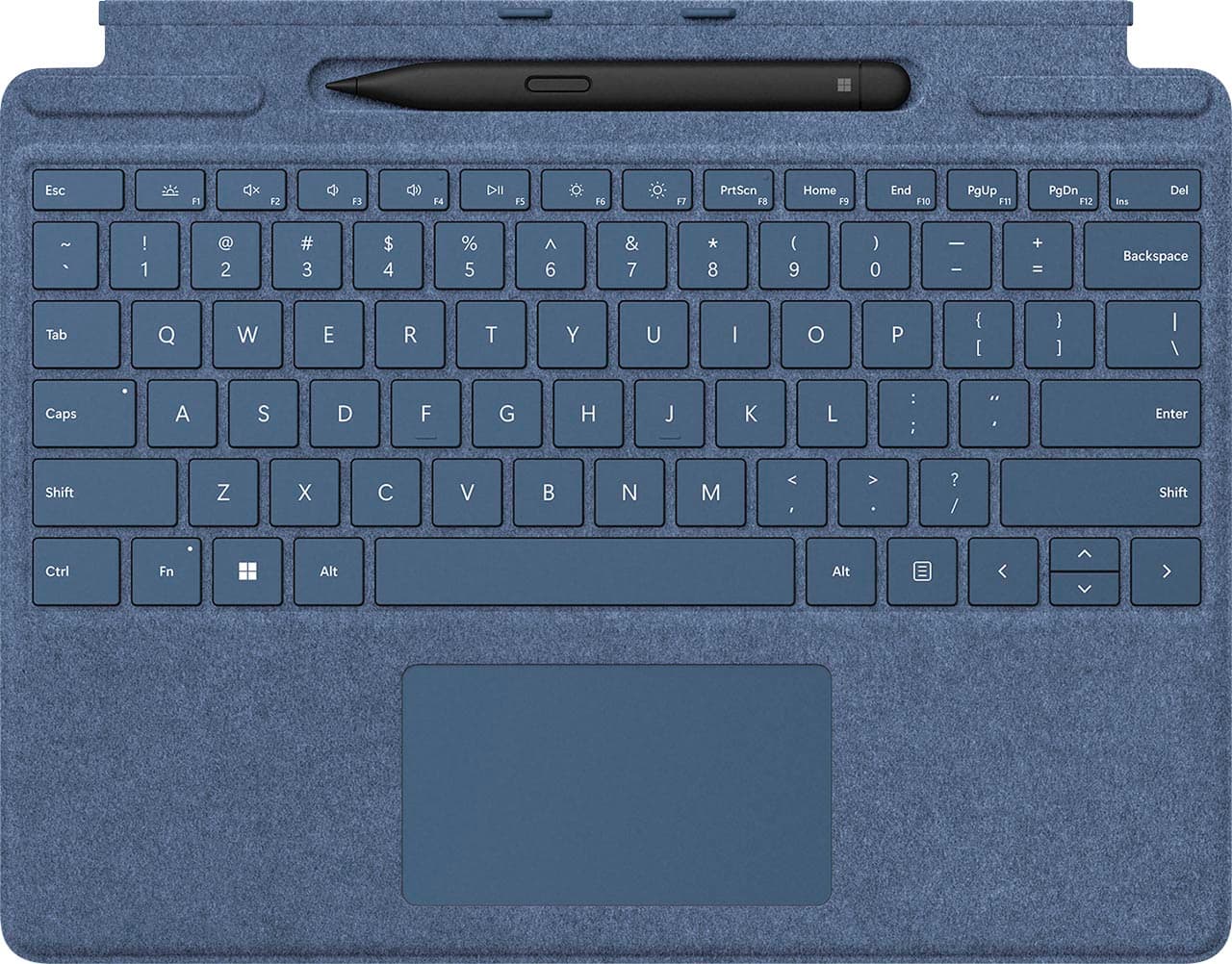
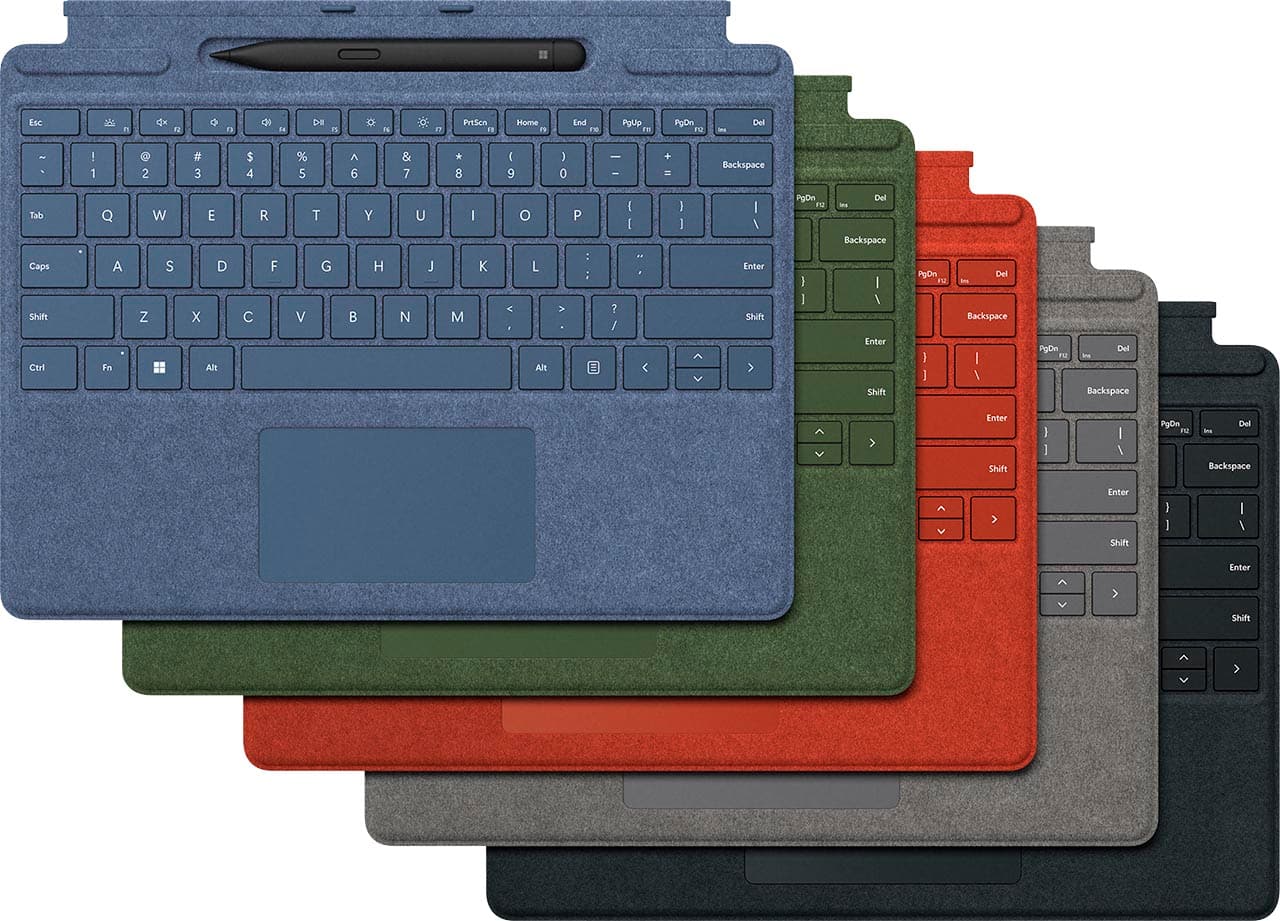
Customers are impressed with the Surface Slim Pen 2 and Pro Signature Keyboard for Pro X, 8, 9 for its pen storage, color options, ease of use, and durability. Some customers find the price to be a bit high, and there have been a few complaints about the trackpad size and connectivity issues.
This summary was generated by AI based on customer reviews.
- Pros mentioned:Pen

Very nice keyboard cover.
|Posted .This reviewer received promo considerations or sweepstakes entry for writing a review.The keyboard is responsive. I also appreciate that it is backlit, so if you're working in limited light, you can still work without interruption. There's good feeling to the response of the keys. It's not mechanical, which is the type of key's I'm accustomed to using on a daily basis. The Pen is a bit of a mixed bag. I find it a bit awkward to hold due to it being flat versus the natural styling of a pen. It's also very responsive and accurate. I'm a terrible writer but the handwriting recognition has come a ways since the last time i used a Windows based tablet that used a pen. I like that the pen sits in a spot inside the cover so it's tucked away when you're not needing to use it. The Alcantara is a nice touch as well and gives a feel of quality to the keyboard.
I would recommend this to a friend A necessary addition to the Surface Pro
|Posted .This reviewer received promo considerations or sweepstakes entry for writing a review.This keyboard and pen are almost a required addition to the Surface Pro! I am used to using a Chromebook as my ultraportable device, so if I had to use this as just a tablet, I would be very uncomfortable! Screen Cover The keyboard acts as a very good cover, snapping on and off very easily as needed. The ability to hide the pen when not needed is awesome as I was used to being able to keep my pen tucked into the case on the Chromebook, so was worried I would lose it if it didn't attach in some way. The material is very comfortable, I only hope it lasts since it is also very porous so I expect it will attract the oils and dirt from its environment. The magnets click in very well and give it a strong attachment to the tablet. The multiple magnets allow it to conceal the pen, giving the keyboard just enough angle to type comfortably. Keyboard The keys work very well - even sitting on my lap I can type easily. The keys themselves feel very responsive, much better than I anticipated given their very small height. I use the ten-keypad on my full size keyboard often for entering grades, so I miss it but there is just no place to put the keys on this compact keyboard. The backlight is very handy when using it in lowlight environments, and I didn't even notice that feature for a while! It has several brightness settings and the labels on the keys light up as well, making it very nice. The multipoint touch features are very useful and can be programmed if you need something other than the Windows default settings. I can see myself spending a bit more time here as I get more comfortable and find other uses for this feature. Pen The pen works very well with Microsoft Whiteboard, making this a perfect replacement for my actual board in my classroom and allows me to save notes and drawings for later. The buttons are very handy for launching programs or making selections without putting my hand back on the touchpad or screen. Conclusion The only thing I have been annoyed at is the size of the right and left- click areas of the touchpad, they seem to take up over half of the touchpad area, so I am constantly right-clicking on things with my thumb instead of selecting them! I'm going to have to work on getting it a little closer to the keys, which is not currently a natural feel for me. Overall, I am very satisfied with the keyboard cover and pen as they make an almost necessary addition to the Surface Pro 9 I just got. Together, they make a very capable and portable machine for my classroom use.
I would recommend this to a friend- Pros mentioned:Ease of use, Keyboard qualityCons mentioned:Price
Great Keyboard/Minor Issues
||Posted . Owned for 3 weeks when reviewed.This reviewer received promo considerations or sweepstakes entry for writing a review.Easy to use. I like the feel of the keyboard and the fact that it has a backlight to see the keys when lighting is low. A little on the expensive sside. Be sure to keep your hands clean as this material can be impossible to clean once it stains.
I would recommend this to a friend A crucial addition to the Surface Pro 9 "tablet"
|Posted .This reviewer received promo considerations or sweepstakes entry for writing a review.If you are considering the Surface Pro 9 from Microsoft as a laptop replacement, having a keyboard to type on is not just a luxury, but crucial. The choice of the Signature Keyboard from Microsoft is the outstanding choice, bundled with the Slim Pen 2. The look and feel was that of highest quality. It was sturdy, and attached firmly but easily to the Surface tablet. The covering was slightly textured, like a durable fabric finish. An integrated trackpad to drive the screen cursor was smooth and responsive. And there is a "hidden" storage space for stowing the Slim Pen, which charges the stylus when not being used (noted in the attached photos).. These come at a cost of $280 additional which drives the total cost above many of the competing integrated laptops, which admittedly do not offer the touch screen capacity. The keyboard is sturdy and affixes securely to the Surface, and utilizes the kickstand whether you have it on a desk or perched on your knees. The is a generous trackpad, and has a full row of function keys at the top. Just beneath the lower edge of the screen is a magnetic hinge that covers the storage and charging slot for the stylus. It is light in the hand, comfortable to use, and has two push buttons to switch commands. I found the stylus as a handy tool for noting changes or add annotations, without having to move the cursor to that spot. It shown as an input for Microsoft's One Note program. The only significant con in the usage was that, unlike my MacBookAir M1, which cost around $1000, when typing in low light, the lack of a backlit keyboard was quite a nuisance. The number of typos soared. A keyboard addition to an iPad made by Apple similarly lacks a backlit keyboard (and also lacks a trackpad) but is cheaper than the Signature Keyboard. There are aftermarket keyboards that do have trackpads for an iPad Pro, but I am unaware of those having a lighted keyboard.
I would recommend this to a friend- Pros mentioned:Keyboard quality
Great addition to the surface
|Posted .This reviewer received promo considerations or sweepstakes entry for writing a review.I can't say enough good things about this keyboard for the surface. The fact that the pen sits in a little recess which is 1. hidden if you fold the small flap up and 2. keeps it always safe when transporting is ingenious. Standard downsides of a flat keyboard aka not much key travel but key response is crisp and I felt like I could type at almost my full max speed on it. The fact that it's so svelte is nice though as it means I can take this along in place of an iPad versus I was always leaving my laptop behind because it was too clunky during meetings.
I would recommend this to a friend One of the best tablet keyboards out there
|Posted .This reviewer received promo considerations or sweepstakes entry for writing a review.The Surface Pro line of keyboards attachments are in my opinion one of the best on the market for any brand of tablet. The Signature with Surface Slim Pen 2 is no exception. The typing experience itself is no different than what you'd get with a laptop. The keys are similarly sized and spaced as any 14-15" laptop. When attached to the tablet I am still able to manage my 90 wpm in typing tests. The glass touchpad is accurate and is very smooth. No complaints. There is a backlight which can be turned on or off with a press of the F1 key. Pressing the key multiple times will increase the brightness from low, medium, high, then off again. The Slim Pen 2 that is included is good but the slim shape took me a few days to get used to. However, the pen's functionality is flawless on Windows 11 apps such as Whiteboard or OneNote. I really like the eraser feature. Simply turn the pen around and use the other end to erase-could not be any more natural. There are a total of 4096 pressure points. The pen's tip is replaceable. There is a neat holder for the pen that is hidden when the tablet is closed so it is impossible for it to get dislodged and go missing. The pen will charge when in this holder and will even reorient itself with magnets if you put it in backwards. In fact, it's kinda fun to watch it flip itself around if you are bored. The keyboard attaches to the tablet with strong magnets, and is powered directly by the tablet. That means there is no charging port for the keyboard and because it is a physical connection to the tablet you will not have any of the connection or input lag issues that you might see with a Bluetooth keyboard. The Alcantara material is hard to describe but the perfect material for this type of application. It's almost like a microfiber that has been compressed into an almost vinyl or leather feel. I really like it and it comes in many colors. I have the Ice Blue which pairs well with a Platinum color tablet. Pros: Spot to hold Slim Pen Recharges the Slim Pen (and orients itself with magnets) Backlit Easy to attach and remove. Incredibly thin and lightweight Glass trackpad Cons: None really
I would recommend this to a friend- Pros mentioned:Keyboard quality, Pen
Sleek and Portable
||Posted . Owned for 5 months when reviewed.This reviewer received promo considerations or sweepstakes entry for writing a review.The Microsoft Surface Slim Pen 2 and Pro Signature Keyboard redefine my productivity. The Slim Pen 2, with its responsive inking and tilt support, turns my Surface device into a digital canvas. The Pro Signature Keyboard, sleek and comfortable, transforms my setup into a dynamic workstation. The magnetic attachment of the Slim Pen 2 is ingenious, ensuring it's always within reach. The keyboard's tactile keys and precise trackpad elevate the typing experience. This duo is a powerhouse for creativity and efficiency, seamlessly blending form and function in the Microsoft Surface ecosystem.
I would recommend this to a friend - Pros mentioned:Color, Keyboard quality, Pen
Green Godess
||Posted . Owned for 2 weeks when reviewed.This reviewer received promo considerations or sweepstakes entry for writing a review.Love this new green color option! I love having the keyboard & the new location of the pen has kept me from having to hunt it down when knocked off the side of my earlier model Surface Pro 4.
I would recommend this to a friend - Pros mentioned:Keyboard quality
Great keyboard!
||Posted . Owned for 2 weeks when reviewed.This reviewer received promo considerations or sweepstakes entry for writing a review.Extremely lightweight and slim while still offering a great trackpad, great keyboard for a tablet, and pen storage and charging! I got an open box option for almost half the price of new, however had that not been available, full price would have been worth it just for the convenience of a laptop with the form factor of a tablet. The keyboard will only work with the surface pro 8 or newer, and the pro X lines, as they changed where the data and power connectors are on the magnetic interface.
I would recommend this to a friend - Pros mentioned:Keyboard quality
Does it’s job
||Posted . Owned for 1 week when reviewed.This reviewer received promo considerations or sweepstakes entry for writing a review.The surface keyboard functions as intended. It’s feels really nice. It’s a pleasure to type with. The trackpad can be a touch bigger even though it already is compared to previous model, but a bit more would be nice. That would however sacrifice palm rest space. And I rather have that tbh. The slim pen 2 feels good in the hand, which I really wasn’t expecting. The amount of functionality the pen has great. They both work really well with the surface pro 8. I cant say anything bad about it. If there is one thing I would say, the price, but they will begin going on sale next month I’m sure because of the holidays, assuming you can find them in stock.
I would recommend this to a friendBrand response from MicrosoftOutreachTeam
Posted .Hi – Thanks for sharing your experience! We appreciate your feedback. We hope you continue to enjoy using your new Surface Pro Signature Keyboard and Surface Slim Pen. Erica, Microsoft Outreach Team

A must have for the Surface Pro 8
|Posted .This reviewer received promo considerations or sweepstakes entry for writing a review.Recently got a Microsoft Surface Pro 8 and having had a similar product from another brand before I knew I needed to get this Keyboard for it. The keyboard is very slim yet provides a great layout for the Surface Pro 8. Keys are of normal size and a good feel to them and are also backlit. The built in holder/charger for the slim pen is built into the keyboard and is a lot better than the old convertible I had that used a band mounted to the side of the keyboard. The keyboards connection to the Surface is magnetic and provides a very solid feel when connected. There are two positions to mount the keyboard in you can either have it laying flat or slightly angled down toward you. I liked it in the angled position as it was more comfortable for me. Having no experience with the previousl generation I can't compare the Slim Pen 2 to it. But I like the feel of the Slim Pen 2. It's shaped like a Carpenter's pencil which for me provides a better grip. The pen performs very well and provides very accurate control. The felt like finish around the keys and touchpad as well as the back looks good and has a nice feel to it. It adds a little bit of grip to the back helping it from sliding around on your desk/table. I do wonder how well it will hold up over time? And the color doesn’t really have any blue to it. Thus the 4* rating. The keyboard does add some protection for your Surface when closed. If your getting a Surface Pro 8 or X your going to want to pick up a keyboard to get the most out of it.
I would recommend this to a friend- Pros mentioned:Keyboard quality
Great product
||Posted .This reviewer received promo considerations or sweepstakes entry for writing a review.Premium quality product. Very comfortable to use. I was very happy with the results.
I would recommend this to a friend - Pros mentioned:Keyboard qualityCons mentioned:Price
Good Bundle
||Posted . Owned for 1 week when reviewed.This reviewer received promo considerations or sweepstakes entry for writing a review.Although not perfect, I think that it is a good bet to use this with the surface pro 9 (as intended by Microsoft) rather than one from someone else that may not work well. The pen works great and the keyboard feels nice and does it's job. Only con would be the price but I got it on sale and the bundle is cheaper than buying these things separate.
I would recommend this to a friend - Pros mentioned:Keyboard quality
Great addition to the surface pro 8
||Posted . Owned for 2 weeks when reviewed.This reviewer received promo considerations or sweepstakes entry for writing a review.I first purchased the MS pro 8 and had it for about a month along with an older refurb pen. Got the keyboard with slim pen two and love both items. Keyboard is super easy to add/remove and is light weight. The slim pen 2 is far better than the older pens and way more responsive and has a better feel in my hand. Only advice, is choose a good case that supports the keyboard functionality and supports the stand on the back of the surface. Pen charges on the keyboard only not magnetically to the surface like the previous pens.
I would recommend this to a friend - Pros mentioned:Keyboard quality, Pen
Surface Pro Keyboard/Pen a must with Surface Pro 9
||Posted . Owned for 1 week when reviewed.This reviewer received promo considerations or sweepstakes entry for writing a review.I purchased the keyboard with my Surface Pro 9. It works flawlessly with it and I love the alcantara finish, which is what I fell in love with my first Surface Laptop. The pen is precise and easily charges in the keyboard, and it all folds up seamlessly. I wouldn't be without it. I also love the right-click keyboard key--way to go Microsoft! It is a bit pricey, but a must have. The color matches the device perfectly.
I would recommend this to a friend - Pros mentioned:Keyboard quality
It just works
||Posted . Owned for 2 weeks when reviewed.This reviewer received promo considerations or sweepstakes entry for writing a review.I loved how well it connected to the Pro 9. It snapped in 100% perfectly every time! The little tray for charging and storing the slim pen is also nice, but I strongly advise not buying that stupid pen. It's not good. The build quality of the keyboard is good. Nice and strong for what it is. Only downside is the price. We all know this thing is probably worth $20 but they'll charge $80+ nonetheless.
I would recommend this to a friend - Pros mentioned:Keyboard quality, Pen
Used with Surface 9
||Posted . Owned for 3 weeks when reviewed.This reviewer received promo considerations or sweepstakes entry for writing a review.The keyboard feels better than previous surface pro keyboards. Different than a traditional keyboard, but works great on laps. The connection is very secure, requiring a little force to separate from the tablet. The pen is secure in the charging slot. So it is a little hard to get it out but not impossible. Very hard to lose the pen.
I would recommend this to a friend - Pros mentioned:Keyboard quality
Works well with my Surface Pro
||Posted . Owned for 1 month when reviewed.This reviewer received promo considerations or sweepstakes entry for writing a review.The keyboard works great for the laptop. It connects with magnets so it's easy to put in and out. It also folds over and you can use te pen to write or even just your fingers for the touchscreen. The pen is pretty accurate and writes and draws in real time with little delay if you use any note-taking or drawing apps.
I would recommend this to a friend - Pros mentioned:Keyboard qualityCons mentioned:Connectivity
Great! Mostly ...
||Posted . Owned for 1.5 years when reviewed.This reviewer received promo considerations or sweepstakes entry for writing a review.I love this keyboard! So many options with it. And it's so thin and sleek. Easy set up and portability. The only qualm I have is, it did have a few connectivity issues from time to time. Otherwise, it was fine.
I would recommend this to a friend - Pros mentioned:Ease of use, Keyboard quality
Must-Have Accessory to Surface Pro
||Posted . Owned for 1 month when reviewed.This reviewer received promo considerations or sweepstakes entry for writing a review.This item is a must-have if you are purchasing a Surface Pro. I don't always use the keyboard but it's the best protection for the screen when not in use. It's uncommon that I don't need the keyboard but it's easy enough to use if not needed.
I would recommend this to a friend