Customer Ratings & Reviews


















- Model:
- ADO951800F114
- SKU:
- 6288072
to a friend
Customers are saying
Customers are delighted by the ease of use and video editing capabilities of Photoshop Elements 2019 & Premiere Elements 2019. Many appreciate the software's intuitive interface and the range of features available, finding it to be good value for the price. While some users experienced occasional performance issues, the overall positive feedback highlights the software's accessibility and effectiveness for photo and video editing.
This summary was generated by AI based on customer reviews.
- Pros mentioned:Ease of use
Great software
||Posted . Owned for 1 month when reviewed.This reviewer received promo considerations or sweepstakes entry for writing a review.Good software to edit videos as a beginner and is simple to use.
I would recommend this to a friend - Pros mentioned:Ease of use
Software is user friendly
||Posted . Owned for 1 month when reviewed.This reviewer received promo considerations or sweepstakes entry for writing a review.Very impressed with the editing tools . User friendly interface.
I would recommend this to a friend - Pros mentioned:Ease of use
Great
||Posted .This reviewer received promo considerations or sweepstakes entry for writing a review.Easy to use. Allows for great creativity for the novice photographer.
I would recommend this to a friend - Pros mentioned:Ease of use
Good program
||Posted .This reviewer received promo considerations or sweepstakes entry for writing a review.Very easy program to use. Would recommend for any photographers.
I would recommend this to a friend - Pros mentioned:Video editing
Awesome software
||Posted .This reviewer received promo considerations or sweepstakes entry for writing a review.I use this software not only on new photos but also old ones.
I would recommend this to a friend - Pros mentioned:Features
great program
||Posted . Owned for 1 month when reviewed.This reviewer received promo considerations or sweepstakes entry for writing a review.nice enjoy new features good programs takes time to learn
I would recommend this to a friend - Pros mentioned:Price
Great
||Posted .This reviewer received promo considerations or sweepstakes entry for writing a review.Best product for the price. does everything I want to do.
I would recommend this to a friend - Pros mentioned:Features
Excellent
||Posted .This reviewer received promo considerations or sweepstakes entry for writing a review.Love the new features with this version. Excellent upgrade.
I would recommend this to a friend - Pros mentioned:Video editing
Great value...two for one
||Posted . Owned for 1 month when reviewed.This reviewer received promo considerations or sweepstakes entry for writing a review.Great product...takes care of pictures and videos!
I would recommend this to a friend - Pros mentioned:Ease of use
Just what he needed
||Posted . Owned for 1 month when reviewed.This reviewer received promo considerations or sweepstakes entry for writing a review.Exactly what he needed for his college film school
I would recommend this to a friend - Pros mentioned:Ease of use
Good Tool for vblog
||Posted . Owned for 1 week when reviewed.This reviewer received promo considerations or sweepstakes entry for writing a review.It is good tool for beginners of vblog. Easy to use
I would recommend this to a friend Perfect for my uses. Home office.
||Posted .This reviewer received promo considerations or sweepstakes entry for writing a review.There is a learning curve but perfect for my needs.
I would recommend this to a friend- Pros mentioned:Video editing
Excellent program
||Posted .This reviewer received promo considerations or sweepstakes entry for writing a review.Great programs for editing your photos and movies.
I would recommend this to a friend - Pros mentioned:Ease of use
Amazing
||Posted .This reviewer received promo considerations or sweepstakes entry for writing a review.I love doing photoshop and this program works great.
I would recommend this to a friend Can be hard to use
||Posted .This reviewer received promo considerations or sweepstakes entry for writing a review.This is not a program that you simply install and set out using right away. Luckily there are plenty of YouTube videos, or books, depending on how you like to learn that will take you step by step through this program. If you have used other lr/ps programs this one will be no problem.
I would recommend this to a friend- Pros mentioned:Ease of use, User interface

Cannot go wrong, great bang for the buck
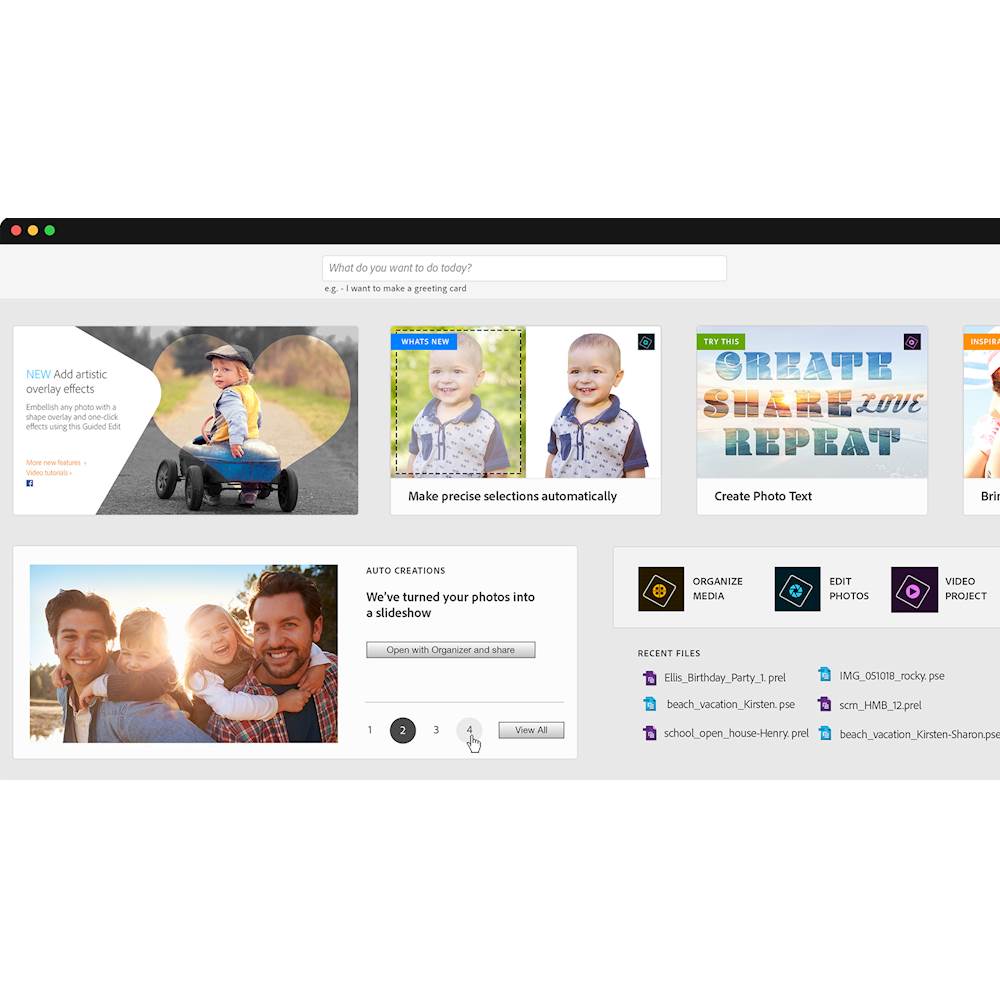
|Posted .This reviewer received promo considerations or sweepstakes entry for writing a review.I first used Adobe Photoshop 25 years ago and have used various Adobe photo and video editing ever since. I eventually moved on to the Adobe Creative Cloud for the full suite of Adobe’s professional software. For most people, Adobe’s high end professional products are way too much for everyday use That is where Adobe Photoshop Elements 2019 & Premiere Elements 2019 comes in . Both programs offer a simple , streamlined tool for editing, organizing and creating content that consists of photo, audio and video. There are a lot of reviews here that are very comprehensive and long. Based on that and myriad of other professional reviews, I’m not going to go into the nitty, gritty details and all the capabilities. What I am going to discuss is the basics of practical use. Interface - clean, clean, clean. One of the issues with Adobe products years ago is you had menu overload. Adobe eliminated this problem by having a graduated menu of options : quick, guided and expert .Quick is the minimalists , basic menu. Not a lot tools( intentionally,) just the basic to get you up and running fast. Guided takes you through which tools to use for what you are trying to accomplish and expert is the full breadth of all the tools available. Simple tools – In Photoshop Elements , it is not as powerful as Photoshop CC but good for cleaning up , altering and changing photos for your need. However, it is pretty comprehensive. You have drawing/editing tools, layers , enhancements etc– really everything you need. Take a close look at the enhance tab, you have every auto correct tool you can think of and they all work great. For Premiere Elements, this has every tool for the casual user and even up to a professional. You can quickly stitch together of videos/audio ( as in youtube video retake,) put in music, you a template for a myriad of options, add title. Simply fantastic. Learning curve – Fast to moderate. For anything less than expert, it does not take much. For myself who has experience with Adobe products, I was able to use everything in expert mode relatively fast. You get a lot for your money, these programs are powerful and , frankly, there is no true competition at this price point and feature set. In general, Adobe is the gold standard in every category. I was not thrilled when Adobe went to subscription based services for most of their top line products so I was happy to see that Photoshop Elements 2019 & Premiere Elements 2019 is a buy it and use program, a one time purchase—no subscription needed. There is not another competitor out there than can give you a full photo, video and audio editor for $150. So what did I not like about it? Not much. The programs are quite large, taking up about 4 GB of space. I guess that is a testament to complexity and power of the program. Bottom line, whether you are a casual user or a semi pro starting out, you cannot go wrong Photoshop Elements 2019 & Premiere Elements 2019. I recommend the programs completely.
I would recommend this to a friend Overall Good Product for the price.
||Posted . Owned for 3 weeks when reviewed.This reviewer received promo considerations or sweepstakes entry for writing a review.This product provides you many ways to accomplish a task. This product also offers you a completed project using artificial intelligence. You can decide how much you want to customize your project; the tools are available. You just have to learn how to use them.
I would recommend this to a friendWorks ok - thought I was buying Photoshop
||Posted . Owned for 1 month when reviewed.This reviewer received promo considerations or sweepstakes entry for writing a review.Overall I think this product is ok... I thought I was buying Photoshop (my bad) The only advice I would have is to understand this is not the "full" product and only has certain "elements"... Some basic design changes can not be done with "elements"
I would recommend this to a friendI'm sure it's great quality but a bit hard to use
||Posted .This reviewer received promo considerations or sweepstakes entry for writing a review.It's been a long time since I've used photoshop and I have a lot to learn. It is not intuitive, which is not surprising since it has so many features. I bought for video creation and have yet to use. I hope I can update my review once I've experimented.
I would recommend this to a friendthey belong together
||Posted . Owned for 3 weeks when reviewed.This reviewer received promo considerations or sweepstakes entry for writing a review.When you can't quite afford the full version of Adobe Photoshop, or you don't want to use the cloud version, this is the best way to have fun with your photos. the opening screens are a little confusing, but be curious and click on things...you will quickly figure it out.
I would recommend this to a friend