Customer Ratings & Reviews
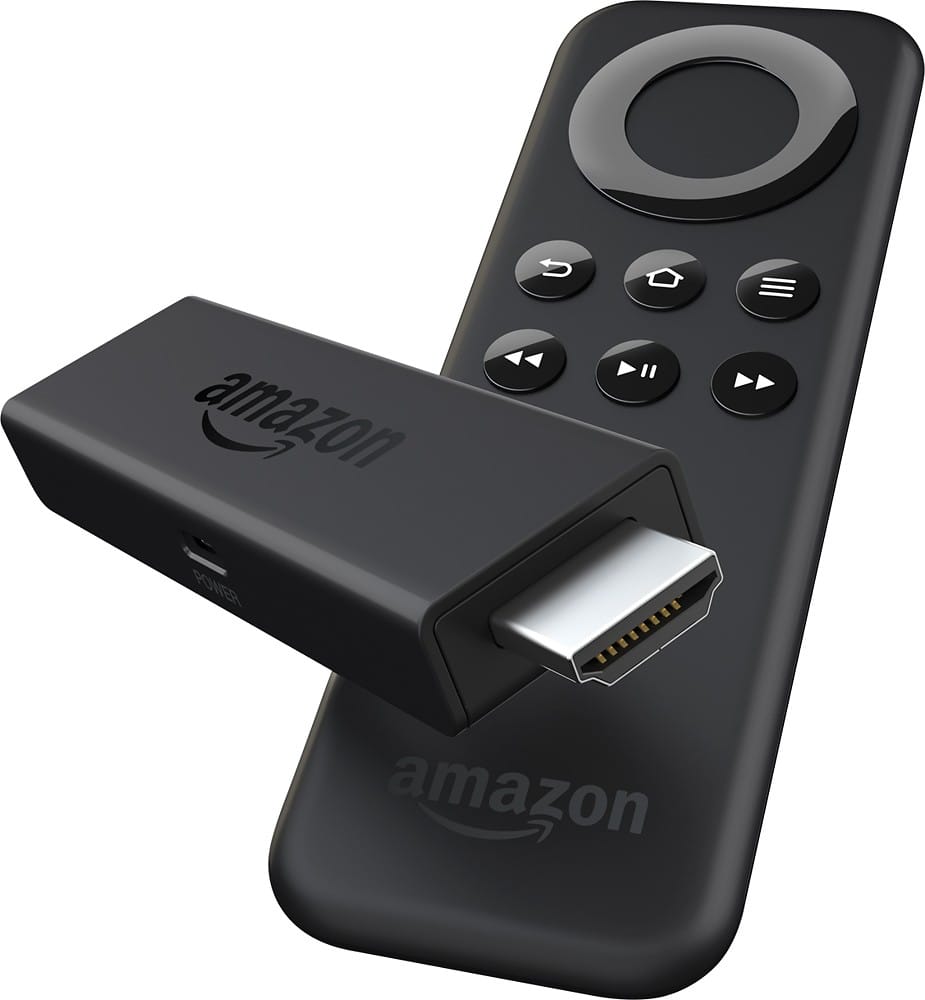
- Model:
- 53-002444
- |
- SKU:
- 9999119
Customer reviews
Rating 4.6 out of 5 stars with 19800 reviews
(19,800 customer reviews)Rating by feature
- Value4.8
Rating 4.8 out of 5 stars
- Quality4.8
Rating 4.8 out of 5 stars
- Ease of Use4.7
Rating 4.7 out of 5 stars
Customers are saying
Customers are positive about the Fire TV Stick's ease of use, streaming capabilities, and affordability. Many appreciate its performance, compact size, and the selection of apps available. While some users noted that the device can get warm, most experiences were overwhelmingly positive. The remote control and setup process also received favorable feedback.
This summary was generated by AI based on customer reviews.
Rated 4 out of 5 stars
Hmmm. Which streamer (Fire, Roku, Chromecast)
||Posted .This reviewer received promo considerations or sweepstakes entry for writing a review.I own all three streamer. In roku, I have the 2xs and the stick, chromecast stick and now the Fire stick. All are easy to install and use. Here is the difference: 1. Chromecast (a Google Product): Allows you to stream content using your Android or iPhone to your TV's HDMI port. There is no remote, your device is your remote (Tablets included). The main services, are Netflix, Hulu, YouTube, Pandora, IHeart Radio, Vevo TV, and others. Basically, you can use your phone, tablet, or Chrome browser from your computer to throw the program at your TV. It then plays from the stick and does not drain your battery from your device during playback. There are a bunch of developers who make apps for the chromecast, some are useless and some are practical, but if you are looking for a ton of choices beyond Netflix, Hulu, YouTube and music, at this time although, Chromecast is a great product, it falls short in the programming department. And yet you can toss images from your google connected drive or device to the TV as well (Slide show). 2. Roku (2xs older model puck, or Stick): Roku comes with a remote control and also an app can be downloaded that you can run from your phone or tablet. Roku, simply has the most channels to add to the device, some are pay channels, some are private channels, not published to the public. Roku has been around the longest and has all the basic channels, such as Netflix, Hulu and all the others (Pandora, Vevo). Actually there's over 1000 channels, trust me you'll never watch them all, but its fun to see whats out there. Everything from How to, to religion, sports, games, holistic teaching, news, (this list keeps going). Roku also uses your WiFi to tap into the streaming service. The roku software is simple, open a channel and pick the program within the channel to watch. There are some apps to stream content directly from your device to the Roku, I found them to be a little jerky at best. Roku requires a credit card enabled account for initial setup. I have never in 4 years been charged for anything, however, if I choose to download pay content, they would use the credit card for that. You can enable password before purchase for this feature. I find the batteries for the Roku to be the fastest draining. However, the remote has a good feel, except for the 3 branded service buttons they added to the newer models. 3. FIRE TV: Very similar to Roku, but featuring better gaming and speed than either of the other streamers. Requires you to pair your Amazon (or set up an) account. Get a free month of prime to test out the service. This was my latest purchase and I made some striking discoveries. You can use the streamer without paying Amazon for anything. They offer all the same services, as well as HBO programming (not all HBO programming), but I did not like the menu, I found it to be confusing, when you look at a show, instead of cleanly showing a season and it's episodes, it strings them all in a line and you have to scroll all the way to the side to get to the next season, where on Roku, the device shows a season and just the episodes for that season, it is just a bit better organized. So you are asking, what did I find. I found that Amazon doesn't really offer much more than Hulu, or Netflix if you already have those subscriptions like me. Amazon will actually open Hulu for some of the episodes, which really annoyed me since Amazon actually charges extra if you are not a Hulu subscriber. Amazon will also charge for more recent episodes of programs that Hulu offers as part of the regular package. I like all 3 streamers, go for best price, they are all basically the same. If you own a SMART TV, don't waste your money, that's what the streamers already to. But the streamers are completely portable. Pull it out of the HDMI port, bring it to a friend or family's house and as long as you have the WiFi password; log in and it will work. Alot of people ask this question, what is the difference between HULU, Netflix, and Amazon? 1: HuluPlus ($90 annual): Next day TV. Watch your favorite network show the day after it airs. Saturday Night Live? Watch it Sunday, Monday etc. The Voice? Catch the singers after the season ended. There's History, Smithsonian, A&E, and some others (with limited recent programming, but plenty to watch). Litterally zillions of shows. Kids and family adult programming. Commercials are shown during most network programs (NBC, CBS, ABC, etc.). Hulu offers original programming as well, most of it is decent quality. 2. Netflix: ($108 annual) Movies, TV shows, original programming (House of Cards, Orange is new Black, Arrested Development, and others), most of the movies did not come out yesterday, they are about 2 years old. TV shows are obviously not recent episodes. Basic service allows you to watch on two screens simultaneously (one on streaming stick, one on laptop or tablet). 3. Amazon: ($99 annual, but comes with PRIME 2 day shipping with all orders): Some original programming, older but recent movies, TV programs from various networks, both cable and regular networks, but less recent episodes, unless you want to pay for a recent rental. All 3 services just mentioned can also be streamed to your laptop, phone, tablet, WiFi TV, Xbox, if you are already a member. I don't have cable by choice. I run a 10mb HDSL line from my provider to my home (which is just fast enough - but not if multiple people are streaming simultaneously in your home). I buy myself a gift certificate for HULU and Netflix every year and give it to myself. This way I have a year of programming with no billing (of course credit card on file is required for all the pay services). I watch OTA (Over the Air) TV for day to day programming. There is more than enough to keep me busy, not to mention Xbox for Video game entertainment. All 3 streamers offer Amazon Prime TV and video services, however, this is a $99 annual paid fee to watch. The main issue I found with all the streamers is that you need a bunch of logins to service. Such as one for netflix, one for Hulu, etc.. etc. Sometimes, they ask you to log into your main account to link the device to your account, this can be tedious if you have a bunch of streaming devices like me (Roku, Fire, Chromecast, XBOX, Cellphone, WiFi TV's, etc). Each one needs to be registered with the service (once). All services require a decent Wifi signal. If you are too far away from the source your service may be non existent or buffer a lot. Hope all this info helps you make a decision and understand the crazy tech we are faced with these days. N-Joy
I would recommend this to a friend- Pros mentioned:Ease of use, Streaming
Rated 5 out of 5 stars
Portable and fast
||Posted .This reviewer received promo considerations or sweepstakes entry for writing a review.Simply, this product is a must to have. Portable, fast, and quality streaming features make this item a perfect most-have item for your home and office. It is a great travel companion. I always take it with me when I travel. All I have to do is plug it to a hotel!s tv's HDMI port and BOOM! I have my all movies and tv shows.
I would recommend this to a friend - Pros mentioned:Price, Remote control
Rated 5 out of 5 stars
Great price, easy setup for access to streaming me
||Posted .This reviewer received promo considerations or sweepstakes entry for writing a review.The price for this product was great. Setup was very easy. Just plug the fire stick in and follow instructions. Now I have access to all my favorites such as netflix, you tube, etc. It has a very simple remote which makes it user friendly. Great product
I would recommend this to a friend - Pros mentioned:Performance
Rated 5 out of 5 stars
Fire TV Stick is a great deal
||Posted .This reviewer received promo considerations or sweepstakes entry for writing a review.The Fire TV Stick is small streaming device that works great. It's even better for members of Amazon Prime. There are a good number of apps available. You can even side load certain apps to get features not currently available from the Amazon App Store. It has a remote and is very responsive with hardly any lag at all.
I would recommend this to a friend - Pros mentioned:Ease of use
Rated 5 out of 5 stars
Best bang for your buck
||Posted .This reviewer received promo considerations or sweepstakes entry for writing a review.I just installed the Amazon fireTV stick, and it was one of the easiest installations I've ever done. Congratulations Amazon. The steps are easy: 1. Connect USB cable into fireTV stick, and plug in power adapter. 2. Connect fireTV stick to HDMI port via HDMI extender. 3. Put batteries in the remote. 4. Turn on TV and select HDMI port. fireTV stick is already looking for the remote. After installing the Amazon fireTV stick checks for and downloads any needed updates. Another screen then comes up asking if you want to continue with your pre-loaded Amazon account, or change. That's a very nice feature. Then an Amazon fireTV stick Welcome video plays and you see an animated tour of the features of the Amazon fireTV stick. Very impressive.
I would recommend this to a friend - Pros mentioned:Ease of use, Remote control
Rated 5 out of 5 stars
Fantastic!
||Posted .This reviewer received promo considerations or sweepstakes entry for writing a review.Amazingly easy to set up and use. It is fast, responsive, and I love that I can use my phone as a remote control. There are lots of apps in addition to the Prime features and they are very easy to download and access. Unlike my Roku, the Fire Stick takes up almost no space and is invisible behind my TV. Great!
I would recommend this to a friend - Pros mentioned:Ease of use, PerformanceCons mentioned:Lag
Rated 5 out of 5 stars
Easy to setup
||Posted .This reviewer received promo considerations or sweepstakes entry for writing a review.The installation was a breeze took a few minutes to setup. During installation process it said to connect to an outlet for better performance but I left it connected to the tv's USB port and had no problems. Watched two movies on Netflix without any lag. I have not tried kodi yet if I do I'll update my review.
I would recommend this to a friend - Pros mentioned:Ease of use, Price
Rated 5 out of 5 stars
Great for streaming
||Posted .This reviewer received promo considerations or sweepstakes entry for writing a review.This stick essentially turns any tv (with an HDMI port) into a smart tv. At this price point, this is probably a great buy and will cover almost anything you need. With a wide range of apps available including the very popular Netflix, Hulu and Amazon Prime, I would recommend this for anyone!
I would recommend this to a friend - Pros mentioned:Remote control
Rated 5 out of 5 stars
Great Price & Great Product
||Posted .This reviewer received promo considerations or sweepstakes entry for writing a review.In the past I had a Roku box that was nearing the end of its life. The remote was never particularly great, and I thought it was pretty clunky to use. I went to buy one of the newer generations and checked out the difference between what the Fire Stick offered at $39 vs. the three versions of Roku that were much more pricey. I picked the Fire Stick and I'm thrilled with my purchase. * Super easy set up. If you can find your HDMI port in your TV you can make this work. * Didn't require purchasing additional hardware or cables to make it work. * Simple connection to my WiFi network to get going. * Took about 20 minutes to log in to my Amazon Prime, Hulu and Netflix accounts just because typing on a remote is time consuming, but easy. Highly recommend. The remote seems to work much better than the Roku one did. It's small though, so I am afraid losing it might be an issue. If you have a power plug that is a bit farther away from your HDMI port you might need an extension cord. The cord provided is fairly short.
I would recommend this to a friend - Pros mentioned:Ease of use
Rated 5 out of 5 stars
Works great and love the portability
||Posted .This reviewer received promo considerations or sweepstakes entry for writing a review.After reviewing many other competitor products, decided to try the stick and could not be happier. Easy to install and operate for everyone in the family, which includes Dad, Mom, and 3 teens. We love the portability of this item, as you can take it with you when traveling. As we were pleased with the stick, we then purchased the console, which we connected to the main tv, as it is a bit faster than the stick. However, if the stick was the only item available, we would still be just as happy because both work well and are fast in general. The stick is great if you are on a tighter budget and want to move it around the house from tv to tv, or would like to take it with you out of the home (when traveling or otherwise). Having both the stick and the console is helpful, and both operate identically with regard to function and process (with the exception of a slight difference in speed). Additionally, both utilize the exact same remote, so using both the stick and console are seamless in operation.
I would recommend this to a friend - Pros mentioned:Ease of use, Streaming
Rated 5 out of 5 stars
Great for streaming content!
||Posted .This reviewer received promo considerations or sweepstakes entry for writing a review.The firestick works great and can be customized to your liking. It is very convenient and does not take up space. The streaming is in full HD and you can add so many apps. Easy to install from one room to another as well as traveling. It's better than Apple TV in my opinion!
I would recommend this to a friend - Pros mentioned:Remote controlCons mentioned:Lag
Rated 5 out of 5 stars
The Fire TV is the best streaming device!
||Posted .This reviewer received promo considerations or sweepstakes entry for writing a review.Before I bought the Fire TV stick, I used a Wii to stream Netflix, Hulu Plus, and Amazon Prime Instant Video. But the issue was there was a lot of lagging on the Wii. So I gave in and did some research as to what streaming media stick I should go for. I decided on the Fire TV Stick, and I am very pleased with that purchase. There was no lagging on this player at all and I never had it freeze up on me. Unlike the Chromecast stick, the Fire TV stick does NOT overheat. The remote is excellent. It operates via Bluetooth so there is no line of sight required. This is excellent since the stick is hidden behind my TV. The remote is rather comfortable in the hand and overall easy to use. I hands down recommend this device over any other stick out there!
I would recommend this to a friend - Pros mentioned:Price
Rated 5 out of 5 stars
Great little device, nice and fast!
||Posted .This reviewer received promo considerations or sweepstakes entry for writing a review.I've used several add-on boxes over the last few years, and they were all slow and had issues with updates.. So far this thing is 10x faster than the older boxes, menus are zippy! It also has tons of apps, and can even install XBMC if you want. Couldn't be happier for the price!
I would recommend this to a friend Rated 5 out of 5 stars
Worth every penny
||Posted .This reviewer received promo considerations or sweepstakes entry for writing a review.I simply am amazed that such a small device has so much power. The overall setup is fast and simple. Connecting to Amazon was a snap. New apps added daily. Cant ask for much more. BUY ONE!!!! You wont regret it.
I would recommend this to a friend- Pros mentioned:Ease of use, Streaming
Rated 5 out of 5 stars
Amazing Fire TV
||Posted .This reviewer received promo considerations or sweepstakes entry for writing a review.This is an amazing device to watch online television. It is fast, reliable and has a great connectivity. It is also easy to install. It can stream without a lag and never slows down. My online tv viewing has been a pleasant experience because of this.
I would recommend this to a friend - Pros mentioned:Ease of use, Remote control
Rated 5 out of 5 stars
Excellent product
||Posted .This reviewer received promo considerations or sweepstakes entry for writing a review.The kindle stick is a great product and an excellent purchase. It is very easy to use. Hooking it up was a breeze. Love the remote and it's ease to use. Would definitely recommend to everyone.
I would recommend this to a friend - Pros mentioned:Ease of use
Rated 5 out of 5 stars
Great streaming device!
||Posted .This reviewer received promo considerations or sweepstakes entry for writing a review.I love the firestick. It's small and easy to setup. It has a variety of apps to use for streaming along with games and pictures. It's really cool, and all I've used so far is Hulu.
I would recommend this to a friend - Pros mentioned:Ease of use, Remote control
Rated 5 out of 5 stars
really good for price
||Posted .This reviewer received promo considerations or sweepstakes entry for writing a review.lots apps, easy to use, setup is good, shows you videos to learn how to use it. I also like how it has both apps streaming and screen mirorring. remote is also a plus, you don't have to use your phone as a remote.
I would recommend this to a friend - Pros mentioned:Ease of use, Remote control
Rated 5 out of 5 stars
Great Little Streaming Device!
||Posted .This reviewer received promo considerations or sweepstakes entry for writing a review.Had one of my Chromecasts die on me so decided to try out a FireTV Stick on one of my TV's and so far I'm loving it. Easy to set up and the remote is very very nice to have around instead of relying on using your phone to pause casting (which falls on its face when someone calls you and you want to pause your show to answer the phone). So, overall, I feel myself gravitating toward this more than my Chromecasts in the house. One small glitch I ran into was during setup: no matter how many times I tried it, it would not accept my amazon prime password. I eventually just had to change my password and it worked. Not enough to knock off a star, but something that did happen to my setup to keep in mind if it happens to you.
I would recommend this to a friend - Pros mentioned:Ease of use, Remote control
Rated 4 out of 5 stars
Best Product so far
||Posted .This reviewer received promo considerations or sweepstakes entry for writing a review.Tons of apps that you can choose from. Easy to set up and use. You can also download an app on your phone and use for a remote. Best part can take with you anywhere.The amazon stick is simply amazing especially if you have an amazon prime account. Nice selection of movies and games
I would recommend this to a friend